Recipient profile not visible under recipient folder. | Community
Skip to main content
navinKumar
Level 2
March 11, 2020
Solved

Recipient profile not visible under recipient folder.

  • March 11, 2020
  • 14 replies
  • 10640 views

Hello,

I have added few recipients using an import workflow (data upload --> enrichment-->deduplication --> update data). The worklow ran fine without any error, but I cannot see the newly added profiles under the recipient folder (profiles & Targets --> Recipient).

The newly added profiles can be viewed in the data tab of Data Schemas--> nms:recipient as well as the exteded recipient schema. Also, I can filter the recipient with query activity. 


What could be the issue?


Thanks & regards,

Navin
This post is no longer active and is closed to new replies. Need help? Start a new post to ask your question.
Best answer by geoffreyl240454

Thanks @navinkumar,

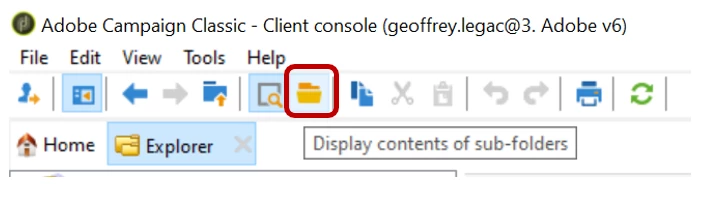
Could you please go to the recipient folder and click on "Display contents of sub-folders":

Then, if you sort by last modification date, you should see your recipients.

The folder can be displayed by a right click into the list, configure list..., double-click on the folder link.

If the folder information is empty, the recipient is "nowhere" and the foreign key of the folder should be updated for this recipient in order to add it to a folder.

If you need further information, feel free to ask.

Thanks

Geoffrey

14 replies

geoffreyl240454
Level 3
March 11, 2020

Hi @navinkumar,

Have you selected a folder where to create the recipient into the update data box?

Thanks

Geoffrey

navinKumar
Level 2
March 11, 2020

Hi @ geoffreyl240454

I have not created a new folder. I just added the "recipients" in the updated dimension in the update data activity.


Thanks,

Navin

geoffreyl240454
Level 3
March 11, 2020
Thank you @navinkumar, you should try to add the folder link into the fields to update section and select one recipient folder. Thanks, Cheers, Geoffrey
navinKumar
Level 2
March 11, 2020

Hi @ geoffreyl240454


Thanks for the reply. 

I am not trying to update here, just insert data and have already selected the "recipient" folder to update. Could you please tell me where /how can I provide the link?


Thanks,

Navin

geoffreyl240454
Level 3
March 11, 2020

Hi @navinkumar,

You should double-click on the "folder" link from the recipient table:


And then, double-click on the folder that you want to insert the recipients into:


navinKumar
Level 2
March 11, 2020

Hi @geoffreyl240454

Followed your steps, but still cannot see the the profile data under profiles&target --> recipients. Although, the data did get added as I can see in the data tab for recipient schema.


geoffreyl240454
Level 3
March 11, 2020

Hi @navinkumar,

I can see that you defined the operation to "Insert". I don't know what is the context before the update data box but if the recipient already exists, the box will not add it.

Could you please take a look at the workflow log, especially the update data box logs? How many recipient should be added by the box? Also, could you please control the creation date and last modification date of the recipients before and after the execution in order to control if the box do something?

Thanks

Geoffrey


geoffreyl240454
Level 3
March 11, 2020
You can also try to change the "Record identification" to "Using reconciliation keys" and select the email or the primary key field (depending on how you want to detect that the recipient is a new one). Geoffrey
Darren_Bowers
Level 9
March 12, 2020

In your Data Schemas data tab, add two columns - [nms:recipient]/folder/@internalName and [nms:recipient]/folder/@label

Compare the folder of your existing recipients and the new ones you are inserting. The Recipients folder under Profiles and Targets will probably look at nmsRootRecipient folder, so wont show any others that are put in a different Recipient folder.

Data Schemas data tab will show all recipients regardless of folder

navinKumar
Level 2
March 12, 2020

Hi @darren_bowers


As per your suggestion, I added the 2 columns. But cannot see any data.

And, I am trying to add the profiles inside profiles & Targets --> Recipient, not any other recipient folder.


Thanks,

Navin


navinKumar
Level 2
March 12, 2020

Hi @ geoffreyl240454


At first, I was trying to add data, so I chose the "Insert" operation. The data got added but cannot be seen under profiles & targets --> recipient. 

Following your suggestion, I tried again. This time with "Update" operation as the data were same as before. I also changed the "Record identification" to "Using reconciliation keys" and selected email.


Here is the logs from the update box for both the operations "Insert" and "Update".

03/12/2020 4:26:25 PM [1,000/1,000] record(s) processed (step 'Update data')
03/12/2020 4:26:25 PM : Insertion of 0 record(s) 'Update data' step)
03/12/2020 4:26:25 PM : updating 1,000 record(s) ('Update data' step)
03/12/2020 4:26:25 PM : 0 record(s) unchanged ('Update data' step)
03/11/2020 9:41:17 PM [1,000/1,000] record(s) processed (step 'Update data')
03/11/2020 9:41:17 PM 0 record(s) rejected 'Rejects' (step 'Update data')
03/11/2020 9:41:17 PM : Insertion of 1,000 record(s) 'Update data' step)


Thanks,

Navin