Query on Splitting Large Data Exports into Batches | Community
Skip to main content
Level 2
May 13, 2025
Solved

Query on Splitting Large Data Exports into Batches

  • May 13, 2025
  • 2 replies
  • 667 views

Hi All

I have a question regarding my requirements. I have implemented an ETL technical workflow that exports data in CSV format to our downstream applications.

My requirement is to split the response data into multiple batch files. For instance, sometimes we target more than 10 million individuals in an hour. When the broadLogData is exported, it includes all 10 million responses in a file, which takes a significant amount of time and results in a large file. What I would like to achieve is that if the export data exceeds 2.5 million, it should be split into four batch files, each containing 2.5 million records.

Could you help me understand how to achieve this, either through code or if there are any out-of-the-box options available for this?

Thank you.

This post is no longer active and is closed to new replies. Need help? Start a new post to ask your question.
Best answer by Manoj_Kumar

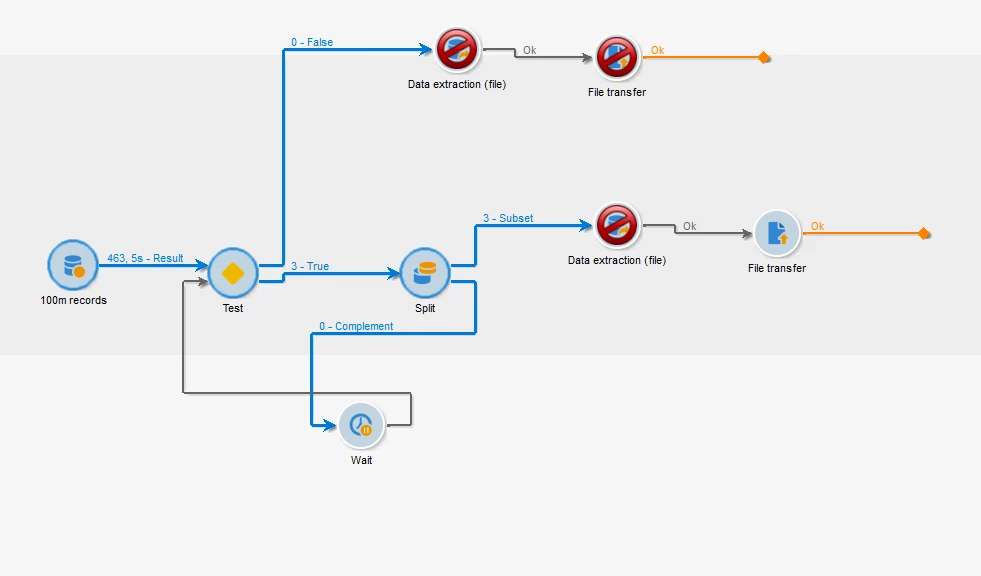
Hello @pradyumn  You can do something like this:


1. Query all records

2. Use test to check if the count is greater than 2.5m If no, export them in single batch

3. Otherwise use split to take out 2.5 m for export and create a loop

4. Adjust the wait time based on the time it takes to export 1st file of 2.5m records. Eg if it takes 15 mins then add wait for 25 or 30 mins


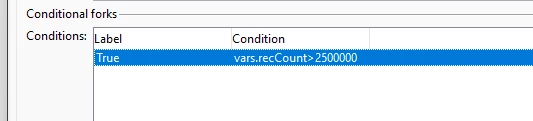
Configuration of test


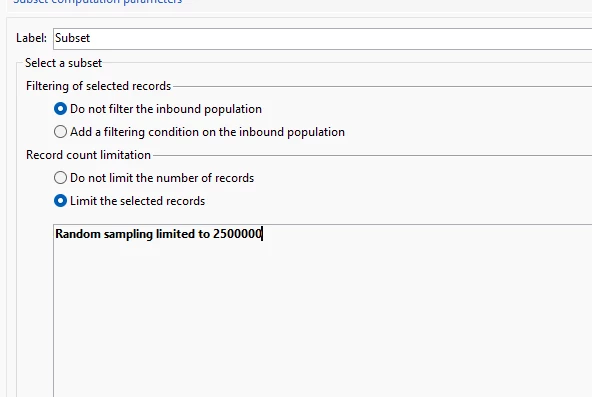
Configuration of Split:


Note: Make sure of add seconds in the file name otherwise it will overwrite the previous file.


2 replies

ParthaSarathy
Community Advisor
Community Advisor
May 13, 2025

Hi @pradyumn ,

Use Split activity and create multiple subsets. And in each Subset, Limit the count to 2.5M

~  ParthaSarathy S~  Click here to join ADOBE CAMPAIGN USER GROUP for Quarterly In-person | Hybrid | Virtual Meetups
PradyumnAuthor
Level 2
May 13, 2025

Thank you for quick response. And Yes if target data is known and fixed we can implement this OOB solutions. We can use exact number or we can go for percentage of size well .

Manoj_Kumar
Community Advisor
Manoj_KumarCommunity AdvisorAccepted solution
Community Advisor
May 13, 2025

Hello @pradyumn  You can do something like this:


1. Query all records

2. Use test to check if the count is greater than 2.5m If no, export them in single batch

3. Otherwise use split to take out 2.5 m for export and create a loop

4. Adjust the wait time based on the time it takes to export 1st file of 2.5m records. Eg if it takes 15 mins then add wait for 25 or 30 mins


Configuration of test


Configuration of Split:


Note: Make sure of add seconds in the file name otherwise it will overwrite the previous file.


Manoj  | https://themartech.pro
PradyumnAuthor
Level 2
May 13, 2025

Thank you for quick response . Yes this solutions is close to my requirement. I will try to implement this for my requirement .