
jorgeferreira
Level 3
October 9, 2023
Solved

Publish resource file via JSCode

Hello, 


I'm trying to create and publish resource files dynamically by JS code but I'm not being able to publish them after creating. 


My code is as follows:

var file = new File("F:\\Attachments\\current\\attach1.pdf"); if(!file.exists) logError ("File '" + file.fullName + "' does not exist."); var extension = /[^.]+$/.exec(file.name); var md5 = digestStrMd5(file.name); if (!file.copyTo("E:\\Adobe\\Campaign\\var\\campaign_tst\\upload\\" + md5 + "." + extension)) logError ("File '" + file.fullName + "' was not copied"); var xmlString = '<fileRes alt="" codepage="0" height="0" name="'+md5+'" nature="" publish="1" storageType="5" useMd5AsFilename="1" userContentType="0" version="" width="0" xtkschema="xtk:fileRes"/>' var fileRes = xtk.fileRes.create( new XML(xmlString)); fileRes.contentType="application/pdf"; fileRes.label = "Attachment 1" fileRes.md5 = md5; fileRes.fileName = md5; fileRes.originalName = md5+".pdf"; fileRes.save(); fileRes.PublishIfNeeded();


After this code, the files are always with the state publishing is needed:
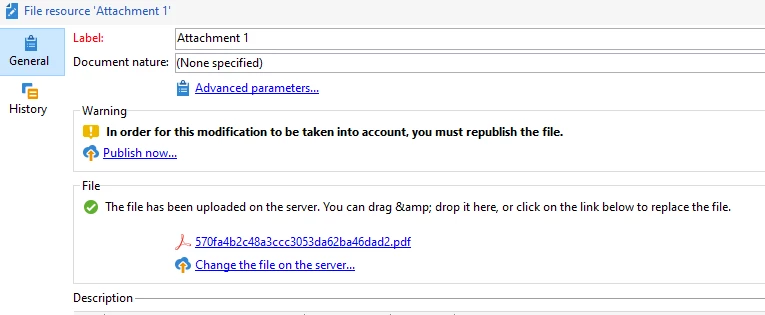
 

Are there any suggestions on how can I publish this attachments via code?
Even if I have to load them in a separate JS. 


Thanks in advance

This post is no longer active and is closed to new replies. Need help? Start a new post to ask your question.
Marcel_Szimonisz
Marcel_SzimoniszAccepted solution
Community Advisor
October 9, 2023

Hello @jorgeferreira,

I remembered i was having similar issue but did not finish the thing

https://experienceleaguecommunities.adobe.com/t5/adobe-campaign-classic-questions/i-want-to-upload-images-to-public-resources-every-morning-is-it/td-p/234118

And they recommend use publishIfNeededFromId for one file resource
https://experienceleague.adobe.com/developer/campaign-api/api/sm-fileRes-PublishIfNeededFromId.html


In your case I gues you need to create some sort of file list  but i could not find the structure. Maybe it can follow session write collection logic:


<fileRes-collection xtkschema="xtk:fileRes"> <fileRes name="" md5=""/> <fileRes name="" md5=""/> <fileRes name="" md5=""/> </fileRes-collection>


Marcel Szimonisz

MarTech Consultant
for more tips visit my blog
https://www.martechnotes.com/

6 replies

LakshmiPravallika
Community Advisor
Community Advisor
October 9, 2023
jorgeferreira
Level 3
October 9, 2023

Hi, 


I also came accross that unanswered question. 
It's not clear for me how can I call that method. 


Translate
LakshmiPravallika
Community Advisor
Community Advisor
October 9, 2023

Hi @jorgeferreira 


Could you Please try fileRes.FilePublishing(fileRes); at the end of the code and let me know if it works.


Regards,

Pravallika.

Translate
Marcel_Szimonisz
Community Advisor
Marcel_SzimoniszCommunity AdvisorAccepted solution
Community Advisor
October 9, 2023

Hello @jorgeferreira,

I remembered i was having similar issue but did not finish the thing

https://experienceleaguecommunities.adobe.com/t5/adobe-campaign-classic-questions/i-want-to-upload-images-to-public-resources-every-morning-is-it/td-p/234118

And they recommend use publishIfNeededFromId for one file resource
https://experienceleague.adobe.com/developer/campaign-api/api/sm-fileRes-PublishIfNeededFromId.html


In your case I gues you need to create some sort of file list  but i could not find the structure. Maybe it can follow session write collection logic:


<fileRes-collection xtkschema="xtk:fileRes"> <fileRes name="" md5=""/> <fileRes name="" md5=""/> <fileRes name="" md5=""/> </fileRes-collection>


Marcel Szimonisz

MarTech Consultant
for more tips visit my blog
https://www.martechnotes.com/

Translate
jorgeferreira
Level 3
October 9, 2023

Hi Marcel, 


In the first link you have provided I could find the answer to this specific issue.

I just needed to add 

xtk.fileRes.PublishIfNeededFromId(fileRes.id);

After the .save()


Thanks! 

Translate