Precheck in adobe campaign classic | Community
Skip to main content
Level 2
October 17, 2025
Solved

Precheck in adobe campaign classic

  • October 17, 2025
  • 1 reply
  • 350 views

Hi team,


I have set up a daily trigger workflow that is intended to run only once per day. However, due to occasional manual errors, it sometimes runs twice. To prevent this, I want to implement a check that, before executing the delivery a second time, splits the transactions and notifies the user.


Delivery type : Action delivery (star delivery)

Delivery : New, create from aTemplate 

Best answer by Amine_Abedour

Hello @adobewisdomwarrior 
Here’s a logic that could meet your need.
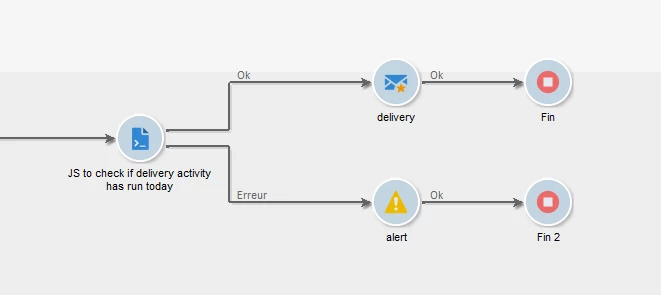
Before your delivery activity, insert a JavaScript activity and activate the "process errors" branch inside it:


Then use the JavaScript code below:

// Build the query to select workflow tasks matching the criteria var queryWkfTask = xtk.queryDef.create( <queryDef operation="select" schema="xtk:workflowTask"> <select> <node expr="@id"/> </select> <where> <condition boolOperator="AND" expr={"@activity = '"+activity.transitions.done.target+"'"}/> // Filter by activity matching the target transition (the delivery activity in ou case) <condition boolOperator="AND" expr={"[@workflow-id] = "+instance.id}/> // Filter by workflow instance ID (only workflow tasks of current workflow <condition boolOperator="AND" expr="@creationDate &gt;= ToDate( GetDate())"/> // Filter by creation date greater than or equal to today <condition expr="@status = 1"/> // Filter by status done (optional) </where> </queryDef> ).ExecuteQuery(); // Count the number of <workflowTask> nodes returned by the query var taskCount = queryWkfTask.*.length(); // If at least one task exists, log an error and activate Error transition (the one going to alert activity) if (taskCount > 0) { logError("A '" + activity.transitions.done.target + "' task has already been created today."); }

Next, in the error transition, place an alert activity.

The JavaScript code checks if a workflow task has already been created today with the same name as the target activity of the JS. If it finds at least one matching task, it logs an error message to prevent creating another one and activate the error transition instead.

Br,


1 reply

Amine_Abedour
Community Advisor
Amine_AbedourCommunity AdvisorAccepted solution
Community Advisor
October 20, 2025

Hello @adobewisdomwarrior 
Here’s a logic that could meet your need.
Before your delivery activity, insert a JavaScript activity and activate the "process errors" branch inside it:


Then use the JavaScript code below:

// Build the query to select workflow tasks matching the criteria var queryWkfTask = xtk.queryDef.create( <queryDef operation="select" schema="xtk:workflowTask"> <select> <node expr="@id"/> </select> <where> <condition boolOperator="AND" expr={"@activity = '"+activity.transitions.done.target+"'"}/> // Filter by activity matching the target transition (the delivery activity in ou case) <condition boolOperator="AND" expr={"[@workflow-id] = "+instance.id}/> // Filter by workflow instance ID (only workflow tasks of current workflow <condition boolOperator="AND" expr="@creationDate &gt;= ToDate( GetDate())"/> // Filter by creation date greater than or equal to today <condition expr="@status = 1"/> // Filter by status done (optional) </where> </queryDef> ).ExecuteQuery(); // Count the number of <workflowTask> nodes returned by the query var taskCount = queryWkfTask.*.length(); // If at least one task exists, log an error and activate Error transition (the one going to alert activity) if (taskCount > 0) { logError("A '" + activity.transitions.done.target + "' task has already been created today."); }

Next, in the error transition, place an alert activity.

The JavaScript code checks if a workflow task has already been created today with the same name as the target activity of the JS. If it finds at least one matching task, it logs an error message to prevent creating another one and activate the error transition instead.

Br,


Amine ABEDOUR
Level 2
October 23, 2025

Hi @amine_abedour ,


Excellent its work fine  also how i am change script  Instead of running the campaign once per day, it should be executed only once during the entire duration.