
Pictures do not load in email template | Community
Skip to main content
Michael_Soprano
Level 10
August 26, 2024
Question

Pictures do not load in email template

  • August 26, 2024
  • 1 reply
  • 1587 views


I have got two mailings. I created a workflow which requests JSON product recommendations to Target. Then I put urls/product name, price etc. into html.

  • One has an h2 with a header. It looks like this the pictures are not loaded. 
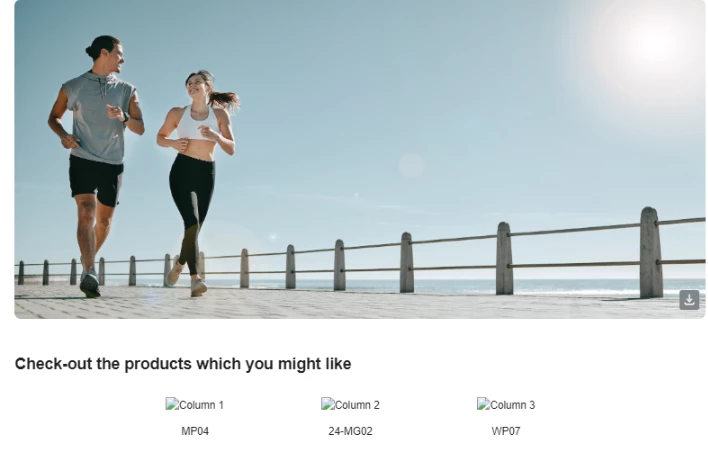
 

  • The other doesn't have it the div with text and it works ... Pictures are loaded
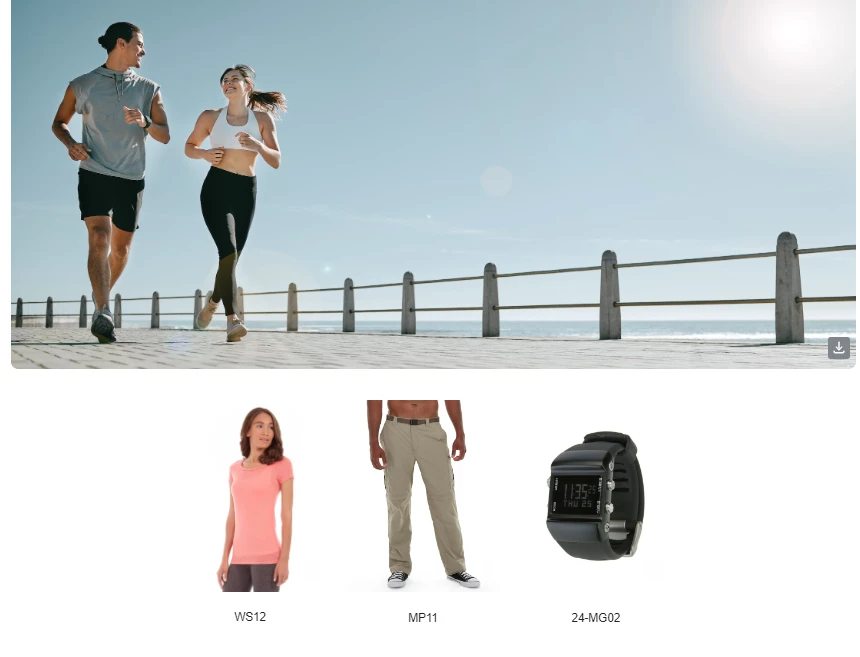
HTML is like this. If I add bold element then the product pictures does not work:

<div style="text-align: center; padding-bottom: 20px;">
<img src="https://demo-system-next.s3.amazonaws.com/assets/luma/banners/AdobeStock_570499457.jpg" alt="Banner Image" style="width: 100%; border-radius: 8px;">
</div>
<div>
Check-out the products which you might like
</div>
<div style="width: 100%; max-width: 600px; margin: 0 auto; text-align: center;">
<div style="display: flex; justify-content: space-between;">
<div style="width: 32%; padding: 10px; box-sizing: border-box;">
<img src=<%= variables.x1 %> alt="Column 1" style="max-width: 100%; height: auto;">
<p><%= variables.x2 %></p>
</div>
<div style="width: 32%; padding: 10px; box-sizing: border-box;">
<img src=<%= variables.x4 %> alt="Column 2" style="max-width: 100%; height: auto;">
<p><%= variables.x5 %></p>
</div>
<div style="width: 32%; padding: 10px; box-sizing: border-box;">
<img src=<%= variables.x7 %> alt="Column 3" style="max-width: 100%; height: auto;"> </img>
<p><%= variables.x8 %></p>
</div>
</div>
</div>

Do you you have any ideas why is that?  How to debug this?


This post is no longer active and is closed to new replies. Need help? Start a new post to ask your question.

1 reply

MeitMedia
Level 4
August 26, 2024

Hi @michael_soprano ,


Here is mine observation and some suggestions for your issue:

Potential Issues and Debugging:

  1. HTML Structure and Flexbox: The code uses display:flex to arrange the product columns. Flexbox layouts can sometimes be sensitive to additional elements (like headers) that might inadvertently disrupt the layout. If an <h2> or other block-level elements are added directly before the flexbox container, they might push or misalign elements, causing issues with image rendering.
  2. CSS Specificity and Inheritance: Adding an <h2> might introduce unexpected margins, paddings, or other CSS properties that affect the layout. These properties might shift elements or cause layout issues in email clients, leading to images not loading.
  3. Email Client Rendering: Different email clients render HTML and CSS differently. Adding a header tag, such as <h2>, might trigger different rendering modes or cause issues with how the email client processes the HTML structure.

Suggestions:

  • Test with Inline Styling on the Header: If you plan to use an <h2>, ensure you control its styling to prevent it from affecting the layout.
    Add this before the product container and see if the images still load.


<h2 style="margin: 0; padding: 10px 0; text-align: center;"> Check-out the products which you might like </h2>​​


  • Place Header Outside Flexbox: Ensure that if you're using a header, it's placed outside any display: flex containers to avoid any layout disruption.
  • Use a <div> Instead of <h2>: If you don't require the semantic benefits of a header tag, consider using a styled div to simulate the header:


<div style="font-size: 24px; font-weight: bold; margin-bottom: 20px; text-align: center;"> Check-out the products which you might like </div>​​


  • Run an Email Client Test: Tools like Litmus or Email on Acid can help test how the email renders across different clients and diagnose where the issue may lie.

These steps should help you identify and resolve the issue with the images not loading when using a header.

Best regards,

MEIT MEDIA (https://www.meitmedia.com)

Find us on LinkedIn

Contact Us: infomeitmedia@gmail.com


Michael_Soprano
Level 10
August 27, 2024

Thank you very much for you extensive response.

It seems like that it does not work with any addidional div with text. I also tried tr / td structure and it also did not work. 

If I add here whatever div with text it does not work:

<body>
<div style="text-align: center; padding-bottom: 20px;">
<img src="https://demo-system-next.s3.amazonaws.com/assets/luma/banners/AdobeStock_570499457.jpg" alt="Banner Image" style="width: 100%; border-radius: 8px;">
</div>
<div style="width: 100%; max-width: 600px; margin: 0 auto; text-align: center;">
<div style="display: flex; justify-content: space-between;">
<div style="width: 32%; padding: 10px; box-sizing: border-box;">
<img src=<%= variables.x1 %> alt="Column 1" style="max-width: 100%; height: auto;">
<p><%= variables.x2 %></p>
</div>
<div style="width: 32%; padding: 10px; box-sizing: border-box;">
<img src=<%= variables.x4 %> alt="Column 2" style="max-width: 100%; height: auto;">
<p><%= variables.x5 %></p>
</div>
<div style="width: 32%; padding: 10px; box-sizing: border-box;">
<img src=<%= variables.x7 %> alt="Column 3" style="max-width: 100%; height: auto;">
<p><%= variables.x8 %></p>
</div>
</div>
</div>
</body>

MeitMedia
Level 4
August 27, 2024

Hi @michael_soprano ,


Outlook has limited support for CSS, especially when it comes to styling within <div> tags. This could definitely be contributing to the image rendering issues you're experiencing.


Steps to Resolve Image Rendering Issues:

  • Replace <div> tags with <table>, <tr>, and <td> tags for layout purposes. Tables are more widely supported across different email clients, including Outlook.
  • Instead of relying on CSS within <div> tags, use inline styles directly within your <img> and <td> tags. This ensures better compatibility, especially with Outlook.
  • Minimize the use of advanced CSS properties like display: flex;, justify-content, and margins/paddings. Stick to basic properties that are well-supported by email clients.


Here's a simplified version using a table-based layout and inline styles you can try to test:

<body> <table align="center" border="0" cellpadding="0" cellspacing="0" width="600" style="border-collapse: collapse; text-align: center;"> <tr> <td colspan="3" style="padding-bottom: 20px;"> <img src="https://demo-system-next.s3.amazonaws.com/assets/luma/banners/AdobeStock_570499457.jpg" alt="Banner Image" style="width: 100%; border-radius: 8px;"> </td> </tr> <tr> <td width="33%" style="padding: 10px; text-align: center;"> <img src="<%= variables.x1 %>" alt="Column 1" style="width: 100%; height: auto;"> <p><%= variables.x2 %></p> </td> <td width="33%" style="padding: 10px; text-align: center;"> <img src="<%= variables.x4 %>" alt="Column 2" style="width: 100%; height: auto;"> <p><%= variables.x5 %></p> </td> <td width="33%" style="padding: 10px; text-align: center;"> <img src="<%= variables.x7 %>" alt="Column 3" style="width: 100%; height: auto;"> <p><%= variables.x8 %></p> </td> </tr> </table> </body>


This approach should address the issues related to both display: flex; and <div> styling in Outlook.


Best regards,

MEIT MEDIA (https://www.meitmedia.com)

Find us on LinkedIn

Contact Us: infomeitmedia@gmail.com