Not able to save attribute in delivery input form | Community
Skip to main content
Level 2
May 18, 2020
Solved

Not able to save attribute in delivery input form

  • May 18, 2020
  • 3 replies
  • 13319 views

Hi,


I have created smsInformation attribute in delivery schema and added it in xpathsToLoad and xpathsToLoadOpt inside nms:delivery input form.


Added below code in nms:delivery input form-

<container img="xtk:text.png" label="Text content" name="tabSMS" readOnlyIf="[/tmp/@readOnly] or ([/ignored/@limitEdition] and [/ignored/@contentStatus]!=10)">
<container>
<input label="SMS Information." xpath="/@smsInformation"/>
</container>
<input fullToolbar="true" htmlMode="false" name="ctSource" nolabel="true"
type="htmlSource" xpath="../content/sms/source" xpathInsert="/ignored/customizeSMSContent">
<container>
<input menuId="deliveryMenuBuilder" type="customizeBtn" xpath="/ignored/customizeSMSContent"/>
</container>
</input>
</container>


Below is delivery template-
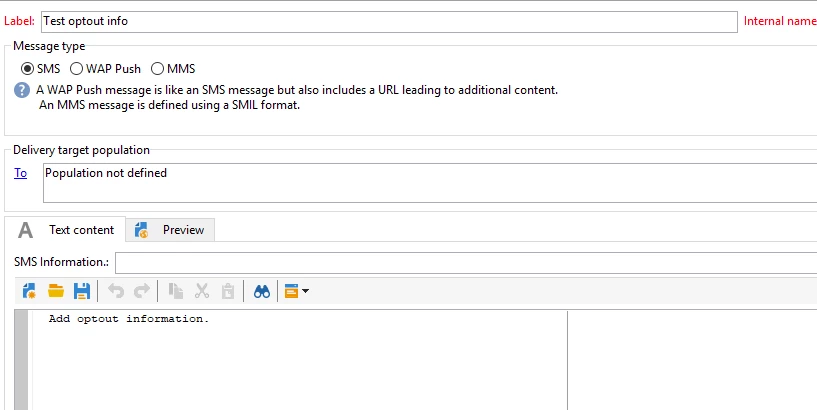
 

When I type data in SMS information attribute, save the delivery and re-open it the atrribute looks blank.

Please let me know why data not getting save in sms information attribute.


Thanks,


This post is no longer active and is closed to new replies. Need help? Start a new post to ask your question.
Best answer by Manoj_Kumar

Hello @tejashri12 ,

Can you please share the error you are getting while saving the input form.

i believe the error is at the xpath for smsinformation input. Can you double check if the xpath is correct?


3 replies

Manoj_Kumar
Community Advisor
Manoj_KumarCommunity AdvisorAccepted solution
Community Advisor
May 18, 2020

Hello @tejashri12 ,

Can you please share the error you are getting while saving the input form.

i believe the error is at the xpath for smsinformation input. Can you double check if the xpath is correct?


Manoj     Find me on LinkedIn
Level 2
May 19, 2020

Hi @milan_vucetic and @_manoj_kumar_ 


I checked, smsInformation field is updated in schema. Previously I was not getting any error in delivery input form or delivery template.

Since I changed xpath to "@smsInformation", while opening the sms delivery template I'm getting below error.


Milan_Vucetic
Level 9
May 18, 2020

Hi @tejashri12 ,


if you created attribute @smsInformation in the main tree in nms:delivery schema you should address it with: <input label="SMS Information." xpath="@smsInformation"/>

Before that, check if you Updated database structure (if new column is reflected to DB not only in the schema).


Regards,

Milan

Level 2
May 19, 2020

@milan_vucetic @_manoj_kumar_ 


I have sms delivery template as below-


When I type text on SMS content (like Test email) attribute it should automatically reflect on optout information, the one which I greyed out.

Could you please help here?


Manoj_Kumar
Community Advisor
Community Advisor
May 19, 2020