nms.extAccount.load JSON.stringify JSON.parse | Community
Skip to main content
Level 3
May 14, 2024
Question

nms.extAccount.load JSON.stringify JSON.parse

  • May 14, 2024
  • 2 replies
  • 1151 views

I am performing some tests, I have in an external account in the comment section some configuration in object literal
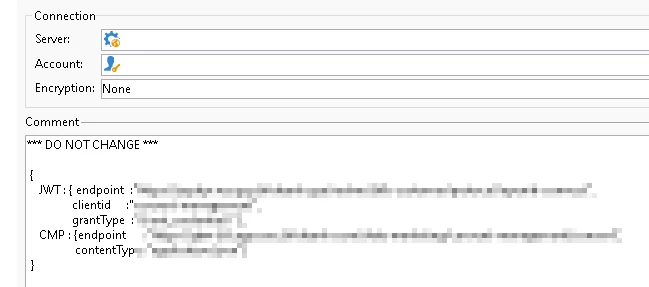


{ JWT : { endpoint :"https://somelink1", clientid :"consent-management", grantType :"client_credentials" }, CMP : {endpoint :"https://someotherlink2", contentType :"application/json"} }


In a workflow I am loading the external account object and matching object configuration in the comment section using a regex, while I can JSON parse it, I cannot seem to navigate using dot notation.


var auth = nms.extAccount.load(39010); var regex = /{([^;]*)}/gm; var authObj = JSON.parse(JSON.stringify(auth.comment.match(regex))); logInfo(authObj);



Normally I would then navigate using dot notation (authObj.JWT.endpoint) but I am getting undefined.


This post is no longer active and is closed to new replies. Need help? Start a new post to ask your question.

2 replies

CampaignerForLife
Level 5
May 15, 2024

Which type object is the variable you're trying to access? Print it to check it's the right one

Tobias_Lohmann
Adobe Employee
Adobe Employee
May 17, 2024

Hi o_X,


there are two issues with your approach:


1. code is wrong. Look at this line:

var authObj = JSON.parse(JSON.stringify(auth.comment.match(regex)));

the "match" method returns an array of found matches (in your case 1), like this:


[{ JWT : { endpoint :"https://somelink1", clientid :"consent-management", grantType :"client_credentials" }, CMP : {endpoint :"https://someotherlink2", contentType :"application/json"} }]


 Then your performing a stringify on that Array, which results in this 

"["{\u000a JWT : { endpoint :\"https://somelink1\",\u000a clientid :\"consent-management\",\u000a grantType :\"client_credentials\" },\u000a CMP : {endpoint :\"https://someotherlink2\",\u000a contentType :\"application/json\"}\u000a}"]"


Then your JSON.parsing that thing and you again get the same array as the result from the first step.

Instead you should modify you code to this (no JSON stringify needed and you access the first found match):

var auth = nms.extAccount.load(28470478); var regex = /{([^;]*)}/gm; var matches = auth.comment.match(regex); // returns array var authObj = JSON.parse(matches[0]); // access first match and remove JSON.stringify logInfo('authObj.JWT.endpoint: ' + authObj.JWT.endpoint); logInfo('authObj.CMP.contentType: ' + authObj.CMP.contentType);


2. problem: the JSON in the external account's comment is invalid and the parser isn't able to parse it. You noted:

{ JWT : { endpoint :"https://somelink1", clientid :"consent-management", grantType :"client_credentials" }, CMP : {endpoint :"https://someotherlink2", contentType :"application/json"} }

Instead you need to add double quotes around the keys and remove the spaces between the key and the colon:

{ "JWT": { "endpoint": "https://somelink1", "clientid": "consent-management", "grantType": "client_credentials" }, "CMP": { "endpoint": "https://someotherlink2", "contentType": "application/json" } }

 Best regards, Tobias

o_XAuthor
Level 3
May 27, 2024

Hi Tobias,


In the case of geting a string from platform options, how do you get the timestamp of lastLog


I've tried


var data    = getOption("NmsTracking_Pointer");
var doc     = new DOMDocument.fromXMLString(data)
logInfo(doc.root.getElementsByTagName('lastLog')[0])


Amine_Abedour
Community Advisor
Community Advisor
May 27, 2024

Hello @o_x,

i've had the same need in the past, here is how i did it : 


//Get lastLog Date from NmsTracking_Pointer option var trackingOption = getOption('NmsTracking_Pointer'); var trackingOptionXML = new XML (trackingOption.replace("<?xml version='1.0'?>","")); var dateLastLog = parseTimeStamp(trackingOptionXML.server.@lastLog);


Br,

Amine ABEDOUR