Modify delivery template | Community
Skip to main content
tejashriw155148
Level 4
June 24, 2020
Solved

Modify delivery template

  • June 24, 2020
  • 2 replies
  • 2353 views

Hi,


When I open any delivery template and click on properties, it shows below properties window.

I want to modify the bottom part of the template. I search the "Execution folder" logic in nms:delivery and nms:newDelivery input form but didn't find label in input form.
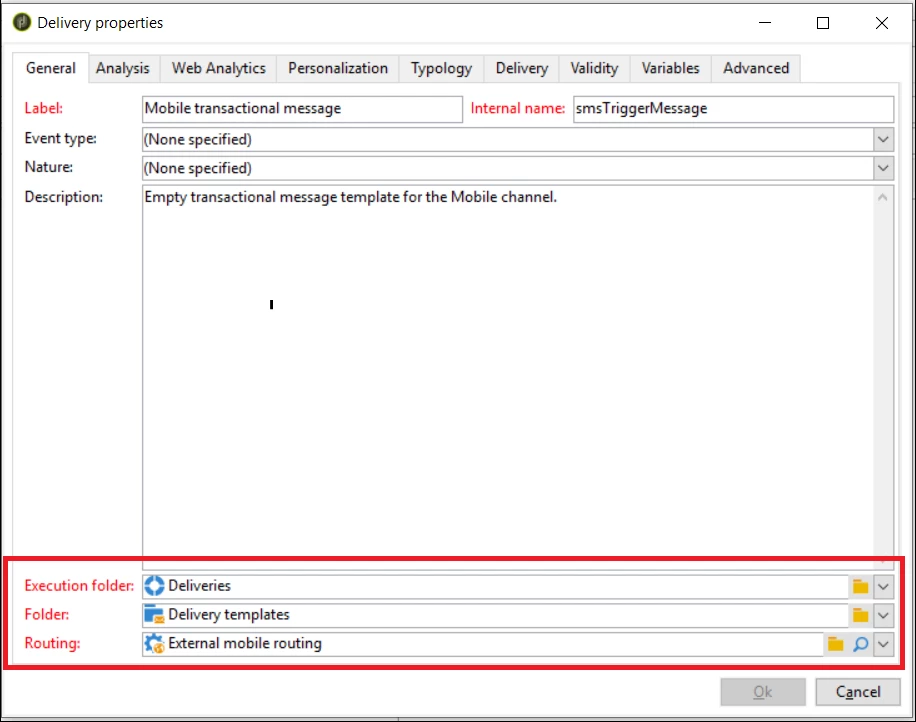


Please let me know where I can find the logic for template's bottom part.


Thanks,

This post is no longer active and is closed to new replies. Need help? Start a new post to ask your question.
Best answer by Anita_punmiya

Hi @tejashriw155148 


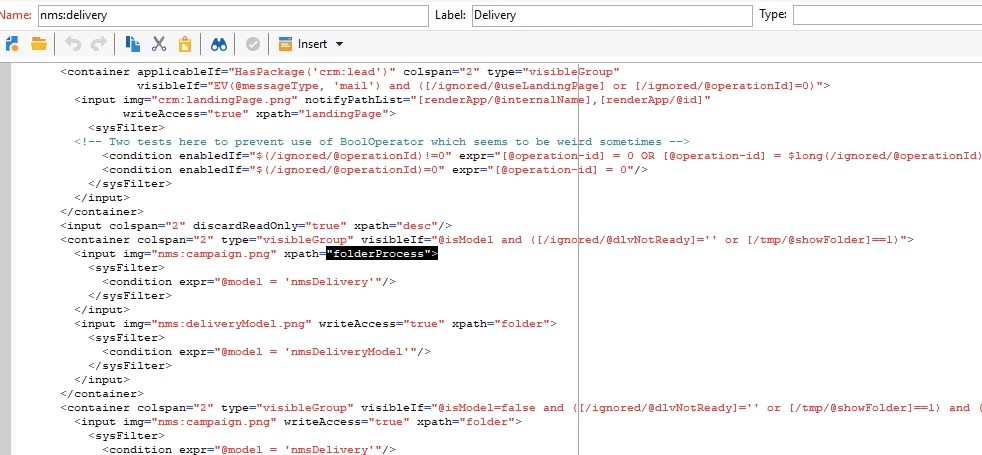
Here are the screenshots from nms:delivery schema and nms:delivery form to check the Execution Folder (folderProcess). You need to look around in the schema/form for the details.


2 replies

Anita_punmiya
Level 5
June 24, 2020

Hi @tejashriw155148 ,


Not sure, if I have followed your question correctly, but if you are looking to change the Execution Folder/Routing , it is best to duplicate the existing template and make the changes in your custom delivery template and reuse it.


Thanks.

tejashriw155148
Level 4
June 24, 2020

Hi @anita_punmiya 


I want to know where I can find the logic of execution folder. 

what is the name of input form or schema.


Regards

Tejashri


Darren_Bowers
Level 9
June 24, 2020

Hi @tejashriw155148 I think you are asking for where the bottom three elements in the nms:delivery form are defined?

Look around for the xpath for folderProcess and folder elements

The first one looks like this:

<container colspan="2" type="visibleGroup" visibleIf="@isModel and ([/ignored/@dlvNotReady]='' or [/tmp/@showFolder]==1)"> <input img="nms:campaign.png" xpath="folderProcess"> <sysFilter> <condition expr="@model = 'nmsDelivery'"/> </sysFilter> </input> <input img="nms:deliveryModel.png" writeAccess="true" xpath="folder"> <sysFilter> <condition expr="@model = 'nmsDeliveryModel'"/> </sysFilter> </input> </container>