List activity in Adobe campaign classic | Community
Skip to main content
Level 3
September 19, 2025
Solved

List activity in Adobe campaign classic

  • September 19, 2025
  • 1 reply
  • 990 views

Hi @parthasarathy 

Kindly help me to understand below points in the Adobe campaign classic List activity, I tried refering document, but not able to understand.


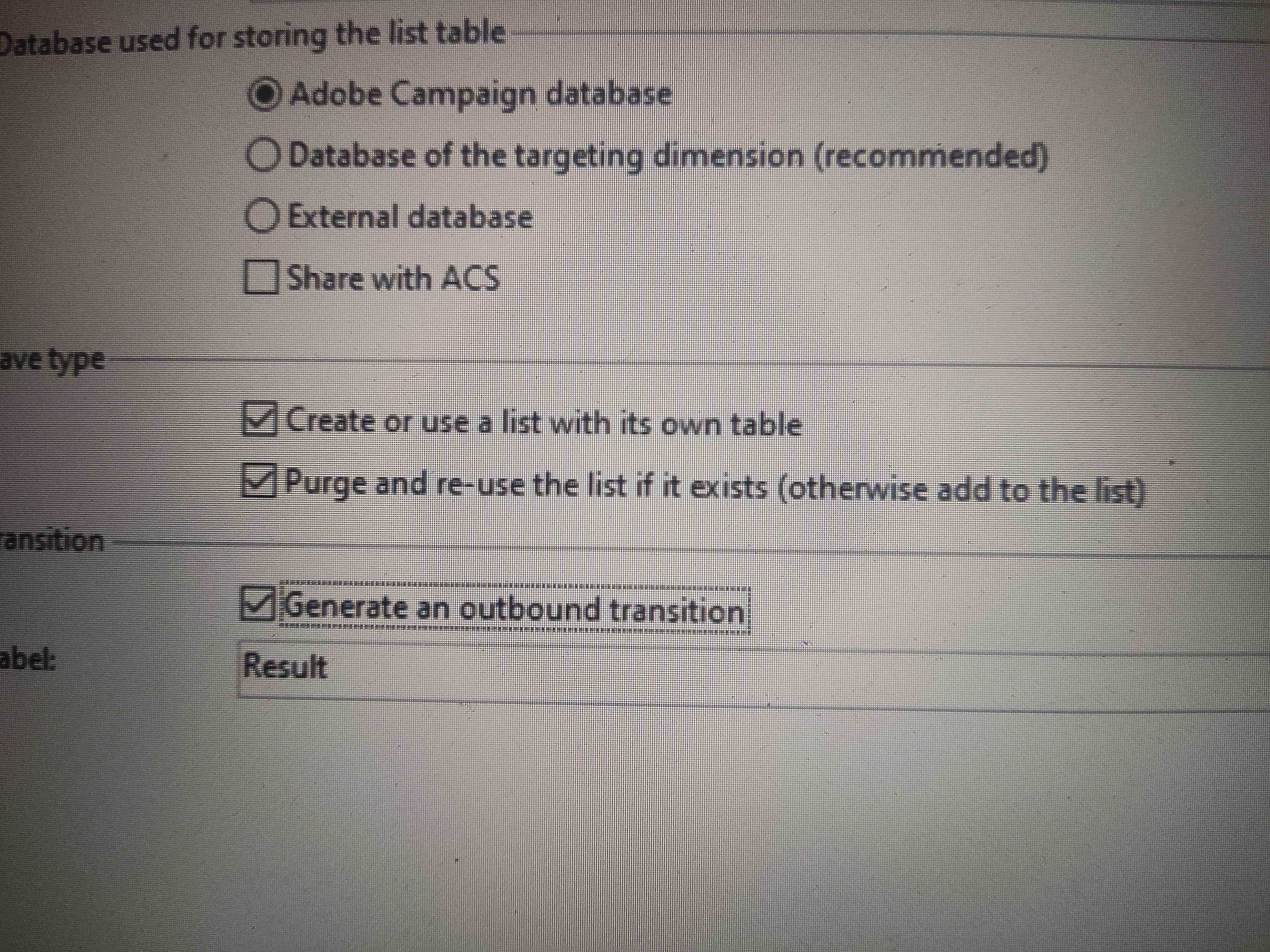
1. In Save type:

i. What does “Create or use a list with its own table” mean?

If I check this option, the list type saved is List.

If I uncheck this option, the list type saved is Group.

What difference does this make?


2. In Database used for storing the list table, there are below options:

i. Adobe Campaign database

ii. Database of targeting dimensions

iii. Share with ACS


Kindly help me to understand the above points.
 

Best answer by RCh2_

Hi @kd1-1,


I’m not sure how detailed the official docs are on this, but here’s my understanding of the List activity options in Adobe Campaign Classic:

1. Create or use a list with its own table

* Checked: Creates a List, which means a new table is created that stores a copy of the selected recipients. Think of it as a static snapshot you can reuse later.

* Unchecked: Creates a Group, which doesn’t copy data but simply references the existing recipients dynamically. So it updates automatically if your base data changes and uses less storage.


2. Database options

* Adobe Campaign database: The default internal database where most data is stored.

* Database of targeting dimensions: Stores the list in the same database as your main targeting data (like recipients). Useful if you have multiple databases.

* Share with ACS: For sharing lists with Adobe Campaign Standard (ACS). Only relevant if you have a hybrid ACC + ACS setup.


Hope this helps! Feel free to ask if you want more examples or details.

Thanks,


1 reply

RCh2_
RCh2_Accepted solution
Level 2
September 19, 2025

Hi @kd1-1,


I’m not sure how detailed the official docs are on this, but here’s my understanding of the List activity options in Adobe Campaign Classic:

1. Create or use a list with its own table

* Checked: Creates a List, which means a new table is created that stores a copy of the selected recipients. Think of it as a static snapshot you can reuse later.

* Unchecked: Creates a Group, which doesn’t copy data but simply references the existing recipients dynamically. So it updates automatically if your base data changes and uses less storage.


2. Database options

* Adobe Campaign database: The default internal database where most data is stored.

* Database of targeting dimensions: Stores the list in the same database as your main targeting data (like recipients). Useful if you have multiple databases.

* Share with ACS: For sharing lists with Adobe Campaign Standard (ACS). Only relevant if you have a hybrid ACC + ACS setup.


Hope this helps! Feel free to ask if you want more examples or details.

Thanks,


KD1-1Author
Level 3
September 21, 2025

Hi @rch2_ 

Thank you for the reply, is it possible if you provide an eg for above. It will be a great help!!