Issue with input button to call Soap Method | Community
Skip to main content
Marcel_Szimonisz
Community Advisor
Community Advisor
June 12, 2023
Solved

Issue with input button to call Soap Method

  • June 12, 2023
  • 2 replies
  • 1246 views

Hello Dear Campaigners,

i have extended schema and updated the database.

<srcSchema _cs="Workflows (cus)" created="2023-06-12 14:12:10.909Z" createdBy-id="0" desc="Workflows definitions" entitySchema="xtk:srcSchema" extendedSchema="xtk:workflow" img="xtk:workflow.png" label="Workflows" labelSingular="Workflow" lastModified="2023-06-12 15:28:33.969Z" mappingType="sql" md5="45F3C2BF3E8134B802BA695FFCEAA60A" modifiedBy-id="0" name="workflow" namespace="cus" xtkschema="xtk:srcSchema"> <element desc="Workflows definitions" img="xtk:workflow.png" label="Workflows" labelSingular="Workflow" name="workflow"> <attribute label="Locked by" name="lockedBy" type="long"/> </element> <methods> <method library="cus:workflow.js" name="ToggleLockOnWorkflow" static="true"> <parameters> <param desc="Workflow id" inout="in" name="id" type="long"/> <param desc="Status" inout="out" name="status" type="boolean"/> </parameters> </method> </methods> </srcSchema>


I have created JS library

//cus:workflow.js function cus_workflow_ToggleLockOnWorkflow(id){ var operator = application.operator, wkf = NLWS.xtkWorkflow.load(id) if (wkf.lockedBy > 0) wkf.lockedBy = 0;//unlock the workflow else wkf.lockedBy = operator.id;//lock the workflow wkf.save(); return true; }

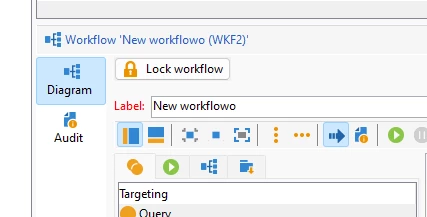
I have added button to the form

<!-- Under diagramme in xtk:workflow form view --> <!-- wlock --> <container colspan="2" type="visibleGroup" visibleIf="@lockedBy=='0'"> <input img="nms:lock.png" label="Lock workflow" type="button"> <enter> <!-- SOAP call to get the generated source --> <soapCall name="ToggleLockOnWorkflow" service="cus:workflow"> <param exprIn="@id" name="id" type="number"/> <param type="boolean" xpathOut="/tmp/@nothingHere"/> </soapCall> <reload/> </enter> </input> </container> <container colspan="2" type="visibleGroup" visibleIf="@lockedBy!='0'"> <input img="nms:unlock.png" label="Unlock workflow" type="button"> <enter> <!-- SOAP call to get the generated source --> <soapCall name="ToggleLockOnWorkflow" service="cus:workflow"> <param exprIn="@id" name="id" type="number"/> </soapCall> <reload/> </enter> </input> </container> <container colspan="2" padding-top="5" type="hpaned"> <static/> </container>

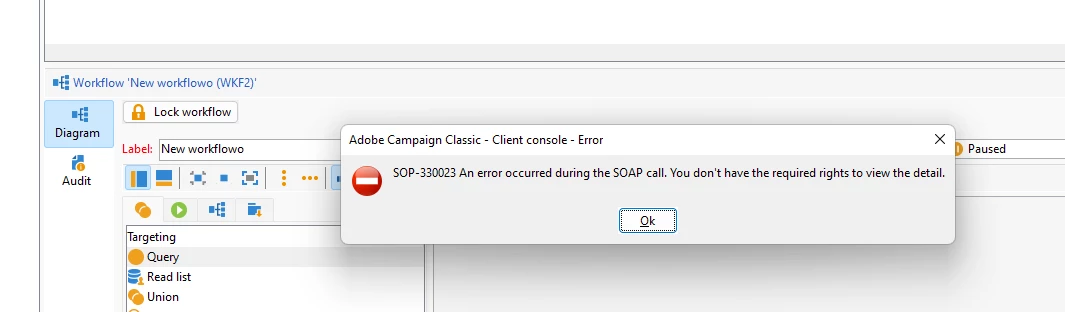
  Once i click on the button in the workflow i get weird error without any description that can help
On the server logs

2023-06-12 15:35:30.688Z 00078449 00078495 2 error log XSV-350000 Unable to load document of identifier 'cus:workflow' and type 'xtk:schema'. (iRc=-2003)


Maybe my settings missing somoething but have run this on already set isntance and throws same error

Thanks a lot 🙂

This post is no longer active and is closed to new replies. Need help? Start a new post to ask your question.
Best answer by Amine_Abedour

Hello @marcel_szimonisz 


Your javascript function should be called xtk_workflow_ToggleLockOnWorkflow. Because you have just extended the schema xtk:workflow. Also in service of the soapCall node you should call xtk:workflow for the same reasons.


Br,

Amine

2 replies

akshaaga
Adobe Employee
Adobe Employee
June 12, 2023

@marcel_szimonisz,

The error message you're encountering suggests that there is an issue loading the document with the identifier 'cus:workflow' and type 'xtk:schema'. This error is often related to a misconfiguration or missing component in the AC instance. Here are a few things you can check to troubleshoot the issue:

  1. Verify the existence of the 'cus:workflow' schema: Make sure that the 'cus:workflow' schema exists in your Adobe Campaign instance. You can check the Schemas folder in the Adobe Campaign Explorer to see if the schema is present.

  2. Check the extended schema definition: Ensure that the extended schema 'xtk:workflow' is correctly defined and accessible. Double-check the namespace, name, and xtkschema values in your srcSchema XML. Make sure that the extended schema exists and is correctly referenced.

  3. Confirm the availability of the cus:workflow.js library: Make sure that the 'cus:workflow.js' library is created and accessible in your Adobe Campaign instance. Check the Adobe Campaign Explorer's JavaScript libraries folder to verify if the library is present.

Amine_Abedour
Community Advisor
Amine_AbedourCommunity AdvisorAccepted solution
Community Advisor
June 12, 2023

Hello @marcel_szimonisz 


Your javascript function should be called xtk_workflow_ToggleLockOnWorkflow. Because you have just extended the schema xtk:workflow. Also in service of the soapCall node you should call xtk:workflow for the same reasons.


Br,

Amine

Amine ABEDOUR
Marcel_Szimonisz
Community Advisor
Community Advisor
June 12, 2023

Hello @amine_abedour ,

that solved one part now i cannot see the additional field lockedBy


2023-06-12 20:30:26.716Z 00079C34 00079C45 2 error log Element 'lockedBy' unknown (see definition of schema 'Workflows (xtk:workflow)'). (iRc=16384) 2023-06-12 20:30:26.722Z 00079C34 00079C45 2 error log XTK-170036 Unable to parse expression 'lockedBy'. (iRc=16384)


Using the javascript above


EDIT: it is funny because logInfo prints the contents of wariable but i guess i cannot write it

EDIT: Okey now it is fixed I have problems with argument types in form and schema and cache problem not i can change the value..

Last problem is to build sysfilter:


how do i check against the shcema value?
I tried EV("@lockedBy",0) is there any other way?


<sysFilter name="writeAccess"> <condition enabledIf="$(lockedBy)!=0" expr="FALSE"/> </sysFilter>


EDIT:
I have abandoned the schema lock and trying to do form on leave validation check which has more options. But do we know how to get current user id?
currentuser 


<leave> <if expr="@lockedBy &gt; 0"> <check expr="@lockedBy != [currentOperator/@id]"> <error>You must populate the 'Test' field!</error> </check> </if> </leave> <leave> <if expr="@lockedBy &gt; 0"> <check expr="@lockedBy != CurrentUser()"> <error>You must populate the 'Test' field!</error> </check> </if> </leave>​ <leave> <if expr="@lockedBy &gt; 0"> <check expr="@lockedBy != $(loginId)"> <error>You must populate the 'Test' field!</error> </check> </if> </leave>


EDIT LAST ONE 🙂

finially get that working by calling SoapCall on the form Leave

<soapCall name="CanBeModified" service="xtk:workflow"> <param exprIn="@id" type="int"/> </soapCall>

where i did even more checks. 

thanks a lot