I want to Upload images to Public resources every morning. Is it possible to automate this process. | Community
Skip to main content
March 3, 2017
Solved

I want to Upload images to Public resources every morning. Is it possible to automate this process.

  • March 3, 2017
  • 9 replies
  • 13762 views

I want to Upload images to public resources at a regular interval of time are there any API's to this.

This post is no longer active and is closed to new replies. Need help? Start a new post to ask your question.
Best answer by Marcel_Szimonisz

Hello,

i have done  script to upload photos to public resources from JS activity within workflow. You can add list of files and loop below script

var file = new File("path_to_file\\mont.jpg");

if(!file.exists)

     logError ("File '" + file.fullName + "' does not exists.");

var extension = /[^.]+$/.exec(file.name);

var md5 = HMACStr(file.name,"UTF-8","MD5");

if (!file.copyTo("path_to_adobe\\Adobe Campaign v6\\var\\res\\bootcamp\\" + md5 + "." + extension))

     logError ("File '" + file.fullName + "' was not copied");

var xmlString = '<fileRes alt="" codepage="0" height="0" name="owl.jpg" nature=""  publish="0" storageType="5" useMd5AsFilename="1" userContentType="0" version=""  width="0" xtkschema="xtk:fileRes"/>'

var fileRes = xtk.fileRes.create( new XML(xmlString));

fileRes.contentType="image/jpeg";

fileRes.label = "some_label"

fileRes.md5 = md5;

fileRes.fileName = "path_to_adobe\\Adobe\\Adobe Campaign v6\\bin\\..\\var\\res\\bootcamp\\" + md5 + "." + extension;

fileRes.originalName = "path_to_file\\Downloads\\mont.jpg";

fileRes.save();

Result after you run this javascript

Marcel

9 replies

vraghav
Adobe Employee
Adobe Employee
March 6, 2017

There is one but I don't remember it now. However, it observes few concerns when there are more than one frontal servers.

It is something to be requested from Adobe PS and hence is out of scope for this forum.

May 30, 2017

We inherited a system which included a workflow, build by an Adobe engineer, to import images from a shared folder on the Campaign server as xtk:fileRes. There's a fundamental problem with trying to do this within Campaign itself, that it's not possible (as far as I can see in the docs, and confirmed by someone from Adobe Support) to calculate the md5 hash of a file - and thus the xtk:fileRes record you end up with is not the same as that which would have been created by uploading the same image in the UI. We don't know what the consequences of this are, but it certainly has potential for things to break.

I ended up writing a .NET app through which images (along with their md5 hash!) can be uploaded to a custom SOAP endpoint, which then creates the xtk:fileRes records - see the github project. The treatment of folders could still do with a bit of work - it doesn't create folders, or change the folder if the image already exists in a different one. But it works for our purposes, and may work for yours; or at least give you some useful ideas.

Marcel_Szimonisz
Community Advisor
Marcel_SzimoniszCommunity AdvisorAccepted solution
Community Advisor
June 8, 2017

Hello,

i have done  script to upload photos to public resources from JS activity within workflow. You can add list of files and loop below script

var file = new File("path_to_file\\mont.jpg");

if(!file.exists)

     logError ("File '" + file.fullName + "' does not exists.");

var extension = /[^.]+$/.exec(file.name);

var md5 = HMACStr(file.name,"UTF-8","MD5");

if (!file.copyTo("path_to_adobe\\Adobe Campaign v6\\var\\res\\bootcamp\\" + md5 + "." + extension))

     logError ("File '" + file.fullName + "' was not copied");

var xmlString = '<fileRes alt="" codepage="0" height="0" name="owl.jpg" nature=""  publish="0" storageType="5" useMd5AsFilename="1" userContentType="0" version=""  width="0" xtkschema="xtk:fileRes"/>'

var fileRes = xtk.fileRes.create( new XML(xmlString));

fileRes.contentType="image/jpeg";

fileRes.label = "some_label"

fileRes.md5 = md5;

fileRes.fileName = "path_to_adobe\\Adobe\\Adobe Campaign v6\\bin\\..\\var\\res\\bootcamp\\" + md5 + "." + extension;

fileRes.originalName = "path_to_file\\Downloads\\mont.jpg";

fileRes.save();
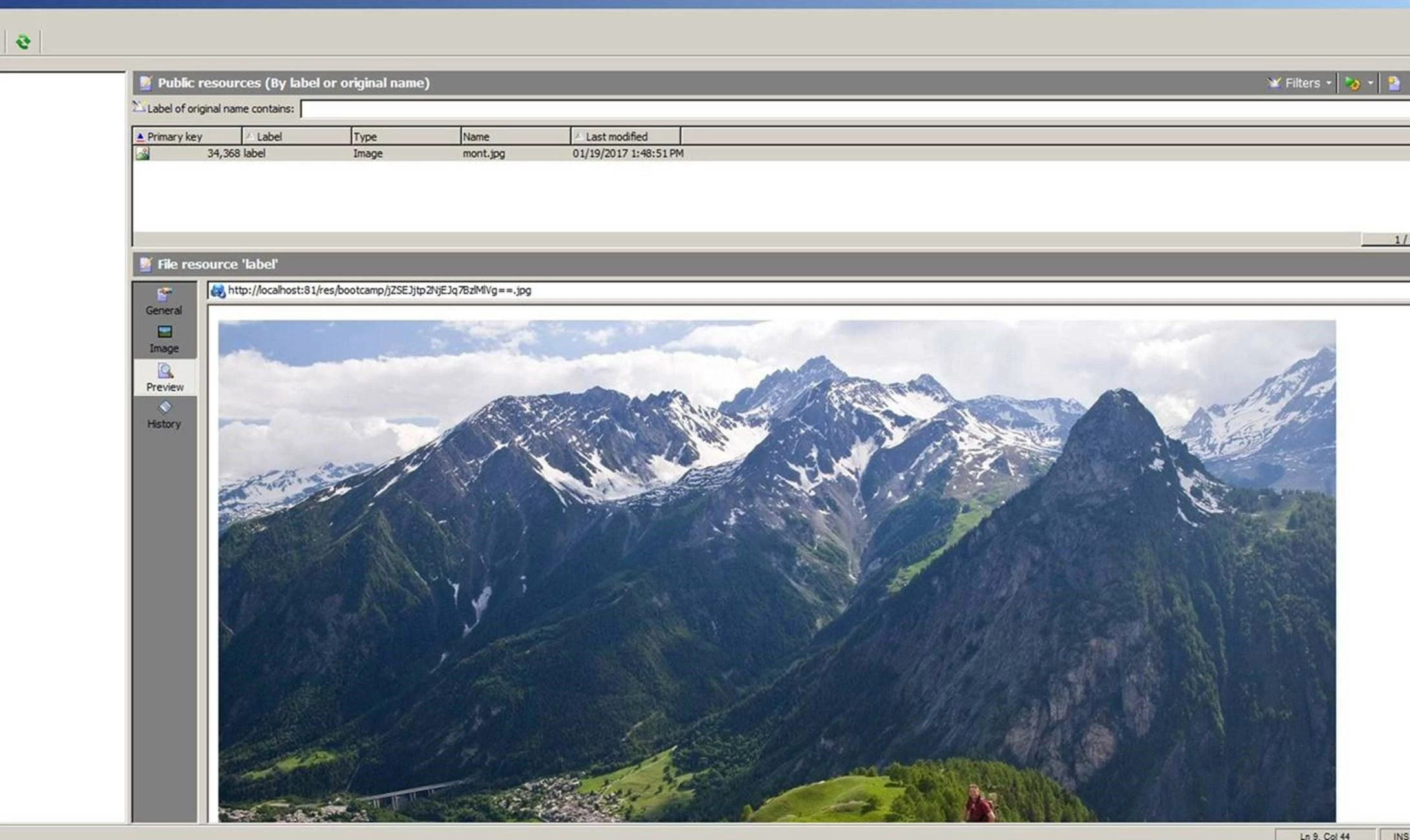
Result after you run this javascript

Marcel

Level 2
August 11, 2022

I'm doing an upload of image from a web page.

Everything works except for two things, and I think they are connected.

  1. First it is not possible to publish the fileres record after creation.
    Neither from within console nor using PublishIfNeededFromId method.
  2. Second the MD5 is different from what the console produces when uploading manually. I've tried creating the MD5 based on different attributes and also from the image file itself, but it always differs from what the console will produce.
    My hyopthesis is that the first issue with not being able to publish to all servers is connected to the MD5 issue.

My question is: From what is the MD5 of fileres produced and how do I replicate that in code?

/Peter


Level 6
August 2, 2017

Hi marcel.gent.86,

When I am running this code I could see that the File object from which we are trying to create a File Resource, should be placed in a path in server("/usr/local/neolane/nl6/var/partners/"). I am unable to find any activity to copy/upload the file to server path. If this understanding is correct can you please mention any suggestion to upload a file/image from local drive to the server.

Level 2
April 20, 2023

I am having the same issue you mentioned could you please let me know how did you make it work for you .

I tried to use the ftp activity in adobe classis campaign but when I try to upload file it seems that I have to upload the file from ftp server not from my local disk .


Thanks 

Marcel_Szimonisz
Community Advisor
Community Advisor
August 2, 2017

Hello debabratat65073412​,

You can use file transfer activity

Marcel

Level 2
April 20, 2023

I am having the same issue you mentioned could you please let me know how did you make it work for you .

I tried to use the ftp activity in adobe classis campaign but when I try to upload file it seems that I have to upload the file from ftp server not from my local disk

vraghav
Adobe Employee
Adobe Employee
August 3, 2017

Hi Marcel,

Your solution will work if there is only one frontal server.

If there are two servers, wfserver process will only run on the first one.

So, if you save it to file resources, the record wil get updated in the database but the actual file will only be published on the first server.

The second server will not receive it.

In a load balanced scenario, if this image is used in email, it will render on occasion if the GET call is sent to the first server. WHen it goes to second HTTP 404 will occur.

Please correct me if my understanding is wrong.

Regards,

Vipul

Marcel_Szimonisz
Community Advisor
Community Advisor
August 4, 2017

Hello Vipul,

yes thats good question you will need to publish images to all frontal servers as it would be done automatically when you are uploading resource via adobe. Thank you for pointing this out.

I think the one who wants this to be automated will figure it out somehow or I suppose it can be done differently at all.

Marcel

February 18, 2021

Hi Marcel, were you able to check on how to publish automatically to all frontal servers?


Update: xtk.fileRes.PublishIfNeededFromId(fileRes.id);


Use this after saving file and it will publish to all frontal servers.

Level 6
August 8, 2017

Hi Marcel,

Thanks a lot. The solution provided above worked fine for me.

Deb

Level 2
April 20, 2023

I am having the same issue you mentioned could you please let me know how did you make it work for you .

I tried to use the ftp activity in adobe classis campaign but when I try to upload file it seems that I have to upload the file from ftp server not from my local disk .

February 18, 2021

xtk.fileRes.PublishIfNeededFromId(fileRes.id);


Use this after saving file and it will publish to all frontal servers.