how to generate a report of deliveries (by type: email, sms, push)? | Community
Skip to main content
Level 6
October 25, 2023
Solved

how to generate a report of deliveries (by type: email, sms, push)?

  • October 25, 2023
  • 1 reply
  • 1980 views

Does anyone know how to create this table using a workflow? 


+------------+---------+------+-----------+
| month       | emails | push | sms |
+-----------+--------+------+-------------+
| august       |     120 |     15 |  10 |
+-----------+--------+------+-------------+
| september |     233 |     12 | 23 |
+-----------+--------+------+------------+
This post is no longer active and is closed to new replies. Need help? Start a new post to ask your question.
Best answer by Marcel_Szimonisz

Hello @god_prophet ,

ofcourse here is my take on the problem:

  • create query on nms delivery table, minimum setup should be:


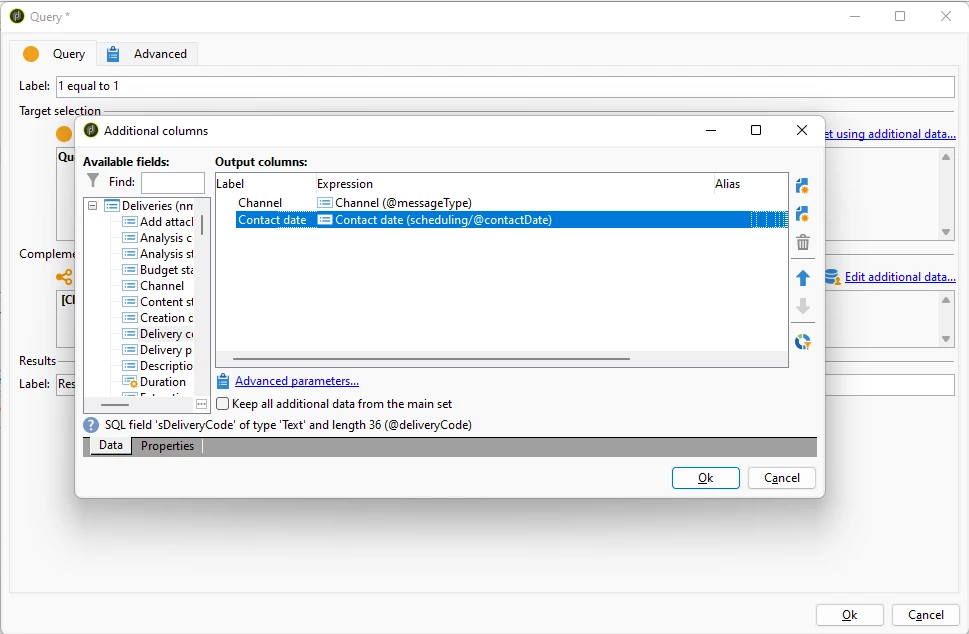
  • Click on Add data... -> Data linked to filtering dimension  Data of filtering dimension -> add contact date([scheduling/@contactDate]) and channel(@messageType) click Finish


  • Now the magic part begins.
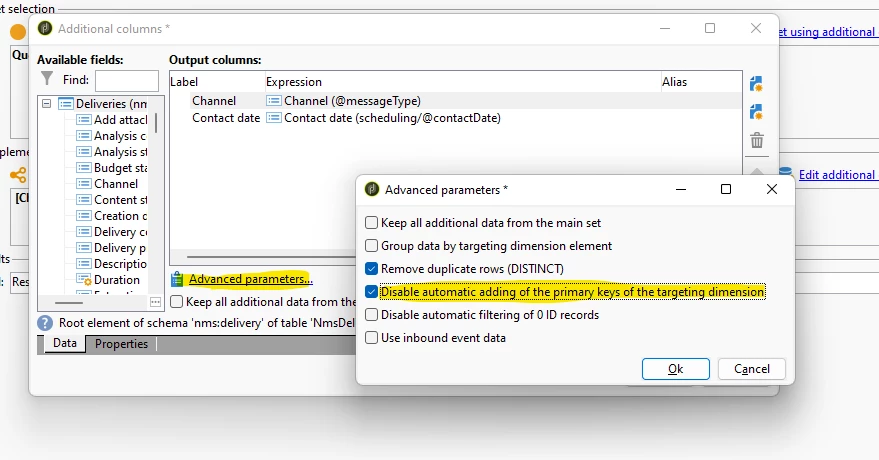
  • Open Edit additional data..  ->Click on Advanced settings and select option Disable automatic adding of the primary keys of the targeting dimension

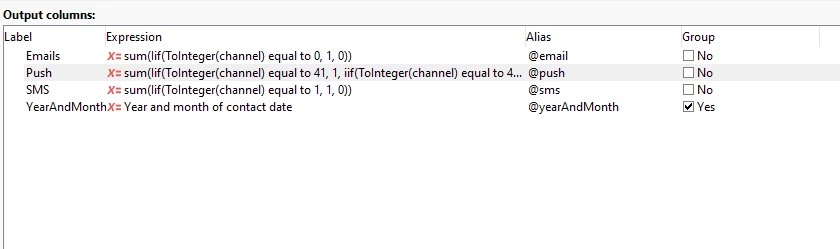
  • Group by Channel and Add expression for contact date YearAndMonth([scheduling/@contactDate]) give it alias e.g. @yearAndMonth and check the "Group" on the field settings 

  • Check enumeration for channel - for your scenario is 0 is for email , 41 and 42 for push IOS and android  and 1 is for sms


<enumeration basetype="byte" default="mail" label="Channel" name="messageType"> <help>Type of messages to send.</help> <value desc="Email channel" img="nms:email.png" label="Email" name="mail" value="0"/> <value desc="Mobile channel (SMS)" img="nms:mobile.png" label="Mobile (SMS)" name="sms" value="1"/> <value desc="Telephone channel" img="nms:phone.png" label="Phone" name="phone" value="2"/> <value desc="Direct mail channel" img="nms:paper.png" label="Direct Mail" name="paper" value="3"/> <value desc="Fax channel" img="nms:fax.png" label="Fax" name="fax" value="4"/> <value applicableIf="HasPackage('nms:centralLocal')" desc="Agency channel" img="nms:agency.png" label="Agency" name="agency" value="5"/> <value applicableIf="HasPackage('nms:social')" desc="Facebook channel" img="nms:facebook.png" label="Facebook" name="facebook" value="20"/> <value applicableIf="HasPackage('nms:social')" desc="Twitter Channel" img="nms:twitter.png" label="Twitter" name="twitter" value="25"/> <value applicableIf="HasPackage('nms:mobileApp')" desc="iOS applications channel" img="nms:ios.png" label="iOS channel" name="ios" value="41"/> <value applicableIf="HasPackage('nms:mobileApp')" desc="Android applications channel" img="nms:android.png" label="Android channel" name="android" value="42"/> <value applicableIf="HasPackage('nms:line') OR HasPackage('nms:lineV2')" desc="LINE channel" img="nms:line.png" label="LINE" name="line" value="61"/> <value desc="Other channel" img="nms:other.png" label="Other" name="other" value="120"/> <!-- value 127 (a.k.a all channels) is already defined in other schemas (i.e nms:operation, nms:remaHypothesis, nms:typologyRule)--> <!-- NEO-34473: make sure enum value is in the range of one byte signed--> <value desc="Undefined channel" img="nms:other.png" label="Undefined" name="undefined" value="126"/> </enumeration>


  • Add new expressions for each channel
    • for email -> sum(Iif(ToInteger(@messageType)=0, 1, 0))
    • for sms -> sum(Iif(ToInteger(@messageType)=1, 1, 0))
    • for push -> sum(Iif(ToInteger(@messageType)=41, 1, iif(ToInteger(@messageType)=42,1,0)))
  • When done it should look like


  • With month names you can follow the iif  loginc on each month 


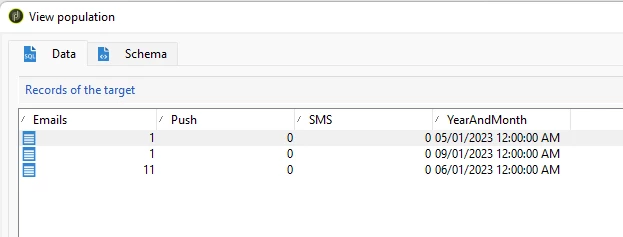
Results:


Marcel Szimonisz

MarTech Consultant
for more tips visit my blog
https://www.martechnotes.com/

1 reply

Marcel_Szimonisz
Community Advisor
Marcel_SzimoniszCommunity AdvisorAccepted solution
Community Advisor
October 25, 2023

Hello @god_prophet ,

ofcourse here is my take on the problem:

  • create query on nms delivery table, minimum setup should be:


  • Click on Add data... -> Data linked to filtering dimension  Data of filtering dimension -> add contact date([scheduling/@contactDate]) and channel(@messageType) click Finish


  • Now the magic part begins.
  • Open Edit additional data..  ->Click on Advanced settings and select option Disable automatic adding of the primary keys of the targeting dimension

  • Group by Channel and Add expression for contact date YearAndMonth([scheduling/@contactDate]) give it alias e.g. @yearAndMonth and check the "Group" on the field settings 

  • Check enumeration for channel - for your scenario is 0 is for email , 41 and 42 for push IOS and android  and 1 is for sms


<enumeration basetype="byte" default="mail" label="Channel" name="messageType"> <help>Type of messages to send.</help> <value desc="Email channel" img="nms:email.png" label="Email" name="mail" value="0"/> <value desc="Mobile channel (SMS)" img="nms:mobile.png" label="Mobile (SMS)" name="sms" value="1"/> <value desc="Telephone channel" img="nms:phone.png" label="Phone" name="phone" value="2"/> <value desc="Direct mail channel" img="nms:paper.png" label="Direct Mail" name="paper" value="3"/> <value desc="Fax channel" img="nms:fax.png" label="Fax" name="fax" value="4"/> <value applicableIf="HasPackage('nms:centralLocal')" desc="Agency channel" img="nms:agency.png" label="Agency" name="agency" value="5"/> <value applicableIf="HasPackage('nms:social')" desc="Facebook channel" img="nms:facebook.png" label="Facebook" name="facebook" value="20"/> <value applicableIf="HasPackage('nms:social')" desc="Twitter Channel" img="nms:twitter.png" label="Twitter" name="twitter" value="25"/> <value applicableIf="HasPackage('nms:mobileApp')" desc="iOS applications channel" img="nms:ios.png" label="iOS channel" name="ios" value="41"/> <value applicableIf="HasPackage('nms:mobileApp')" desc="Android applications channel" img="nms:android.png" label="Android channel" name="android" value="42"/> <value applicableIf="HasPackage('nms:line') OR HasPackage('nms:lineV2')" desc="LINE channel" img="nms:line.png" label="LINE" name="line" value="61"/> <value desc="Other channel" img="nms:other.png" label="Other" name="other" value="120"/> <!-- value 127 (a.k.a all channels) is already defined in other schemas (i.e nms:operation, nms:remaHypothesis, nms:typologyRule)--> <!-- NEO-34473: make sure enum value is in the range of one byte signed--> <value desc="Undefined channel" img="nms:other.png" label="Undefined" name="undefined" value="126"/> </enumeration>


  • Add new expressions for each channel
    • for email -> sum(Iif(ToInteger(@messageType)=0, 1, 0))
    • for sms -> sum(Iif(ToInteger(@messageType)=1, 1, 0))
    • for push -> sum(Iif(ToInteger(@messageType)=41, 1, iif(ToInteger(@messageType)=42,1,0)))
  • When done it should look like


  • With month names you can follow the iif  loginc on each month 


Results:


Marcel Szimonisz

MarTech Consultant
for more tips visit my blog
https://www.martechnotes.com/

Level 6
October 25, 2023

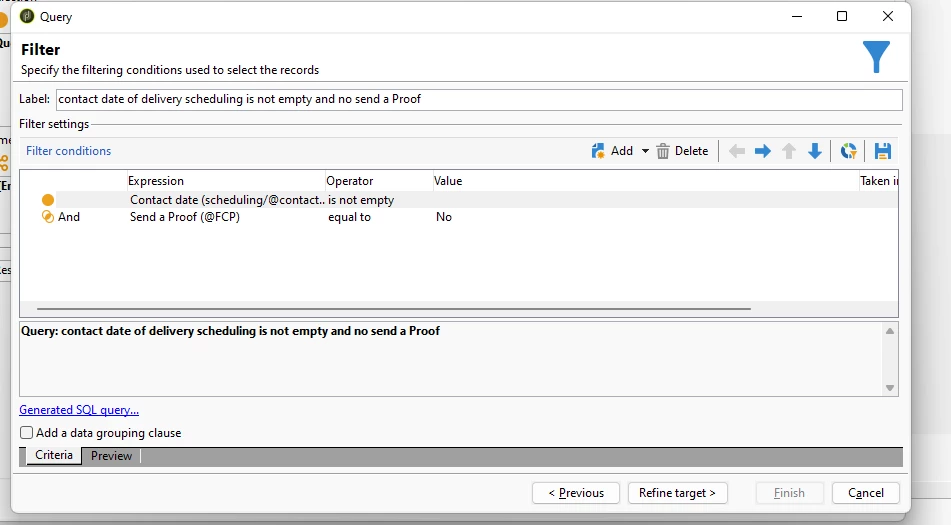
Hi @marcel_szimonisz , why the first query has a : sent proof == No? 

Sometimes, our deliveries sent a proof before sending the message to final users. 

Is the first query: 

1.- Excluding all the deliveries that used a proof before sending the final message? Or
2.- Is excluding all the proofs only?

Marcel_Szimonisz
Community Advisor
Community Advisor
October 26, 2023

Hello @god_prophet,

I did small type between those two conditions put OR instead of AND.

  • @fcp - excludes proofs
  • contact date is empty excludes "pencil deliveries" that are created when you are using the Delivery activity where you set action and delivery is created from template.. and everytime you run it in proof mode it creates deliveries that never run and are in edit status. so this query excludes them


Marcel