How to display a workflow variable value in email delivery | Community
Skip to main content
davidh2892249
Level 5
July 18, 2018
Solved

How to display a workflow variable value in email delivery

  • July 18, 2018
  • 6 replies
  • 9964 views

Hi There,

I'm looking to personalise a simple workflow variable in a delivery.

Basically I simply want to display the number that a query activity outputs in an email delivery.

I was thinking it would be something like:
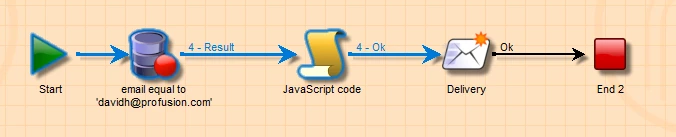
Query to return a number.

Javascript code to store the number as a variable:       instance.vars.queryCount = vars.recCount;

Then how do I personalise the "queryCount" variable value in a delivery?

I've read some other posts and i'm unsure on the steps and syntax required?

(Do i need to add anything to the initialization script of the workflow activity?

Do I need to add anything as a variable to the Variables tab under properties in the delivery template?

What should the syntax be for the personalisation tag in the HTML?)

A clear step by step example would be much appreciated.

Thanks

David

ps. I'm using v6.1.1 of Adobe Campaign Classic

This post is no longer active and is closed to new replies. Need help? Start a new post to ask your question.
Best answer by Amit_Kumar

Hi David,

Did you used a standard delivery object and used it like below?

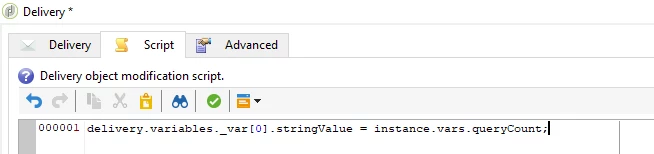
Step1:

Step2:

Step3:

Regards,

AMIT

6 replies

kuthiala_ananya
Adobe Employee
Adobe Employee
July 18, 2018

Hello davidh24373890

If you have an instance variable created on a workflow ex(instance.vars.xxx)  you will have to perform the following steps

  1. Define a variable inside your delivery. You can do it by clicking on delivery properties (Variables tab) Define a delivery variable there
  2. On the workflow canvas, inside the Initialization Script section of the delivery activity, you will have to assign the instance.vars.xxx value to the delivery variable defined in step A.
  3. Then inside your delivery creative make use of this delivery variable for personalization

Hope this helps !!!

Regards,

Ananya Kuthiala

davidh2892249
Level 5
July 18, 2018

Hi Ananya,

It does help, but I wondered if you could screengrab all the steps end to end (the overall workflow diagram and any individually configured pieces)

Remember, I ideally want to get the number of a query activity output using vars.recCount;

So if you could include this step (e.g. assigning this to a new variable and then displaying that new variable in an email delivery) that would be extremely helpful.

Thanks

David

vraghav
Adobe Employee
Adobe Employee
July 19, 2018

Hi David,

Please refer to this forum link which should answer your query,

Re: To Read a variable in Delivery activity - Adobe Campaign

Regards,
Vipul

davidh2892249
Level 5
July 19, 2018

Hi Vipul Raghav

I have tried to follow this but it seems to relate to a direct mail delivery, not email.

Appreciate it's probably extremely similar but i have tried multiple attempts between JS activity, Initialization script on email delivery activity and variables tab on email delivery template to no avail, with various syntaxes attempted in the script i've attempted.

I'm sure i'm close, but keep getting errors.

A step by step run through with screengrabs would be REALLY appreciated.

Thanks

David

Amit_Kumar
Amit_KumarAccepted solution
Level 10
July 19, 2018

Hi David,

Did you used a standard delivery object and used it like below?

Step1:

Step2:

Step3:

Regards,

AMIT

davidh2892249
Level 5
July 24, 2018

Hi Amit Kumar

Thank you very much for the clear example above.

I was using the standard delivery activity and was getting a bit confused between the various elements that needed configuring (bit more complex than the alert activity).

I've now got it working as above.

Thanks for your help, much appreciated.

David