How to compare data originating from 2 different transitions? | Community
Skip to main content
Level 6
January 20, 2023
Solved

How to compare data originating from 2 different transitions?

  • January 20, 2023
  • 1 reply
  • 961 views

Hello Everyone,

I have a requirement where I need to compare data from 2 different transitions and take the last modified record. Example: 

Transition A has details as below:

ID|Name|Type|Last Modified

1001|ABC|Book|20-01-2023 19:57:00

1002|ABC|Book|20-01-2023 18:30:00

Transition B has details as below:

ID|Name|Type|Last Modified

1001|ABC|Book|20-01-2023 20:30:00

1002|ABC|Book|20-01-2023 11:00:00

Now my goal is to compare this data on ID and pickup only that record whose last modified time is latest one from 2 transitions. So, in this case, my result should be as below:

ID|Name|Type|Last Modified

1001|ABC|Book|20-01-2023 20:30:00

1002|ABC|Book|20-01-2023 18:30:00

I know we can do using JS, but I am trying to achieve this with use of Targeting Activities available. Kindly please help how can I achieve this. Thanks in advance

Regards,

Sri Bhargav

This post is no longer active and is closed to new replies. Need help? Start a new post to ask your question.
Best answer by ParthaSarathy

Hi @surabattulasr ,

As you have 2 transition, In any one of the targeting activity add a segment code or create a dummy attribute 


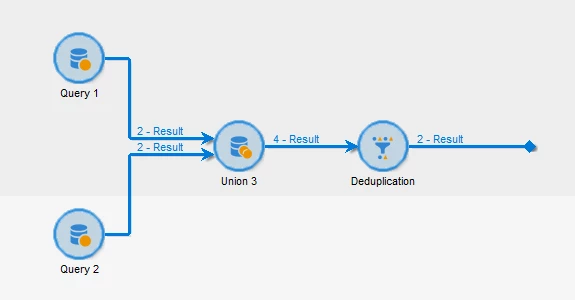
Join the 2 transition with Union activity


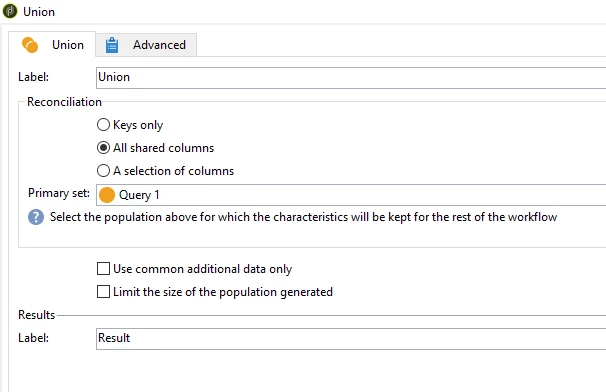
In Union activity, Select 'All shared Columns' in Reconciliation


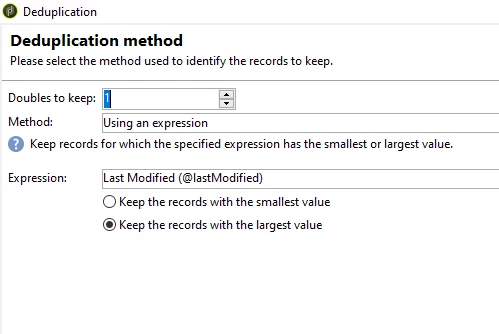
In deduplication activity, Select temporary schema > Select 'ID' in identification of duplicates > Deduplication method: select method: Using an expression >

Expression: Last Modified > Keep the records with Largest value


1 reply

ParthaSarathy
Community Advisor
ParthaSarathyCommunity AdvisorAccepted solution
Community Advisor
January 23, 2023

Hi @surabattulasr ,

As you have 2 transition, In any one of the targeting activity add a segment code or create a dummy attribute 


Join the 2 transition with Union activity


In Union activity, Select 'All shared Columns' in Reconciliation


In deduplication activity, Select temporary schema > Select 'ID' in identification of duplicates > Deduplication method: select method: Using an expression >

Expression: Last Modified > Keep the records with Largest value


~  ParthaSarathy S~  Click here to join ADOBE CAMPAIGN USER GROUP for Quarterly In-person | Hybrid | Virtual Meetups