Formula to schedule contact date and time | Community
Skip to main content
Level 6
September 23, 2023
Solved

Formula to schedule contact date and time

  • September 23, 2023
  • 3 replies
  • 1679 views

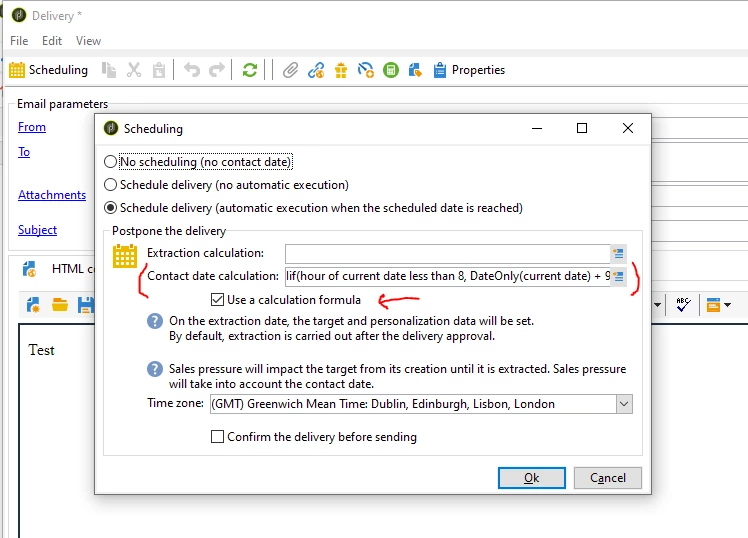
We have this formula, it tries to contact Recipients between 8 am and 8 pm,  in this case it is set to 9 am.

I'd like to make it directly, like: send this delivery the next day at 9 am. Or even better that the user the possibility to insert directly the date: 28/09/23 at 9 am. 

Iif( Hour(GetDate())<=8 , AddHours(ToDate(GetDate()),8) , AddHours(AddDays(ToDate(GetDate()),1),9) )
This post is no longer active and is closed to new replies. Need help? Start a new post to ask your question.
Best answer by ParthaSarathy

Hi @god_prophet ,

Use the below expression in your delivery's scheduling

Iif(Hour(GetDate())<8,AddHours(DateOnly(GetDate()),9 ) ,Iif(Hour(GetDate())>19,AddDays(AddHours(DateOnly(GetDate()),9 ),1 ) ,GetDate() ) )


The above formula works in a way that,

If the delivery gets triggers at before 8 AM, then the delivery's contact will be set to Same day's 9AM.

If the delivery was triggered after 8 PM, then the delivery's contact will be set to Next day's 9AM.

So your Recipient wont get an email before 8 AM and not after 8 PM.

3 replies

Marcel_Szimonisz
Community Advisor
Community Advisor
September 23, 2023

Hello @god_prophet ,

hello is this automated campaign? with continuous delivery? and you want to only deliver messages between 9am 9pm? Or what is that you want? You want trigger campaign from control workflow? 


Marcel Szimonisz

MarTech Consultant
for more tips visit my blog
https://www.martechnotes.com/

Level 6
September 23, 2023

So this is a manual Campaign, it was a Start activity, not a Scheduler activity. So the idea is that user should be able to start the Campaign at anytime, run the queries and so on, but the delivery should arrive to user only between 8 am and 8 pm.

So instead of: 

Iif( Hour(GetDate())<=8 , AddHours(ToDate(GetDate()),8) , AddHours(AddDays(ToDate(GetDate()),1),9) )

I was looking for formula, like this pseudocode:

Send delivery the next day at X hour.
Or: Send delivery on "dd-mm-yy" at X hour.

Company use Recurring delivery, but I guess the should use  just the Email delivery, right?  Not sure about the difference, will have to investigate.

Amine_Abedour
Community Advisor
Community Advisor
September 24, 2023

Hello @god_prophet 


You can use the bellow code (after tunning it to your use case) to set a different contactDate of a delivery.

The code should be in the ''script'' tab of delivery activity: 


//get the current date and time var contactDate = new Date(); //set contactDate to current date and time + 24h contactDate.setDate(contactDate.getDate()+1); // tell the current delivery that the routing should be delayed delivery.scheduling.delayed = true; // set contactDate of current delivery to the date in the variable contactDate delivery.scheduling.contactDate = contactDate;


Br,

Amine

Amine ABEDOUR
ParthaSarathy
Community Advisor
ParthaSarathyCommunity AdvisorAccepted solution
Community Advisor
September 26, 2023

Hi @god_prophet ,

Use the below expression in your delivery's scheduling

Iif(Hour(GetDate())<8,AddHours(DateOnly(GetDate()),9 ) ,Iif(Hour(GetDate())>19,AddDays(AddHours(DateOnly(GetDate()),9 ),1 ) ,GetDate() ) )


The above formula works in a way that,

If the delivery gets triggers at before 8 AM, then the delivery's contact will be set to Same day's 9AM.

If the delivery was triggered after 8 PM, then the delivery's contact will be set to Next day's 9AM.

So your Recipient wont get an email before 8 AM and not after 8 PM.

~  ParthaSarathy S~  Click here to join ADOBE CAMPAIGN USER GROUP for Quarterly In-person | Hybrid | Virtual Meetups