Fixed-length format file generation in ACC from a worktable? | Community
Skip to main content
Level 2
July 1, 2021
Solved

Fixed-length format file generation in ACC from a worktable?

  • July 1, 2021
  • 1 reply
  • 907 views

Hi, 

Context: "Cost allocation and charge back mechanism" on using no of events or no of Lan id's.

Req: Generate a fixed-file length format file and transfer via SFTP.

Fixed-length file: Fixed-length format files use ordinal positions, which are offsets to identify the location of fields in the record. 


Following is a sample data record:

20011228YF2001122814313425 Forest St Marlborough MA017525083828200600


The record is defined by the following column layout:

  • Columns 1 - 8: Date format YYYYMMDD. Null when value is '99991231'.
  • Column 9: Boolean Y/N. Null when value is space (' ').
  • Column 10: Boolean T/F. Null when value is space (' ').
  • Columns 11 - 24: Time stamp format YYYYMMDDHHMMSS. Null when value is '99991231000000'.
  • Columns 25 - 39: Character address. Null when value is all spaces.
  • Columns 40 - 52: Character city. Null when value is '****NULL*****'.
  • Columns 53 - 54: Character state. Null when value is '##'.
  • Columns 55 - 59: Number postal code. Null when value is all zeros.
  • Columns 60 - 68: Character phone. Null when value is all zeros.
  • Columns 69 - 72: Number(3,2). For example, 600 is 6.00. Never null.
  • Column 73: Newline end of record.

I have tried using data extraction activity, but not helpful and struck there, requesting all the experts to provide a solution on this if it can be done in Adobe campaign classic.
This post is no longer active and is closed to new replies. Need help? Start a new post to ask your question.
Best answer by Krishnanunni

Hi @hari_07 ,

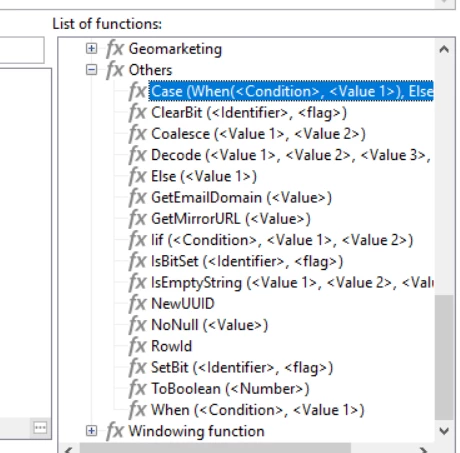
If all you need to do is combine several columns to one, then I suppose you can do that in an enrichment or inside data extraction itself. The advanced expression editor provides a list of functions that you can use to check the data. To append the results to a single column, you may convert all data to string (use ToString() function) and use '+' to concatenate.


If you feel the functions inside advanced expression editor is not enough or the combined column becoming too messy, you may use a JS code similar to below. This will fetch the contents from the inbound transition (you can specify the table and query condition in queryDef itself by entering the schema name manually and adding where clause in queryDef). You may specify the columns needed inside the select tag. Then you can iterate each row and join the content to a single string as you desire. So all your null checks can be done inside the loop itself. The final string can be added to an array or written to a file directly using the writeln() function of the File class.


var schemaName = vars.targetSchema.substr(vars.targetSchema.indexOf(":") + 1); // This is to fetch content from temp schema to JS var query = xtk.queryDef.create( <queryDef schema={vars.targetSchema} operation="select"> <select> <node expr="[target/@phone]"/> <node expr="[target/location/@city]"/> </select> </queryDef> ); var resultSet = query.ExecuteQuery(); var file = new File("filepath"); file.open("w", File.CODEPAGE_UTF8); for each (var row in resultSet.*) { // all conditions goes here logInfo(row.target.location.@city) // write to file using file.writeln(Combined string) }


Hope it helps!

1 reply

Krishnanunni
KrishnanunniAccepted solution
Level 4
July 5, 2021

Hi @hari_07 ,

If all you need to do is combine several columns to one, then I suppose you can do that in an enrichment or inside data extraction itself. The advanced expression editor provides a list of functions that you can use to check the data. To append the results to a single column, you may convert all data to string (use ToString() function) and use '+' to concatenate.


If you feel the functions inside advanced expression editor is not enough or the combined column becoming too messy, you may use a JS code similar to below. This will fetch the contents from the inbound transition (you can specify the table and query condition in queryDef itself by entering the schema name manually and adding where clause in queryDef). You may specify the columns needed inside the select tag. Then you can iterate each row and join the content to a single string as you desire. So all your null checks can be done inside the loop itself. The final string can be added to an array or written to a file directly using the writeln() function of the File class.


var schemaName = vars.targetSchema.substr(vars.targetSchema.indexOf(":") + 1); // This is to fetch content from temp schema to JS var query = xtk.queryDef.create( <queryDef schema={vars.targetSchema} operation="select"> <select> <node expr="[target/@phone]"/> <node expr="[target/location/@city]"/> </select> </queryDef> ); var resultSet = query.ExecuteQuery(); var file = new File("filepath"); file.open("w", File.CODEPAGE_UTF8); for each (var row in resultSet.*) { // all conditions goes here logInfo(row.target.location.@city) // write to file using file.writeln(Combined string) }


Hope it helps!

Hari_07Author
Level 2
July 5, 2021
Thanks @krishnanunni, Using Advanced expression i have tried and its a good approach, and JS code am gonna try.