
File transfer activity - No suffix after download | Community
Skip to main content
jorgeferreira
Level 3
October 3, 2023
Solved

File transfer activity - No suffix after download

  • October 3, 2023
  • 2 replies
  • 701 views

Hello, 


Is it possible to disable the suffix added to the downloaded files on the File transfer activity?

The file "attach1.pdf" downloaded like this:
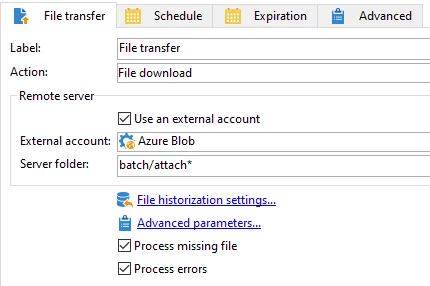
The filename afterwards will be: attach1_20231003101346a.pdf.


I can remove the suffix via JS code, but I'm wondering if there's any way to remove this suffix.


Thanks in advance!


This post is no longer active and is closed to new replies. Need help? Start a new post to ask your question.
Best answer by jorgeferreira

With Marcel's suggestion in mind, I ended up using the copyTo method from the File Class (experienceleague.adobe.com/developer/campaign-api/api/m-File-copyTo.html)


This way, it's transversal between operating systems.

2 replies

Marcel_Szimonisz
Community Advisor
Community Advisor
October 3, 2023

Hello @jorgeferreira,

I think this cannot be turned off.. MIght be.. but you need to work with vars.filename and use js and shell script to rename file if needed.


//vars.filename = "atach1_29509ulkjflr390ru.pdf" var matches = vars.filename.match(/([^_]+)(?=_)(_.+\.([^.]+))/); if (matches && matches.length === 4) { var fileBaseName = matches[1], extension = matches[3], fileName = fileBaseName + "." + extension; logInfo("Filename:", fileName); // This will output: Filename: atach1.pdf try{ //in case you use linux based OS execCommand('mv "/path/to/your/'+vars.filename + ', "/path/to/your/'+ filename+'"', true); }catch(e){ //handle error } }


EDIT: I have not checked if vars.filename contains path as well. but if it does then you would change the code a bit to extract path, filename and extension.


Marcel Szimonisz

MarTech Consultant
for more tips visit my blog
https://www.martechnotes.com/

jorgeferreira
jorgeferreiraAuthorAccepted solution
Level 3
October 9, 2023

With Marcel's suggestion in mind, I ended up using the copyTo method from the File Class (experienceleague.adobe.com/developer/campaign-api/api/m-File-copyTo.html)


This way, it's transversal between operating systems.