Fetching Duplicate Records Only | Adobe Higher Education
Skip to main content
Level 2
November 10, 2020
Beantwortet

Fetching Duplicate Records Only

  • November 10, 2020
  • 1 Antwort
  • 1785 Ansichten

I've a use case where I have a table with several duplicate records now I want to fetch only the  duplicate users and delete some fields data for those users only where the data was updated 6 months ago .


I use Adobe Campaign Classic.


Thanks!!

Dieses Thema wurde für Antworten geschlossen.
Beste Antwort von ParthaSarathy

 Hi @shashanks445952 ,

This workflow logic will help you to solve your use case.
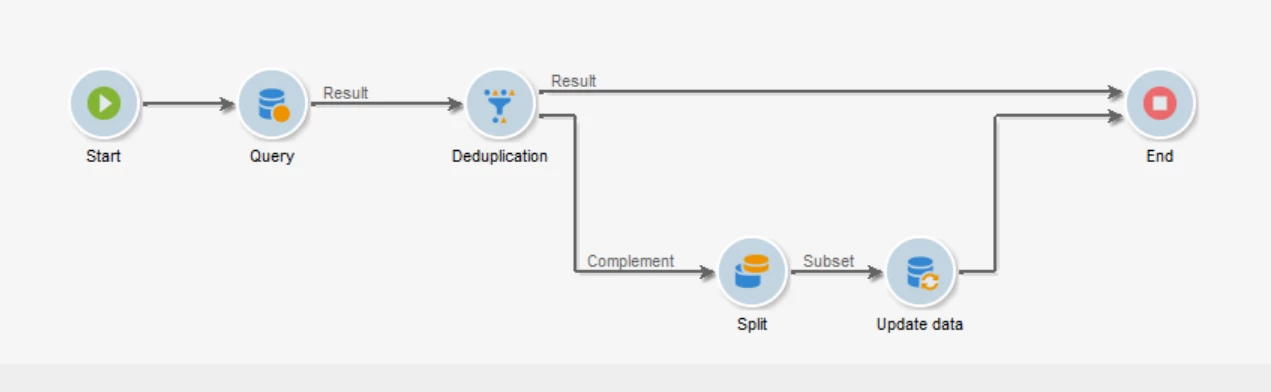
1) Query: Fetch all records from your table ( @id not equal to 0)

2) Dedupliction: select 'Generate complement' and in 'Edit configuration' select temporary schema and in next step add the expression to identify the duplicates. For example, if it is recipient schema, you can identify your duplicates by @email. So when you run the workflow, duplicates records will come in complement transition.

3) Split: Here you can add your filtering condition to filter last Modified 6 months ago.

4) Update data: Here you can delete or update those records as per your business logics.


Regards,

ParthaSarathy S


1 Antwort

ParthaSarathy
Community Advisor
Community Advisor
November 11, 2020

 Hi @shashanks445952 ,

This workflow logic will help you to solve your use case.

1) Query: Fetch all records from your table ( @id not equal to 0)

2) Dedupliction: select 'Generate complement' and in 'Edit configuration' select temporary schema and in next step add the expression to identify the duplicates. For example, if it is recipient schema, you can identify your duplicates by @email. So when you run the workflow, duplicates records will come in complement transition.

3) Split: Here you can add your filtering condition to filter last Modified 6 months ago.

4) Update data: Here you can delete or update those records as per your business logics.


Regards,

ParthaSarathy S


 ~  ParthaSarathy S~  Click here to join ADOBE CAMPAIGN USER GROUP for Quarterly In-person | Hybrid | Virtual Meetups
ParthaSarathy
Community Advisor
Community Advisor
November 11, 2020

Hi @shashanks445952 ,

By default it will deduplicate randomly. If you need to specify with some condition, you can achieve it in below manner.

You can learn more about deduplication from this link. click here - Deduplication

Regards,

ParthaSarathy S

 ~  ParthaSarathy S~  Click here to join ADOBE CAMPAIGN USER GROUP for Quarterly In-person | Hybrid | Virtual Meetups