external signal activity | Community
Skip to main content
Level 3
January 3, 2025
Solved

external signal activity

  • January 3, 2025
  • 1 reply
  • 859 views

Hi All , 

Willing to learn in depth working and functionality  of "External Signal" Activity , i have gone through official document link

"https://experienceleague.adobe.com/en/docs/campaign-classic/using/automating-with-workflows/flow-control-activities/external-signal"

Can someone please provide a link or reference where i can learn more.

Thanks in advance.

Best answer by ParthaSarathy

Hi @at7140 ,

Lets say you want to execute the second workflow only after running the first workflow, you can use postEvent script and external signal activity to trigger the second workflow.

Example,

There are 2 workflows, where Workflow-1 is a master workflow used to update records in database. Once the update is done, Workflow-2 needs to get started and send communication.

Workflow-1:

Workflow-2:
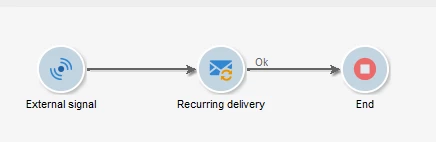
In this case, In workflow-1 JavaScript code activity, call the second workflow using below postEvent script,


xtk.workflow.PostEvent("workflow_internal_name", "internal_name_of_signal_activity", "", "", false);


Note: Workflow-2 should be in started state.

Now when the Workflow-1 runs and once the update is done, the postEvent JavaScript will trigger the signal activity in Workflow-2 and the delivery will get triggered.

And if a variable need to be transferred from Workflow-1 to workflow-2, configure the script as below,


xtk.workflow.PostEvent("workflow_internal_name", "internal_name_of_signal_activity", "", <variables mobile={vars.mobile} email={vars.email} />, false);

To explore more on postEvent, Refer this document 


1 reply

ParthaSarathy
Community Advisor
ParthaSarathyCommunity AdvisorAccepted solution
Community Advisor
January 3, 2025

Hi @at7140 ,

Lets say you want to execute the second workflow only after running the first workflow, you can use postEvent script and external signal activity to trigger the second workflow.

Example,

There are 2 workflows, where Workflow-1 is a master workflow used to update records in database. Once the update is done, Workflow-2 needs to get started and send communication.

Workflow-1:

Workflow-2:

In this case, In workflow-1 JavaScript code activity, call the second workflow using below postEvent script,


xtk.workflow.PostEvent("workflow_internal_name", "internal_name_of_signal_activity", "", "", false);


Note: Workflow-2 should be in started state.

Now when the Workflow-1 runs and once the update is done, the postEvent JavaScript will trigger the signal activity in Workflow-2 and the delivery will get triggered.

And if a variable need to be transferred from Workflow-1 to workflow-2, configure the script as below,


xtk.workflow.PostEvent("workflow_internal_name", "internal_name_of_signal_activity", "", <variables mobile={vars.mobile} email={vars.email} />, false);

To explore more on postEvent, Refer this document 


~  ParthaSarathy S~  Click here to join ADOBE CAMPAIGN USER GROUP for Quarterly In-person | Hybrid | Virtual Meetups
at7140Author
Level 3
January 3, 2025

Hi @parthasarathy ,

Thanks for explanation , Do we have any limitation/s or best practice of this activity i should take care while using , adding this will give me more brief idea.

Thanks

ParthaSarathy
Community Advisor
Community Advisor
January 3, 2025

@at7140 , Only thing is you need to make sure that the target workflow where you use external signal activity should be in started state.

~  ParthaSarathy S~  Click here to join ADOBE CAMPAIGN USER GROUP for Quarterly In-person | Hybrid | Virtual Meetups