
Error when prechecking checkbox | Community
Skip to main content
bryceh57660644
October 2, 2020
Solved

Error when prechecking checkbox

  • October 2, 2020
  • 4 replies
  • 1885 views

I am getting this error when I enter debug mode on my webapp with the checkbox:
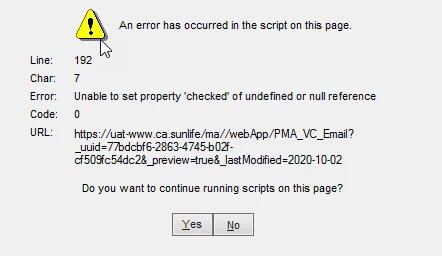
 

I tested the logic as a text field and it is passing through fine, so it is something to do with my checked logic, but I cannot figure out why.


Java script is: 

document.getElementById("control_San")[0].checked = "<%=ctx.vars.San%>"


in the HTML <body>, this is corresponding code: 

<tr>
<td style="padding: 5px 0px 0px 25px;">
<div id="control_San" style="position: relative; overflow: hidden; margin: 5px 3px 5px 0px; font-weight: bold; text-decoration: none; font-style: normal; color: #ffffff;"><input name="San" id="control_San" style="border-radius: 6px; margin: 0 3px 5px 0px; width: 50px;" type="checkbox" label="San" />Increased sanitation measures</div>
</td>
</tr>


This post is no longer active and is closed to new replies. Need help? Start a new post to ask your question.
Best answer by Jonathon_wodnicki

Hi,


Move the JS to the bottom of the page, or add to $(function(){}), or just inline into the DOM itself instead of using JS:

<input name="San" id="control_San" style="border-radius: 6px; margin: 0 3px 5px 0px; width: 50px;" type="checkbox" label="San" checked="<%=ctx.vars.San%>"/>


Thanks,

-Jon

4 replies

_Manoj_Kumar_
Community Advisor
Community Advisor
October 3, 2020

Hello @bryceh57660644 


What are you trying to do with the javascript code?

In the HTML code, I see only one checkbox but the javascript is trying to do something with the first checkbox among multiple checkboxes with the same id.


Can you share your full code?


Thanks,

Manoj


     Manoj     Find me on LinkedIn
prasannakumarmarru
October 4, 2020

Hib @bryceh57660644 

I think Script is running even before the html element is rendered into document. You can try moving the script to different places than where you have it now?

Jonathon_wodnicki
Community Advisor
Jonathon_wodnickiCommunity AdvisorAccepted solution
Community Advisor
October 7, 2020

Hi,


Move the JS to the bottom of the page, or add to $(function(){}), or just inline into the DOM itself instead of using JS:

<input name="San" id="control_San" style="border-radius: 6px; margin: 0 3px 5px 0px; width: 50px;" type="checkbox" label="San" checked="<%=ctx.vars.San%>"/>


Thanks,

-Jon

Sukrity_Wadhwa
Community Manager
Community Manager
October 21, 2020

Hi @bryceh57660644

Were you able to resolve this query with any of the given solutions? Do let us know.

Thanks!

Sukrity Wadhwa