Enrichment: Set the lines to retrieve dynamically so I get no "0" columns? | Community
Skip to main content
Level 4
October 10, 2023
Solved

Enrichment: Set the lines to retrieve dynamically so I get no "0" columns?

  • October 10, 2023
  • 3 replies
  • 2603 views

Hi all!

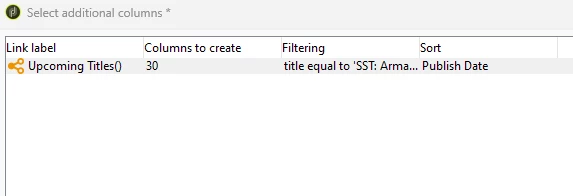
I am attempting to make my enrichment activity fetch N amount of rows and only return the amount that equals to the amount of rows in the table I am looking into. 

I am dynamically fetching data from a database table, that is continously updated. That means that the amount of rows can differ at each send-out. It can range from anything between 10 - 30 records. This data is then used to dynamically enrich the email activity later on as targetData in order to automate an email proces. 

Issue is, that I can't seem to figure out how I can set it to create only the amount of columns that are actually present in the table. 

I hope it is just me who is overlooking something? Any help or pointers are much appreciated! Thanks!  
 

This post is no longer active and is closed to new replies. Need help? Start a new post to ask your question.
Best answer by ParthaSarathy

Hi @sorendp ,

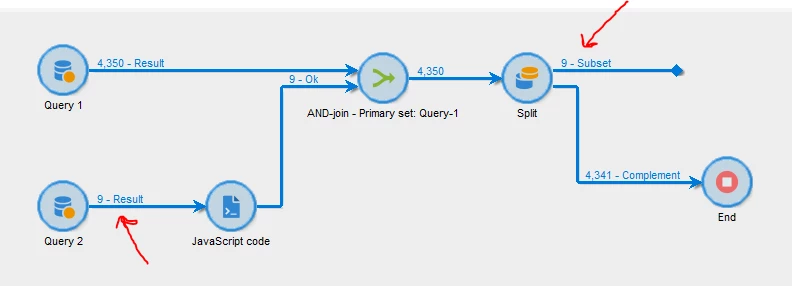
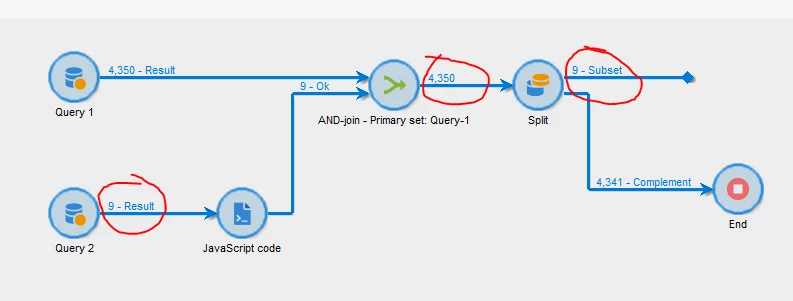
you can solve this using Split activity. Create a workflow as below,

Query1:

Select your primary schema

Query2:

Select the table where you want to check the total count of it. In filtering condition, either leave it empty, or give a condition as primary key is not empty. So that you can fetch all the records from your schema and count it.

JavaScript Code activity:

Enter the below script

instance.vars.query2Count = vars.recCount;

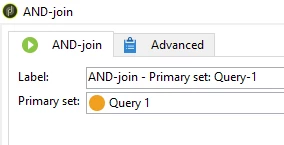
And-join:

Select Query-1 as Primary set

Split:

In general tab, select 'Use the additional data only' radio button and select 'generate complement' checkbox.

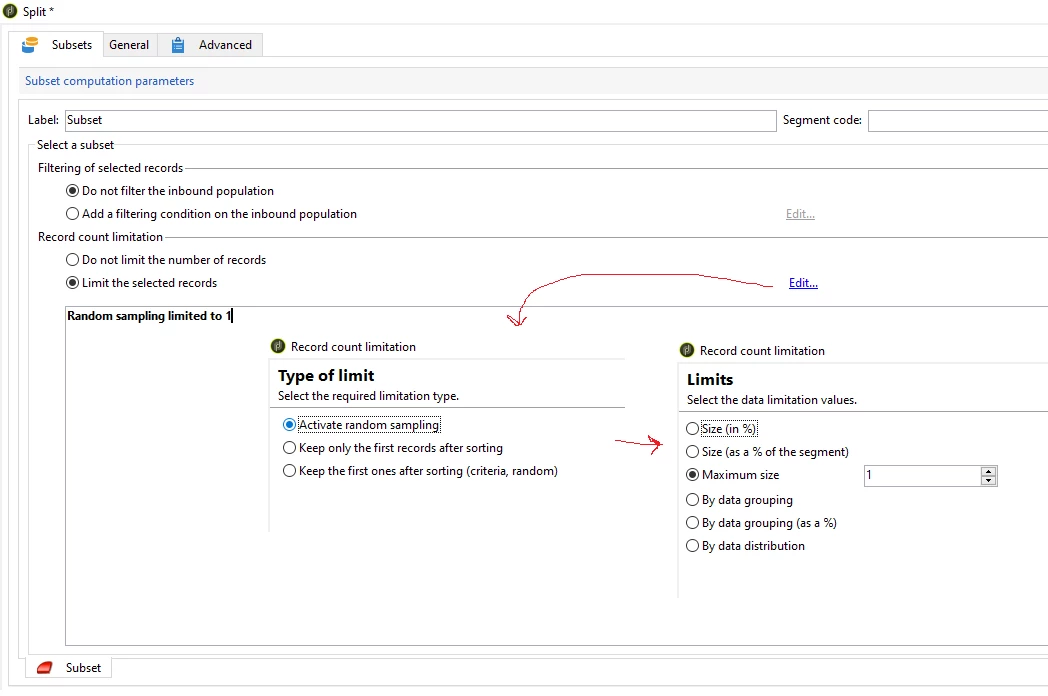
In subset tab, configure as below 

Limit the selected records > edit > Activate random sampling > Maximum size: 1

In Advanced tab, initialization script, paste the below code,

activity.transitions.extractOutput[0].limiter.number = instance.vars.query2Count;


Result:

If your table-B has 15 records today, u will limit to 15 at end. Tomorrow if it is 20 records, then the script automatically limit the count to 20

3 replies

LakshmiPravallika
Community Advisor
Community Advisor
October 11, 2023

Hi @sorendp ,


Could you Please try limiting the line count to 1 record instead of 30 records  in order to match the Output Table


Also you can change the count to 1 (highlighted in yellow) by changing the below options


Regards,

Pravallika.


SorenDPAuthor
Level 4
October 11, 2023

Hi @lakshmipravallika
Thanks for the reply!  It is not exactly what I am looking for though. 

The table I am looking up in contains for instance 15 records today. Then I need to fetch the 15 records, nothing less nothing more. 

But tomorrow, the table may contain, 20 records. Then tomorrow I need to fetch the 20 records, nothing less nothing more. 

This is an automated workflow, so it runs automatically every day on a schedule, thus I don't want to manually change this setting every day. Is this achievable? 

LakshmiPravallika
Community Advisor
Community Advisor
October 11, 2023

Hi @sorendp ,


It is actually not possible to set that variable dynamically using Enrichment activity.


The same logic can be tried using JavaScript activity by giving the condition on Count of the Records in the Output and if possible try to add that Join directly in the Schema instead of using Enrichment activity.


Regards,

Pravallika.


ParthaSarathy
Community Advisor
ParthaSarathyCommunity AdvisorAccepted solution
Community Advisor
October 11, 2023

Hi @sorendp ,

you can solve this using Split activity. Create a workflow as below,

Query1:

Select your primary schema

Query2:

Select the table where you want to check the total count of it. In filtering condition, either leave it empty, or give a condition as primary key is not empty. So that you can fetch all the records from your schema and count it.

JavaScript Code activity:

Enter the below script

instance.vars.query2Count = vars.recCount;

And-join:

Select Query-1 as Primary set

Split:

In general tab, select 'Use the additional data only' radio button and select 'generate complement' checkbox.

In subset tab, configure as below 

Limit the selected records > edit > Activate random sampling > Maximum size: 1

In Advanced tab, initialization script, paste the below code,

activity.transitions.extractOutput[0].limiter.number = instance.vars.query2Count;


Result:

If your table-B has 15 records today, u will limit to 15 at end. Tomorrow if it is 20 records, then the script automatically limit the count to 20

~  ParthaSarathy S~  Click here to join ADOBE CAMPAIGN USER GROUP for Quarterly In-person | Hybrid | Virtual Meetups
SorenDPAuthor
Level 4
October 18, 2023

Thanks for the suggestion, this seems to solve the challenge at hand! 🙂 

Marcel_Szimonisz
Community Advisor
Community Advisor
October 12, 2023

Hello @sorendp ,

you have to dynamically set this "columns to create" number from the initialization script of the enrichment/query activity. 

  • create the link as needed
  • view XML find where the variable is set.
  • traverse structure to change that variable dynamically depending on the number of rows from the table.. that you can also pull with xtkQueryDef in the same init script


<node alias="xxxxx" expr="[target/xxx/yyy]" label="Internet browser statistics" noComputeString="true"> <rowsConditionLink lineCount="3"/> </node> </select> <conditionLink alias="xxxxx" groupBy="0" id="2525168917" label="Internet browser statistics" lineCount="3" schema="temp:enrich-src" singleRow="0" xpath="target/xxx/yyy"> <select/>


HINT: in init script you can loop over activity nodes and only change lineCount the one with your alias. Same with condition link


Marcel Szimonisz

MarTech Consultant
for more tips visit my blog
https://www.martechnotes.com/

SorenDPAuthor
Level 4
October 18, 2023

Thanks! 🙂