Email delivery from external file | Community
Skip to main content
Heku_
Level 5
September 8, 2023
Solved

Email delivery from external file

  • September 8, 2023
  • 2 replies
  • 1451 views

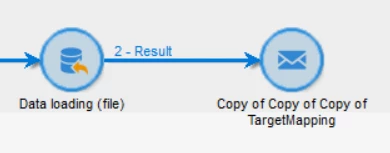
Hi, I have a workflow that sends an email delivery with the content of an external file. You can see it here:
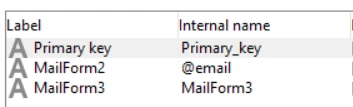
The format of the file is this:
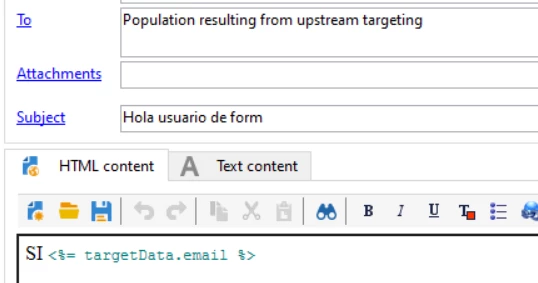
And the content of the email is this:
 

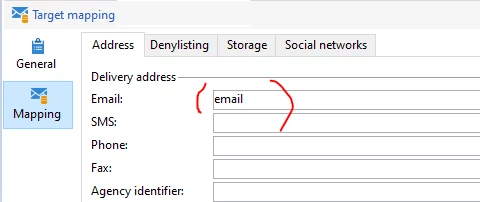
With this Target Mapping

Targeting is working, the address to send is the same as the email in the external file.

But it fails due to personalization, if i use sentences like <%= targetData.email %> the delivery fails with this error:

 

Thank you in advance. @Manoj_Kumar_ @ParthaSarathy @Parvesh_Parmar @DavidKangni 

 

This post is no longer active and is closed to new replies. Need help? Start a new post to ask your question.
Best answer by ParthaSarathy

Hi @heku_ ,

In data loading activity > click here to change the file format > in internal name of the email column, instead of @email, modify it to email 


And in you target mapping, for EMAIL address, modify it to email


~  ParthaSarathy

2 replies

ParthaSarathy
Community Advisor
ParthaSarathyCommunity AdvisorAccepted solution
Community Advisor
September 8, 2023

Hi @heku_ ,

In data loading activity > click here to change the file format > in internal name of the email column, instead of @email, modify it to email 


And in you target mapping, for EMAIL address, modify it to email


~  ParthaSarathy

~  ParthaSarathy S~  Click here to join ADOBE CAMPAIGN USER GROUP for Quarterly In-person | Hybrid | Virtual Meetups
Heku_
Heku_Author
Level 5
September 8, 2023

Hi @parthasarathy, thank you for your reply, I've tried that but the same error appears, any more ideas?

AkshayAnand
Community Advisor
Community Advisor
September 8, 2023

Hi @heku_ 


Could you please try the syntax of <%= dataSource.Email %> while inserting the personalization.


Regards

Akshay

LakshmiPravallika
Community Advisor
Community Advisor
September 8, 2023

Hi @heku_ ,


Can you Please check your Temp Table Data for the @email field by enabling the Interim Results and also go to Workflow Properties and enable it and also Please check the Data in the workflow whether you are able to "Display the Target " on the Transition and view the Data for email field.

If yes, in your delivery select that particular field from the dropdown instead of typing the syntax as shown below ie,


Please check the syntax you are getting after trying this and use it and let me know if it works.


Regards,

Pravallika.


Heku_
Heku_Author
Level 5
September 11, 2023

Hi @lakshmipravallika, I get the same code if I choose Target Extension -> MailForm2