Eliminate quarantine emails up front | Community
Skip to main content
Level 2
September 5, 2023
Solved

Eliminate quarantine emails up front

  • September 5, 2023
  • 1 reply
  • 797 views

How can I join to the Address table to identify the quarantines so I can eliminate them from the population prior to the delivery?


The way the workflow is currently written, we read an imported table that contains the recipient ID, change dimension to recipient table, then eliminate quarantines. I'm not finding the correct join method to get to the Status field in the Address table. Every way I've tried ends in Status 4 cannot be resolved. Thanks.
This post is no longer active and is closed to new replies. Need help? Start a new post to ask your question.
Best answer by ParthaSarathy

Hi @n235ps ,

After changing the dimension to recipient (Recipient as Targeting dimension), try the below workflow logic,


Enrichment:

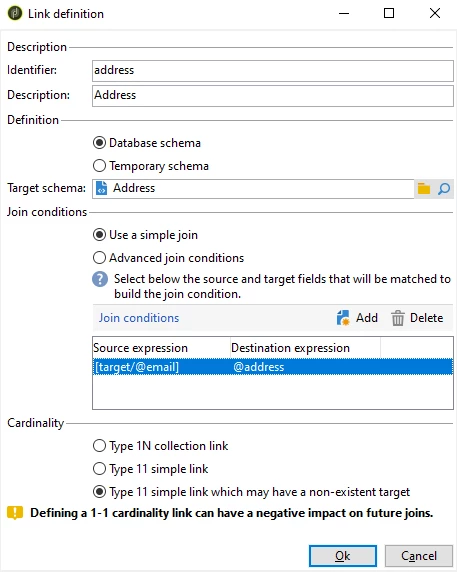
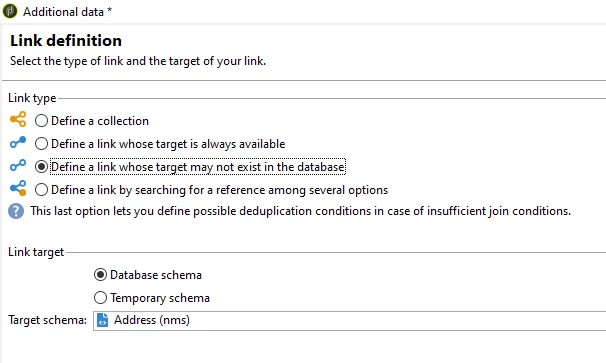
Add data > a link >
Link type: Define a link whose target may not exist in database
Link Target: Database schema
target schema: nms:address

Next > Use a simple join,

If you are performing Email campaign,

Source expression: [target/@email]

Destination expression: @address

 > Finish


Whereas, if you do SMS campaign, select source as [target/@mobilePhone]


Save the workflow, open 'Enrichment' activity again, Edit additional data > add [address/@status] in output columns.


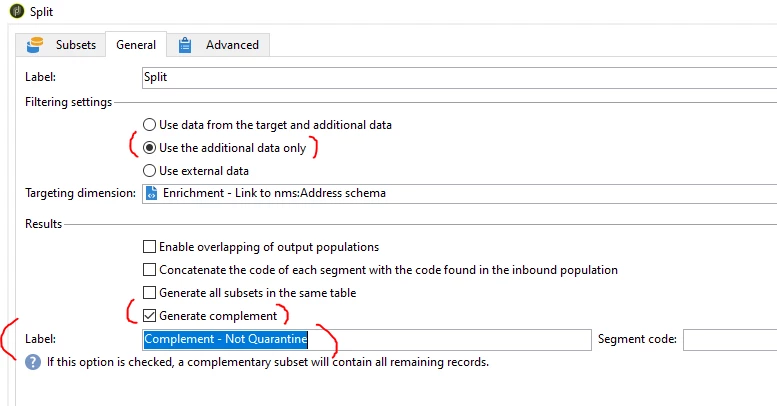
Split:

General tab > configure as below


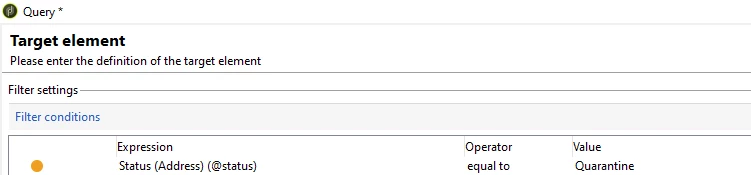
Subsets tab > select 'Add a filtering condition' radio button > Edit >

@status EQUALS TO Quarantine


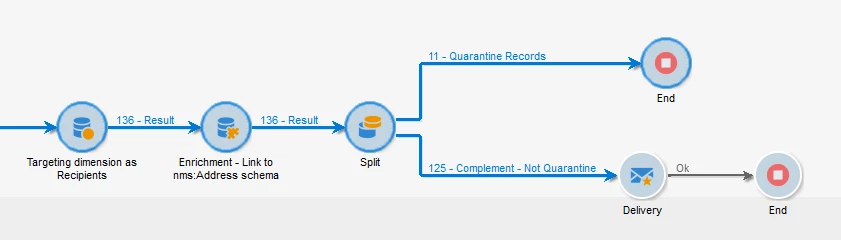
Connect delivery to the complement transition of Split activity.

So all the quarantine records will be eliminated prior to the delivery.


1 reply

ParthaSarathy
Community Advisor
ParthaSarathyCommunity AdvisorAccepted solution
Community Advisor
September 6, 2023

Hi @n235ps ,

After changing the dimension to recipient (Recipient as Targeting dimension), try the below workflow logic,


Enrichment:

Add data > a link >
Link type: Define a link whose target may not exist in database
Link Target: Database schema
target schema: nms:address

Next > Use a simple join,

If you are performing Email campaign,

Source expression: [target/@email]

Destination expression: @address

 > Finish


Whereas, if you do SMS campaign, select source as [target/@mobilePhone]


Save the workflow, open 'Enrichment' activity again, Edit additional data > add [address/@status] in output columns.


Split:

General tab > configure as below


Subsets tab > select 'Add a filtering condition' radio button > Edit >

@status EQUALS TO Quarantine


Connect delivery to the complement transition of Split activity.

So all the quarantine records will be eliminated prior to the delivery.


~  ParthaSarathy S~  Click here to join ADOBE CAMPAIGN USER GROUP for Quarterly In-person | Hybrid | Virtual Meetups