
Download mirror pages in batch | Community
Skip to main content
Heku_
Level 5
February 13, 2024
Solved

Download mirror pages in batch

  • February 13, 2024
  • 1 reply
  • 1331 views

Hello, I need to download the mirror pages of a delivery, i tried doing it with javascript by GetMirrorURL + HttpClientRequest + Write the response.body in a file: 
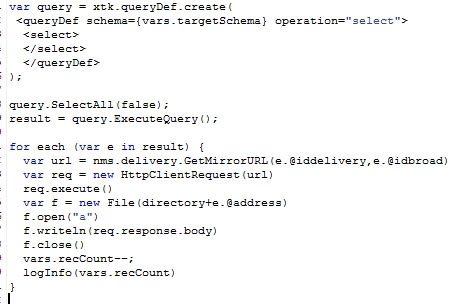
But this is too slow, i get 4 mirrors per second. Is there any way to connect to the mirror page server and download all the mirror pages from a broadlog like using the file collector?

Thank you in advance.

@Manoj_Kumar_ @ParthaSarathy @Parvesh_Parmar @DavidKangni

This post is no longer active and is closed to new replies. Need help? Start a new post to ask your question.
Best answer by AnanthanJa

Hi @heku_ ,


There is no way to connect to the mirror page server and download the mirror pages.


If your client requires copies of emails for their logs or any other compliance purposes, you can look at using the BCC feature by which each email sent from Adobe Campaign can be sent to customers email addresses as well.


Refer to the following link for more information


https://experienceleague.adobe.com/docs/campaign-classic/using/installing-campaign-classic/additional-configurations/email-archiving.html?lang=en

1 reply

AnanthanJaAdobe EmployeeAccepted solution
Adobe Employee
February 13, 2024

Hi @heku_ ,


There is no way to connect to the mirror page server and download the mirror pages.


If your client requires copies of emails for their logs or any other compliance purposes, you can look at using the BCC feature by which each email sent from Adobe Campaign can be sent to customers email addresses as well.


Refer to the following link for more information


https://experienceleague.adobe.com/docs/campaign-classic/using/installing-campaign-classic/additional-configurations/email-archiving.html?lang=en

Heku_
Heku_Author
Level 5
February 13, 2024

Hello, @ananthanja  thanks for your reply. Would I be able to do this with Push or SMS deliveries?

Adobe Employee
February 13, 2024

Hi @heku_,


The archiving feature is available only for Email. For Push or SMS, you can look at using file extraction/custom direct mail deliveries to export the personalized SMS / Push message in the file so that the client can consume the same.