DKIM implementation with on premise installtion | Community
Skip to main content
Marcel_Szimonisz
Community Advisor
Community Advisor
August 9, 2021
Solved

DKIM implementation with on premise installtion

  • August 9, 2021
  • 2 replies
  • 2645 views

Hello,

can somebody give us some documentation on how to implement DKIM keys:

do we follow open dkim implementation with on premise installation?

where do I put information what private key should be used?

Is it automatically assigned from .ssh folder?

Do we need to sign email before we add txt records?

....


Only thing i have found is this from @jonathon_wodnicki in https://experienceleaguecommunities.adobe.com/t5/adobe-campaign-standard/how-to-implement-dkim-and-dmarc-record-in-adobe-campaign/qaq-p/240789


For DKIM: Create a TXT record: Hostname: selector._domainkey Value: v=DKIM1; p=base64 encoding of pub key Follow these steps for the key pair: - Create a private key: openssl genrsa -out dkim_private.pem 2048 - Get its public key: openssl rsa -in dkim_private.pem -pubout -outform der 2>/dev/null | openssl base64 -A - Create a long text xtk:option with internal name selector_RSA_PRIVATE_KEY_domain and fill value with contents of dkim_private.pem. Selector is from the hostname field, domain is the fqdn. - Set hostname to _domainkey.subdomain if desired


Marcel
This post is no longer active and is closed to new replies. Need help? Start a new post to ask your question.
Best answer by Marcel_Szimonisz

Hello All,


Answer from @jonathon_wodnicki  on the other post worked at the end - Post about DKIM 


I guess it would be beneficial that it is added to the official documentation.

Apart from what @jonathon_wodnicki wrote:


For DKIM: Create a TXT record: Hostname: selector._domainkey Value: v=DKIM1; p=base64 encoding of pub key Follow these steps for the key pair: - Create a private key: openssl genrsa -out dkim_private.pem 2048 - Get its public key: openssl rsa -in dkim_private.pem -pubout -outform der 2>/dev/null | openssl base64 -A - Create a long text xtk:option with internal name selector_RSA_PRIVATE_KEY_domain and fill value with contents of dkim_private.pem. Selector is from the hostname field, domain is the fqdn. - Set hostname to _domainkey.subdomain if desired


 also the following 'minor' settings have to be done:

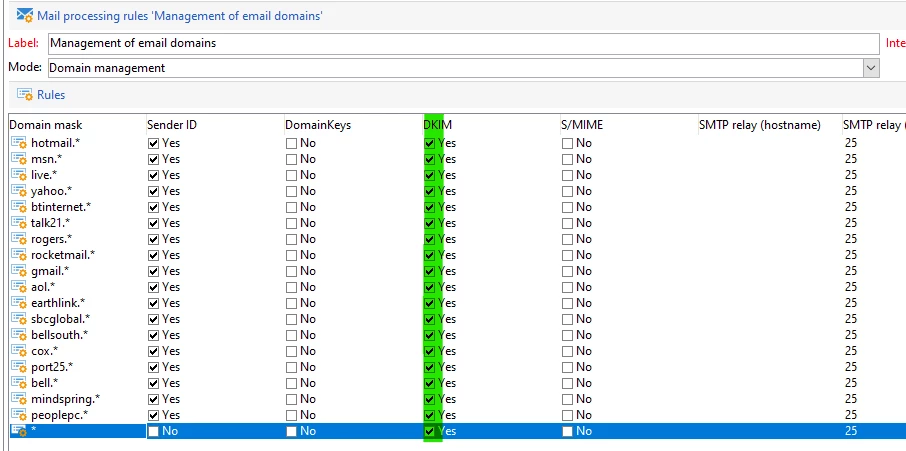
In Administration -> Campaign management -> Non Deliverables Management -> Mail Rule Sets -> Domain management


You need to enable DKIM for domain you want to have DKIM. I have enabled it for all (no idea if that's good practice but ootb this was not checked, i might change it in the future)


Also restart the MTA


The option looks like:

Here you need to add Private key as long text option


selector_RSA_PRIVATE_KEY_domain


After this is set and you send yourself email and you can see in the header that email is signed


Received: from xxxxxxxxxxxxxxxxxxxxxxxxxxxxxxx
...
X-MC-Unique: xxxxxxxxxxxxxxxxxxxxxxxxx
DKIM-Signature: v=1; a=rsa-sha256; c=relaxed/relaxed;
	s=selector;
	d=domain-email.com;
	h=from:subject:date:to:reply-to:mime-version:x-mailer:message-

....
.....


Also Public Key has to be added to the TXT record in domain settings. If its not added the email header will contain following:


dkim=none ("invalid DKIM record")


Marcel

2 replies

Craig_Thonis
Adobe Employee
Adobe Employee
August 9, 2021
Marcel_Szimonisz
Community Advisor
Community Advisor
August 9, 2021

yes 

"Adobe Campaign option declaration: in Adobe Campaign, the DKIM private key is based on a DKIM selector and a domain. It is not currently possible to create multiple private keys for the same domain/sub-domain with different selectors. It is not possible to define which selector domain/sub-domain must be used for the authentication in neither the platform or the email. The platform will alternatively select one of the private keys, which means the authentication has a high chance of failing."

It is not on what option where to add certficates etc.

Marcel_Szimonisz
Community Advisor
Marcel_SzimoniszCommunity AdvisorAuthorAccepted solution
Community Advisor
September 2, 2021

Hello All,


Answer from @jonathon_wodnicki  on the other post worked at the end - Post about DKIM 


I guess it would be beneficial that it is added to the official documentation.

Apart from what @jonathon_wodnicki wrote:


For DKIM: Create a TXT record: Hostname: selector._domainkey Value: v=DKIM1; p=base64 encoding of pub key Follow these steps for the key pair: - Create a private key: openssl genrsa -out dkim_private.pem 2048 - Get its public key: openssl rsa -in dkim_private.pem -pubout -outform der 2>/dev/null | openssl base64 -A - Create a long text xtk:option with internal name selector_RSA_PRIVATE_KEY_domain and fill value with contents of dkim_private.pem. Selector is from the hostname field, domain is the fqdn. - Set hostname to _domainkey.subdomain if desired


 also the following 'minor' settings have to be done:

In Administration -> Campaign management -> Non Deliverables Management -> Mail Rule Sets -> Domain management


You need to enable DKIM for domain you want to have DKIM. I have enabled it for all (no idea if that's good practice but ootb this was not checked, i might change it in the future)


Also restart the MTA


The option looks like:

Here you need to add Private key as long text option


selector_RSA_PRIVATE_KEY_domain


After this is set and you send yourself email and you can see in the header that email is signed


Received: from xxxxxxxxxxxxxxxxxxxxxxxxxxxxxxx
...
X-MC-Unique: xxxxxxxxxxxxxxxxxxxxxxxxx
DKIM-Signature: v=1; a=rsa-sha256; c=relaxed/relaxed;
	s=selector;
	d=domain-email.com;
	h=from:subject:date:to:reply-to:mime-version:x-mailer:message-

....
.....


Also Public Key has to be added to the TXT record in domain settings. If its not added the email header will contain following:


dkim=none ("invalid DKIM record")


Marcel
