Direct Mail Output failing to Add <%= message.cellId %> to output syntax | Community
Skip to main content
Level 2
November 9, 2022
Question

Direct Mail Output failing to Add <%= message.cellId %> to output syntax

  • November 9, 2022
  • 1 reply
  • 2500 views

Hello, The DM Delivery output script is consistently failing to compile when adding any type of variables to the output script (Ex: <%= vars.campaignId %>_<%= vars.workflowId %>_<%= vars.lastSync %>). I've also tried updating the script syntax in the DM template then echoing it to the recurring delivery in the campaign but still failing with errors below. One think I noticed is that whatever variable we add to the script output file, it’s always defaulting to <%= message.cellId %> in the output file external config. The following is the output name I want to achieve ==> DirectMail_2022-10-19_12-48-34-000_3262771_3453765_2210191231.txt. Any feedback would be greatly appreciated.


Screenshots:
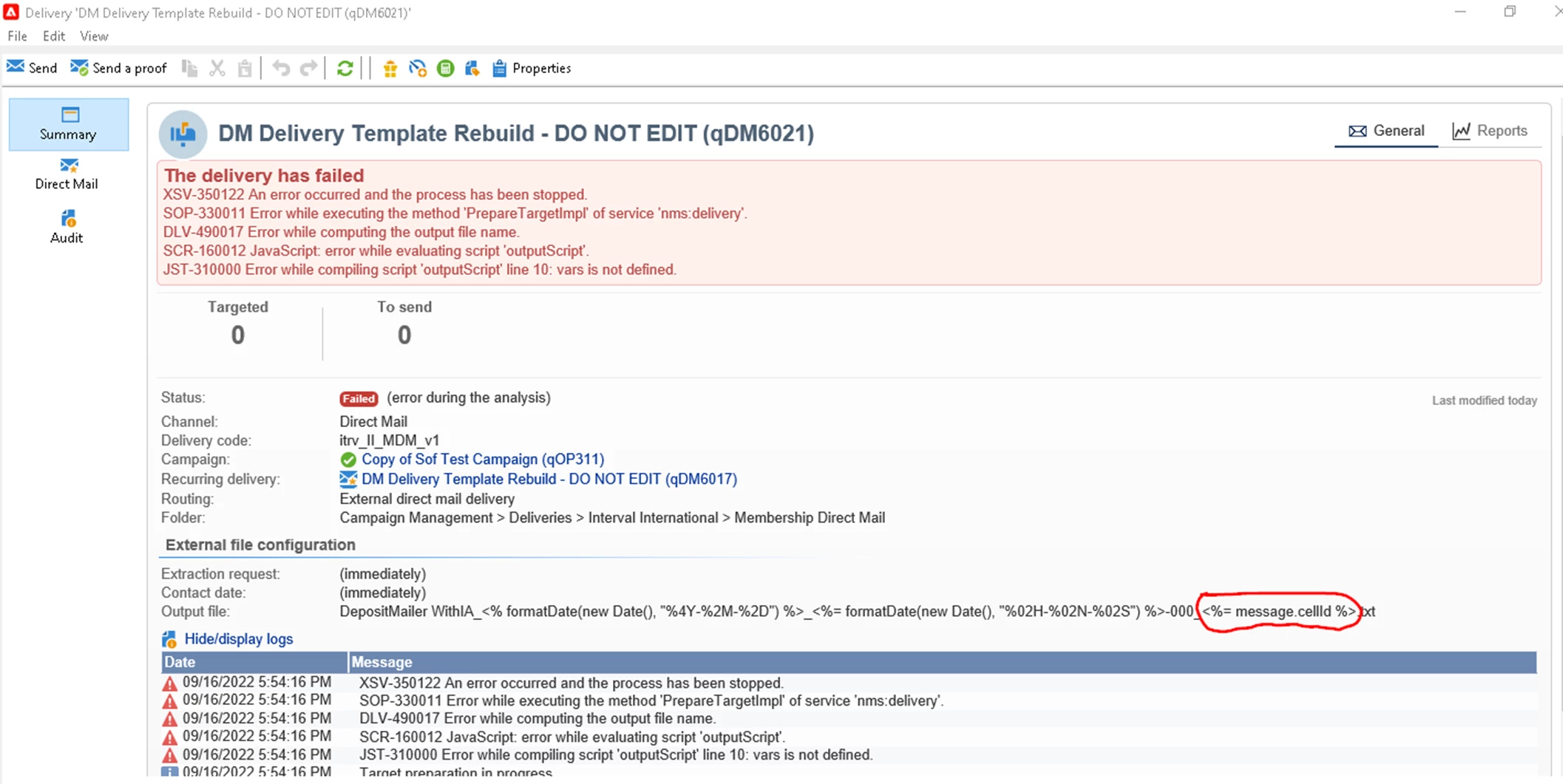
 

Thanks,

Soph

This post is no longer active and is closed to new replies. Need help? Start a new post to ask your question.

1 reply

ParthaSarathy
Community Advisor
Community Advisor
November 11, 2022

Hi @soph75 ,

Configure the below script in Delivery activity's script tab

var query = xtk.queryDef.create(<queryDef schema="nms:operation" operation="select"><select><node expr="@id"/><node expr="@internalName"/></select><where><condition expr={"@id = '"+instance.operation_id+"'"}/></where></queryDef>); var eventExistss = query.ExecuteQuery(); for each (var eventT in eventExistss.operation){ instance.vars.CampaignId = eventT.@id;}

delivery.variables._var[0].stringValue=instance.vars.CampaignId;

delivery.variables._var[1].stringValue=instance.id;

And in Delivery Property > Variable Tab,

Add > Name: CampaignId > ok

Add > Name: workflowId > ok

In Extract File name,

DirectMail_<%= formatDate(new Date(), "%4Y-%2M-%2D_%02H-%02N-%02S") %>-000_<%= variables.CampaignId %>_<%= variables.workflowId %>.txt

Once you run the workflow, you will get the expected file name


And if you want to add few more variables in file name, you can follow the same step,

In delivery tab,
delivery.variables._var[2].stringValue=<Pass the variable (eg, lastSync)>;

In Property>Variable> Add > Name: lastSync

Extract file name,
DirectMail_<%= formatDate(new Date(), "%4Y-%2M-%2D_%02H-%02N-%02S") %>-000_<%= variables.CampaignId %>_<%= variables.workflowId %>_<%= variables.lastSync %>.txt


~  ParthaSarathy S~  Click here to join ADOBE CAMPAIGN USER GROUP for Quarterly In-person | Hybrid | Virtual Meetups
Soph75Author
Level 2
November 11, 2022

Hi Partha, Thanks for the JS scripts, it's very helpful to achieve the output file script calculation. I've applied the scripts and variables to the recurring delivery but campaignId/deliveryId is not sequential as expected, the output of the two variables need to be incremental values every time I deploy a new campaign (Ex: 3262772_3262771, 3262773_3262772, 3262774_3262773...etc). does it need to be defined somewhere else to achieve the desired output? (See screenshot).


Thanks,

Soph

ParthaSarathy
Community Advisor
Community Advisor
November 12, 2022

Hi Soph,

Try replacing delivery activity script tab code with below script and re-run the workflow,

var query = xtk.queryDef.create(<queryDef schema="nms:operation" operation="select"><select><node expr="@id"/><node expr="@internalName"/></select><where><condition expr={"@id = '"+instance.operation_id+"'"}/></where></queryDef>); var eventExistss = query.ExecuteQuery(); for each (var eventT in eventExistss.operation){ instance.vars.CampaignId = eventT.@id;}

delivery.variables._var[0].stringValue=instance.id;

delivery.variables._var[1].stringValue=instance.vars.CampaignId;
~  ParthaSarathy S~  Click here to join ADOBE CAMPAIGN USER GROUP for Quarterly In-person | Hybrid | Virtual Meetups
