DATE FORMAT | Community
Skip to main content
Level 3
December 22, 2023
Solved

DATE FORMAT

  • December 22, 2023
  • 3 replies
  • 2438 views

Hi all,


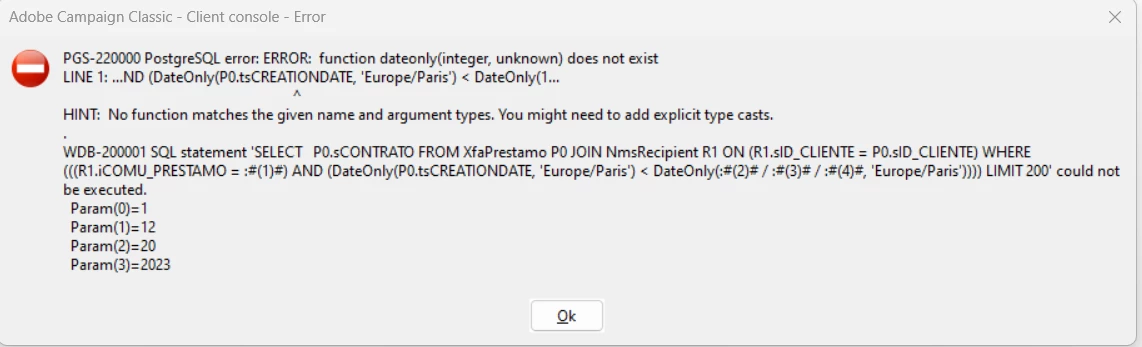
does anyone know how to express the following function in Adobe Campaign Classic?


"Creation date before an specific date" (show me every client who has been created before the 20th of december)


I have tried the following, but is not working:


Thanks in advance,

Blanca

Best answer by ParthaSarathy

Hi @bcollado,

As Amine mentioned, cross check whether your creation date field is datetime data type or string in your schema.


IF IT IS DATETIME, then don't use any expression in query and

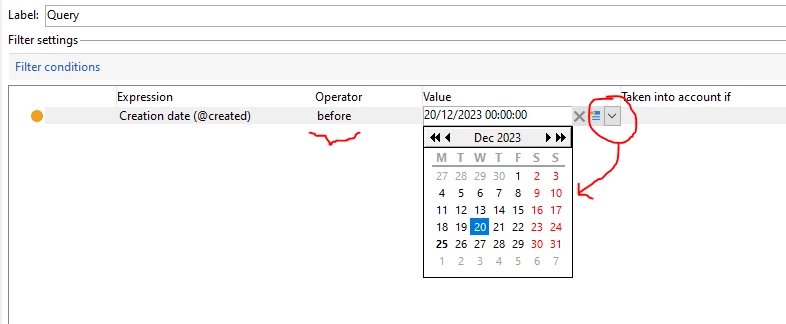
Simply Select @created before (now in value field, you can able to see a calendar drop down) in it select December 20 2023.

So it will be like @created before 20/12/2023 00:00:00 (this will fetch all records created before 20th December 2023).
 

If your field is STRING, either change the creationdate field's data type as datetime in schema 

Or,

In query, use expression to convert your string creationdate to datetime by using below expression,

DateOnly(ToDateTime(@creationDate)) before DateOnly('2023/12/20')

3 replies

Amine_Abedour
Community Advisor
Community Advisor
December 22, 2023

Hello @bcollado 


It seems like your CREATIONDATE field is an integer, could you double check please if it's a dateTime or an integer?


Br,

Amine

Amine ABEDOUR
LakshmiPravallika
Community Advisor
Community Advisor
December 22, 2023

Hi @bcollado ,


Please try by giving single quotes in YYYY/MM/DD Format inside the DateOnly function at the right side of the Expression as shown below. It worked for me


Regards,

Pravallika.


ParthaSarathy
Community Advisor
ParthaSarathyCommunity AdvisorAccepted solution
Community Advisor
December 23, 2023

Hi @bcollado,

As Amine mentioned, cross check whether your creation date field is datetime data type or string in your schema.


IF IT IS DATETIME, then don't use any expression in query and

Simply Select @created before (now in value field, you can able to see a calendar drop down) in it select December 20 2023.

So it will be like @created before 20/12/2023 00:00:00 (this will fetch all records created before 20th December 2023).


If your field is STRING, either change the creationdate field's data type as datetime in schema 

Or,

In query, use expression to convert your string creationdate to datetime by using below expression,

DateOnly(ToDateTime(@creationDate)) before DateOnly('2023/12/20')

~  ParthaSarathy S~  Click here to join ADOBE CAMPAIGN USER GROUP for Quarterly In-person | Hybrid | Virtual Meetups

bcolladoAuthor
Level 3
January 4, 2024

It worked!


thank you very much as always 🙂


Kind regards,

Blanca