Data from file as a base for list of Recipients | Community
Skip to main content
November 16, 2018
Solved

Data from file as a base for list of Recipients

  • November 16, 2018
  • 1 reply
  • 2214 views

Hi,

I would like to load data from a CSV (list of customers to be targeted in a delivery or activity in Campaign), map this list into the Adobe Campaign Recipients dimension. The CSV contains a field for reconciliation (customerID) which is identical to a field in our Recipient-dimension.

I have started with a data loading (file) activity in the workflow - and I am able to load the data from the CSV.  The output from this activity belongs to a on-the-fly dimension temp:fileImport obviously generated by the import-Activity wizard. How do I proceed to pick Recipients in my Campaign database, based on the data in the import data?

I'm a campaign noob, so I am not very experienced with data imports, reconciliation acitivies or data dimensions, so I'll need detailed information to succeed.

All help greatly appreciated.

Kind regards from Norway! :-)
This post is no longer active and is closed to new replies. Need help? Start a new post to ask your question.
Best answer by menno_74

Hi There,

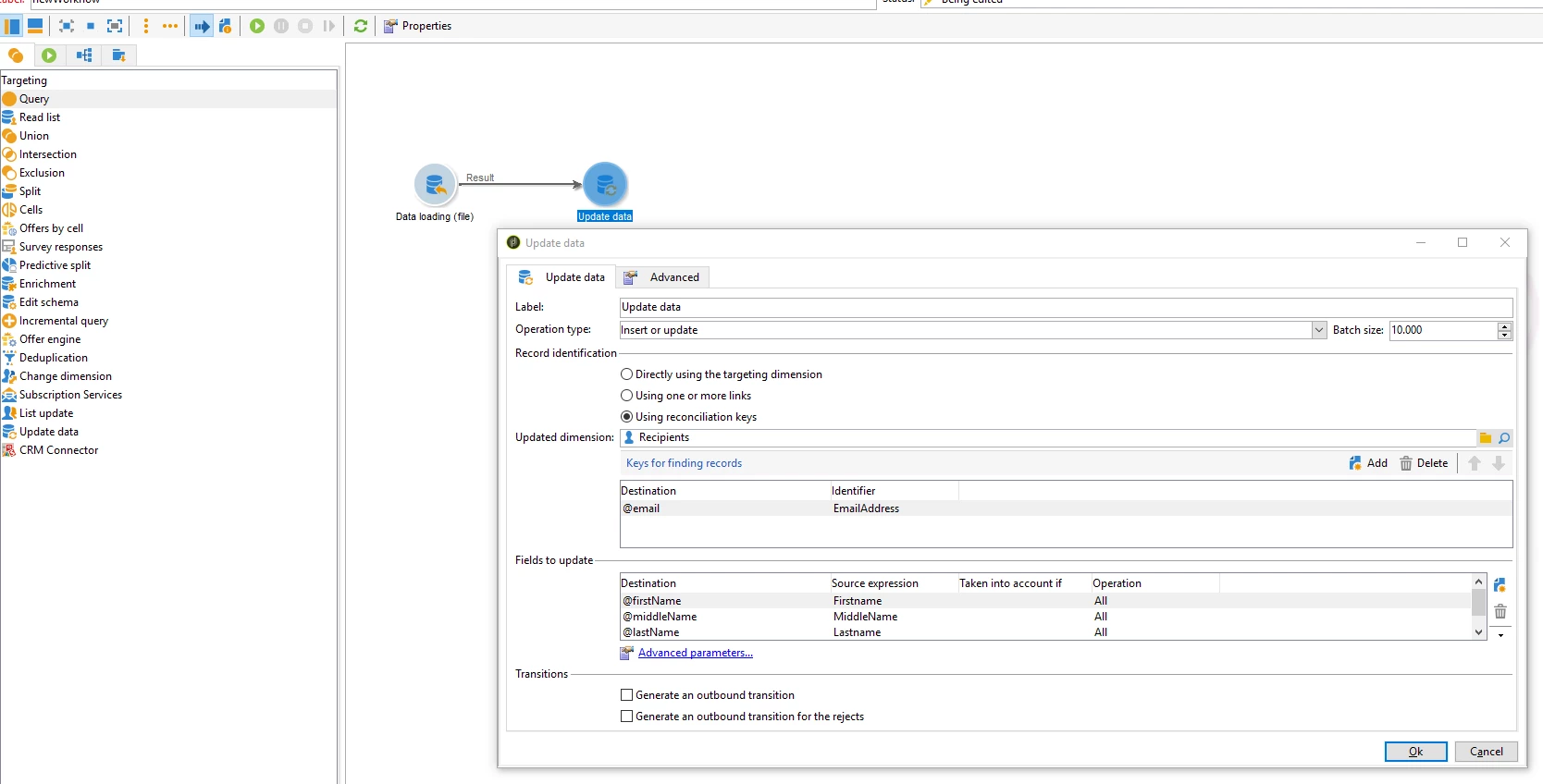
You can simply connect the import activity to an update activity.

To configure the update settings open the activity by clicking on it:

  1. Specify the operation (insert/update/delete, etc): in this case "insert or update"  as we want to insert new records or update in case the data already exists in the destination table.
  2. Select the table to insert the imported data into (recipients in this example)
  3. Select 'Unsing reconciliation keys'  as Recrod Identification method and define the reconciliation key(s). (keys for finding records) (email address in this example:  "email" field from the recipient table to "EmailAddress" field of import file)
  4. Then map the fields from your import file to the fields of the destination table under "fields to update":

So Campaign now tries to find an exising record based upon email-address (in this example) and updates the record when it finds one, otherwise inserts a new record.

Kind Regards,

-Menno

1 reply

menno_74
menno_74Accepted solution
Level 2
November 16, 2018

Hi There,

You can simply connect the import activity to an update activity.

To configure the update settings open the activity by clicking on it:

  1. Specify the operation (insert/update/delete, etc): in this case "insert or update"  as we want to insert new records or update in case the data already exists in the destination table.
  2. Select the table to insert the imported data into (recipients in this example)
  3. Select 'Unsing reconciliation keys'  as Recrod Identification method and define the reconciliation key(s). (keys for finding records) (email address in this example:  "email" field from the recipient table to "EmailAddress" field of import file)
  4. Then map the fields from your import file to the fields of the destination table under "fields to update":

So Campaign now tries to find an exising record based upon email-address (in this example) and updates the record when it finds one, otherwise inserts a new record.

Kind Regards,

-Menno