Creating a Count w/GroupBy within an instance.vars.xxx | Community
Skip to main content
Level 4
August 29, 2022
Solved

Creating a Count w/GroupBy within an instance.vars.xxx

  • August 29, 2022
  • 2 replies
  • 2119 views

All, 

Still learning how to code in JS, so please let me know if this is even possible. I have a worklfow where I pull in data from a list and send that data through a Query to create a count; the count is based on Source Code. I can display the data and see the count; it will look like this: 
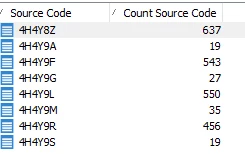
 

But, what I really want to do is have this count display in an Alert activity. I'm trying to come up with ideas on how to display this - but I'm stuck. My thought is to create a JS code to pull the fields in using "queryDef", and then create an instance.vars.xxx where I would get a Sum of each Source Code by group.


Please let me know if I'm off base.  


This post is no longer active and is closed to new replies. Need help? Start a new post to ask your question.
Best answer by montezh2001

@alangridge 


Thank you for looking into this. However, I'm able to create a total number of records rather easy. I actually created the total by using the qty from the transition into the Alert:  instance.vars.totalCount = vars.recCount; this gives me the count I want to display on the email Alert. 


Thank you again. 


2 replies

Marcel_Szimonisz
Community Advisor
Community Advisor
August 29, 2022

Hello @montezh2001,

You have to query target data using execSql. Then use it in your alert html

var res = sqlSelect( "targetData,@ssourceCode:string,@icountSourceCode:number",//not sure how the integer is set maybe :long or :integer:11 you need to try also you can display entire res with JSON.stringify to see the results "select ssourceCode, icountSourceCode from " + vars.tableName ); for (var i = 0; i<res.targetData.length;i++){ logInfo(res.targetData.@ssourceCode); logInfo(res.targetData.@icountSourceCode); }

Marcel

Level 4
August 30, 2022

@marcel_szimonisz  


Thank you for the code and direction. I can see it's pulling the data I need, however I'm still a little confused at the direction you provided. 


Are you saying that once I create this variable (var res), I then need to run EXEC Sql on the variable in the HTML?


Again - I'm just trying to get the values in the snapshot about to display in the Alert. Your code displays as: 


ALangridge
Level 4
August 30, 2022

Hey! I'd achieve this by doing something like this in a JS activity.


var sql = "SELECT sum(" + vars.tableName + ".icolumnName) FROM " + vars.tableName;
instance.vars.totalCount = sqlGetInt(sql);


vars.tableName is set by the workflow and will contain the name of the temporary table you're creating. You'd need to locate the alias name of your Count Source Code field, and then prefix it with i for integer (or d for double, s for string) and use it in place of icolumnName (so icountSourceCode - make sure you keep the full stop in there too so it'll be querying for tableName.icolumnName ).

sqlGetInt just executes the sql statement stored in the above variable, and will return an integer. 

Once this runs, you'd be able to access the variable in your alert email using <%= instance.vars.totalCount %>

montezh2001AuthorAccepted solution
Level 4
August 30, 2022

@alangridge 


Thank you for looking into this. However, I'm able to create a total number of records rather easy. I actually created the total by using the qty from the transition into the Alert:  instance.vars.totalCount = vars.recCount; this gives me the count I want to display on the email Alert. 


Thank you again. 


ALangridge
Level 4
August 30, 2022

Ah gotcha! Didn't realize you had a single target to pull from - definitely the easier option there. 

I'd definitely keep the method I described in your pocket though - it works PERFECTLY for individual column values (eg: I enriched each record with the $ spent in the last week and now want a single sum value to put in an email).

Glad it worked out for you!