Create recurring delivery using java script | Community
Skip to main content
April 11, 2023
Solved

Create recurring delivery using java script

  • April 11, 2023
  • 1 reply
  • 736 views

Hi, i Just want to create automation script for A/B testing. Please let me what should i do to make it work as expected?

Thanks in advance.


1. Target population with query or file then split 20% - A and 20% - B

2.Based on the highest open, the winner delivery should be duplicated automatically and should be executed via script

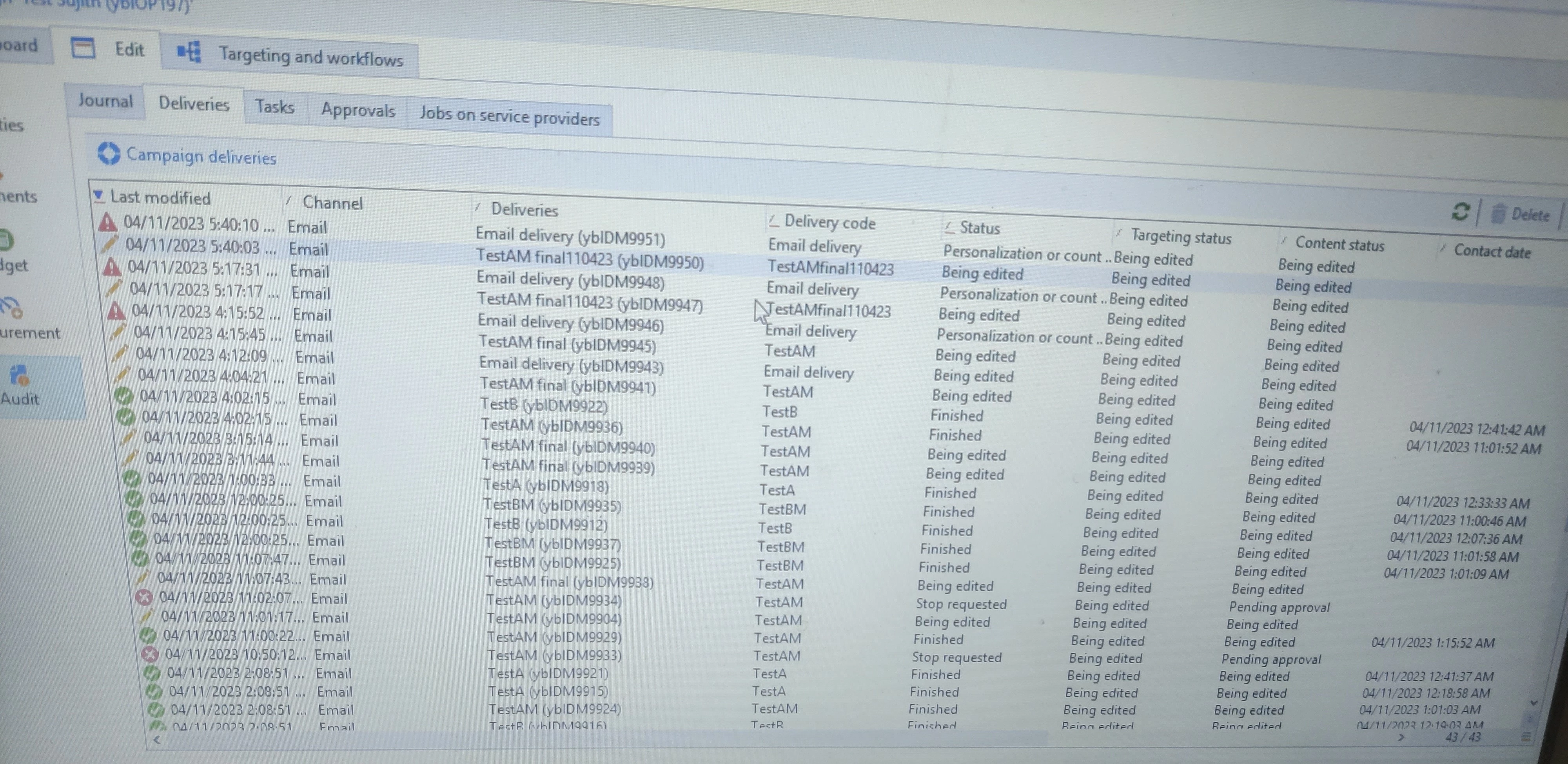
3.But the issue is, the delivery is getting created in audit delivery. It is not visible or the customers are not getting targeted or deployed nor logs are created in the dashboard.


Here's is my workflow with Deliveries from Audit tab:
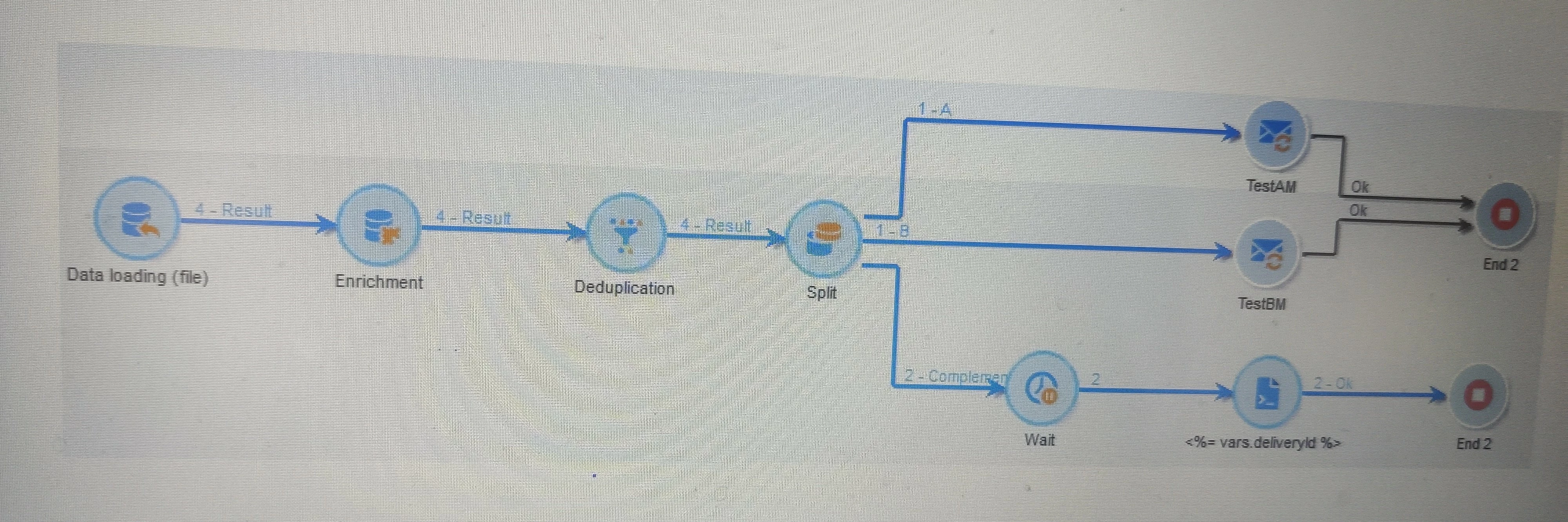
 

Here's my script:


//Query delivery schema to find out largest value based on instance and workflow id
var myWin = xtk.queryDef.create(
     <queryDef schema="nms:delivery" operation="get">
       <select>
         <node expr="@id"/>
         <node expr="@label"/>
         <node expr="[@operation-id]"/>
         <node expr="[@workflow-id]"/>
       </select>
       <where>
         <condition expr={"@FCP=0 and [@workflow-id]= " + instance.id}/>
       </where>
       <orderBy>
         <node expr="[indicators/@estimatedRecipientOpenRatio]" sortDesc="true"/>
       </orderBy>
     </queryDef>).ExecuteQuery()

//Create new delivery
   var myDel = nms.delivery.create()
   myDel.Duplicate("nms:delivery|" + myWin.@id)

//Add final, date with the delivery label
   myDel.label = myWin.@label + " final" + formatDate(new Date(), "%2D%2M%2Y");
   myDel.deliveryCode = myWin.@label + "final" + formatDate(new Date(), "%2D%2M%2Y");

//Link with campaign database
   myDel.operation_id = myWin.@["operation-id"]
   myDel.workflow_id = myWin.@["workflow-id"]

//Prepare and start
   myDel.scheduling.validationMode = "manual"
   myDel.scheduling.delayed = 0

   // save the myDel in database
   myDel.save()

myDel.PrepareAndStart()
// store the new myDel Id in event variables vars.myDelId = myDel.id



This post is no longer active and is closed to new replies. Need help? Start a new post to ask your question.
Best answer by akshaaga

Hi @kumarsujith ,


Based on the provided information, here are some recommendations to troubleshoot and improve your Adobe Campaign automation script for A/B testing:

  1. Target population with query or file: Ensure that your query or file is correctly targeting the desired population for A/B testing. Double-check the logic and conditions used in your query or file to make sure it is accurately segmenting the audience into A and B groups.

  2. Split 20% - A and 20% - B: Verify that the split for A and B groups is correctly set to 20% each. You can check this in your script to ensure that the distribution is accurate.

  3. Winner delivery duplication: Make sure that the logic to duplicate the winner delivery based on the highest open rate is correctly implemented in your script. Verify that the winner delivery is being correctly identified and duplicated.

By following these recommendations and thoroughly validating your script, you can ensure that your Adobe Campaign automation script for A/B testing is correctly targeting the desired audience, and creating deliveries in the desired location.

1 reply

akshaaga
Adobe Employee
akshaagaAdobe EmployeeAccepted solution
Adobe Employee
April 12, 2023

Hi @kumarsujith ,


Based on the provided information, here are some recommendations to troubleshoot and improve your Adobe Campaign automation script for A/B testing:

  1. Target population with query or file: Ensure that your query or file is correctly targeting the desired population for A/B testing. Double-check the logic and conditions used in your query or file to make sure it is accurately segmenting the audience into A and B groups.

  2. Split 20% - A and 20% - B: Verify that the split for A and B groups is correctly set to 20% each. You can check this in your script to ensure that the distribution is accurate.

  3. Winner delivery duplication: Make sure that the logic to duplicate the winner delivery based on the highest open rate is correctly implemented in your script. Verify that the winner delivery is being correctly identified and duplicated.

By following these recommendations and thoroughly validating your script, you can ensure that your Adobe Campaign automation script for A/B testing is correctly targeting the desired audience, and creating deliveries in the desired location.