
Count in Delivery Logs differs from the Count in the Transition, How to check the root cause | Community
Skip to main content
LakshmiPravallika
Community Advisor
Community Advisor
October 16, 2023
Question

Count in Delivery Logs differs from the Count in the Transition, How to check the root cause

  • October 16, 2023
  • 4 replies
  • 2515 views

Hi Team,


We have a delivery where the count in Transition is 26111328 Records, where as in the Delivery logs the count is 4848 Records 
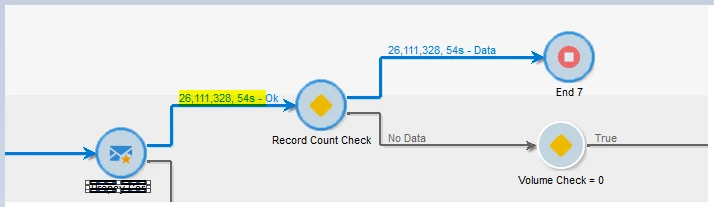


Could you please let us know how this difference of records in Transition VS the records in Delivery Came?


Also, if possible, Please let us know the root cause for this issue.


Regards,

Pravallika.

This post is no longer active and is closed to new replies. Need help? Start a new post to ask your question.

4 replies

Marcel_Szimonisz
Community Advisor
Community Advisor
October 16, 2023

Hello @lakshmipravallika ,
should not be different. But with this amount of recipients I imagine there is delay. Is the count taken right after the delivery or this is already finished one? Can you recalculate indicators manually? right click on the delivery -> actions recompute delivery and tracking indicators...


Do you have set waves? If yes then you only see what was processed up until now with waves (if i remember correctly)
https://experienceleague.adobe.com/docs/campaign-classic/using/sending-messages/key-steps-when-creating-a-delivery/steps-sending-the-delivery.html?lang=en#sending-using-multiple-waves

Marcel Szimonisz

LakshmiPravallika
Community Advisor
Community Advisor
October 16, 2023

Hi @marcel_szimonisz ,


After trying to recalculate indicators manually, the Count in Delivery logs was not changed.

There is no issue in delivery indicators. 

Because the delivery indicator matched with Inbound counts. We have 5K inbound records, and in delivery indicators also has 5k records, but outbound transition of Delivery activity shows 26111000 records instead of 5000.


Also, the waves were not set in the Delivery properties.


Regards,

Pravallika.

LakshmiPravallika
Community Advisor
Community Advisor
October 17, 2023

Hello @lakshmipravallika ,

does not make sense to have in workflow 26m and in delivery 5k with typology rules there would be visible drop in the worklfow. Can you sort all your deliveries to see if you do not have somewhere your 26M delivery?

Also this is send from recipient target mapping? data comes from adobe campaign recipient table?

If you have access to the adobe support then create support ticket 🙂 or if you want we can video call to show me this if possible.

Marcel


Hi @marcel_szimonisz ,


Yes, tried to sort All Deliveries Folder if any having 26M records, but no delivery was created. The Data is coming from a Custom Schema.


Regards,

Pravallika.


Level 3
October 16, 2023

@lakshmipravallika 

Can you show Audit logs of delivery

Also check exclusions tab as well.


Thanks,

Krishna


LakshmiPravallika
Community Advisor
Community Advisor
October 16, 2023

Hi @krishnakanth_patnaik_cc ,


There is no error in Audit logs of Delivery. Also there are no exclusions in the Delivery log.


Regards,

Pravallika.

Level 3
October 16, 2023

Im sure you have configured accurately so there wont be any errors in logs.
However,

Logs would help understand final target audience so wanted to see these audit logs in delivery.

jorgeferreira
Level 3
October 16, 2023

What is on the "TO" part of the delivery? Is it the transition or you have something in the template overriding this?

You should also check the typology.

LakshmiPravallika
Community Advisor
Community Advisor
October 30, 2023

Hi @jorgeferreira ,


The "To" section in the delivery is the inbound population ie, the Data in the Temp Table of the Workflow.


Also the Typology used is the Default typology along with few Filtering SQL Rules added. 


Regards,

Pravallika.

Adobe Employee
December 7, 2023

Hi @lakshmipravallika 

A few things to look at:

  1. Check the Target Mapping on the "To" option, and ensure it is the SAME underlying data schema than the targeting dimension from your workflow
  2. You mention that data comes from a Custom Schema, how does this schema link to Recipient (assuming your Target Mapping on your delivery is Recipient)
  3. Check the Exclusion Logs?
  4. I agree the audit logs would give us an indication of what's happen at the delivery. The 1st thing the delivery preparation does is to link the records from the workflow to their equivalent on the Target Mapping

I suspect your targeting dimension in the workflow (incoming transition on the delivery activity) is not the same than your Target Mapping

I would suggest to enable the SQL logs on the workflow and you will have also the SQL logs at the delivery level only then you would know where the drops comes from...unless these come from the Exclusion rules......


Could you share the Audit Logs of the delivery?

Thanks

Denis

Sukrity_Wadhwa
Community Manager
Community Manager
January 10, 2024

Hi @lakshmipravallika,

Were you able to resolve this query with the help of the given solutions or do you still need more help here? Do let us know. In case the given solutions were helpful, then kindly choose the one that helped you the most as the 'Correct Reply'.
Thanks!

Sukrity Wadhwa
LakshmiPravallika
Community Advisor
Community Advisor
January 11, 2024

Hi @sukrity_wadhwa ,


We are trying to replace the existing Target Mapping with a new Target Mapping.


We will test and let you know the results,


Regards,

Pravallika.

Sukrity_Wadhwa
Community Manager
Community Manager
January 12, 2024

Thanks for sharing that @lakshmipravallika!

Sukrity Wadhwa
