Confirm one time recurring delivery | Community
Skip to main content
This post is no longer active and is closed to new replies. Need help? Start a new post to ask your question.
Best answer by ParthaSarathy

Hi @yansu ,

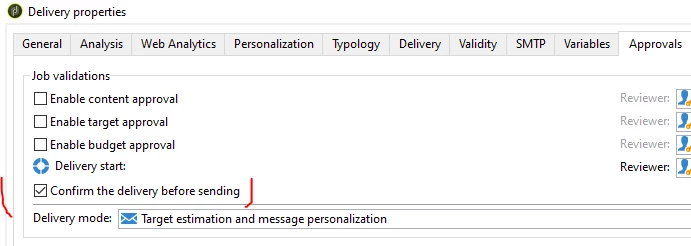
If you had enabled 'Confirm the delivery before sending' in delivery property's Approval tab, then each time it will ask for 'confirmation pending'.

So, for the first time run alone keep it enabled, run the workflow, analyze and confirm the delivery, and come to your workflow again, disable the checkbox of 'Confirm the delivery before sending' in delivery property and Restart your workflow.


1 reply

ParthaSarathy
Community Advisor
ParthaSarathyCommunity AdvisorAccepted solution
Community Advisor
July 26, 2023

Hi @yansu ,

If you had enabled 'Confirm the delivery before sending' in delivery property's Approval tab, then each time it will ask for 'confirmation pending'.

So, for the first time run alone keep it enabled, run the workflow, analyze and confirm the delivery, and come to your workflow again, disable the checkbox of 'Confirm the delivery before sending' in delivery property and Restart your workflow.


~  ParthaSarathy S~  Click here to join ADOBE CAMPAIGN USER GROUP for Quarterly In-person | Hybrid | Virtual Meetups
yansu
yansuAuthor
Level 2
July 26, 2023

my doubt now is that I want to do it with a shceduler, so I would like it to be automatic, is there any way?

ParthaSarathy
Community Advisor
Community Advisor
July 26, 2023

@yansu , anyways your requirement is to confirm the very first delivery alone by navigating to the campaign, So, Once you confirmed the first delivery, you can go to the targeting workflows > Recurring delivery activity and disable the checkbox, and restart the workflow. After that there wont be any issues though it was scheduled.

~  ParthaSarathy S~  Click here to join ADOBE CAMPAIGN USER GROUP for Quarterly In-person | Hybrid | Virtual Meetups