Conditional statement transactional message center issue | Community
Skip to main content
November 19, 2025
Question

Conditional statement transactional message center issue

  • November 19, 2025
  • 2 replies
  • 107 views

I have been testing out conditional content within our transactional message in V8 however I can't seem to get it to work when there is a 'Null' condition present. The piece of Javascript I am using is:


<% if (ctx.@Variable_Name != '') { %>show HTML content<% } else { %>show other HTML content<% } %>


When I use 

<% if (ctx.@Variable_Name != 'variable name') { %>show HTML content<% } else { %>show other HTML content<% } %> 


it seems to work fine however when I change it to a blank input it fails again. What am I doing incorrectly in the transactional message HTML editor compared to the normal delivery HTML editor as the same piece of code works there (obviously changing the variable name to be targetData rather than ctx)

2 replies

Level 2
November 20, 2025

I always get confused about how to check for empty/null in Message Center. How about trying something like:

<% if (ctx.@Variable_Name != '' && ctx.@Variable_Name != null && ctx.@Variable_Name != undefined) { %>show HTML content<% } else { %>show other HTML content<% } %>

Sorry if the syntax is not quite right, I'm not at my desk right now to test this.

ParthaSarathy
Community Advisor
Community Advisor
November 20, 2025

Hi @sanjayna ,

Use the below script,

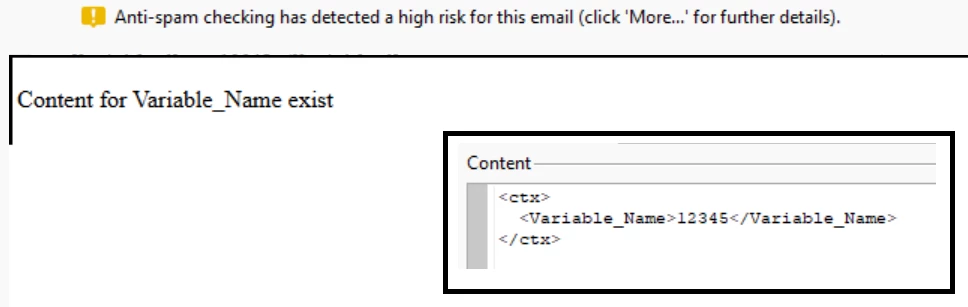
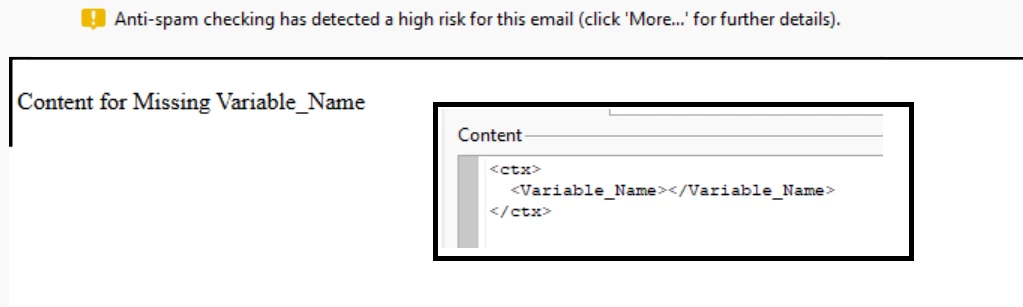
<% if ( String(ctx.Variable_Name).length > 0 ) { %> <p>Content for Variable_Name exist</p> <% } else { %> <p>Content for Missing Variable_Name</p> <% } %>

For Null variable,


For Valid records,

~  ParthaSarathy S~  Click here to join ADOBE CAMPAIGN USER GROUP for Quarterly In-person | Hybrid | Virtual Meetups
SanjayNaAuthor
November 21, 2025

Thanks ParthaSarathy, that seemed to do the trick.