Change of age field in ACC v7 | Community
Skip to main content
Level 4
October 13, 2023
Solved

Change of age field in ACC v7

  • October 13, 2023
  • 2 replies
  • 1229 views

Hello, we are considering changing the @6761651 field  in the Recipient table since we noticed that today we are using this expression in the Recipients (nms) data schema XML-code:


<attribute desc="Age in years" expr="YearsOld([@birthDate])" label="Age" name="age"
notNull="false" type="long"/>


Our @birthDate is not indexed as of today and this change in the schema would help our database performance since the current YearsOld([@birthDate]) expression is heavy to process and we use it in every wkf.

Is there any downside with removing this expression and instead calculate it and populate the @6761651 attribute in a daily workflow?
This post is no longer active and is closed to new replies. Need help? Start a new post to ask your question.
Best answer by ParthaSarathy

This is what we want to do:

We want to remove the expression in the age attribute of the Recipients schema (this attribute is an out of the box one) and use the same expr/calculation in a ETL wkf instead in order to unload the CPU.

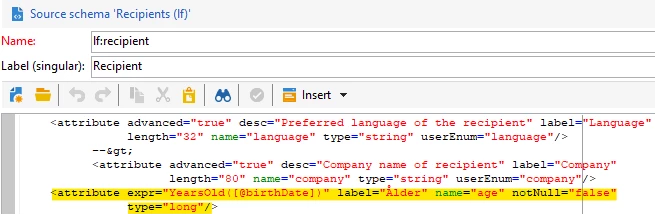
Current data schema (we use an extension of nms:recipients table) with the attribute we want to change:


We want to move the expr="YearsOld([birthDate])" from this table and use it in a ETL wkf instead:


Are there any risks in case for example of future ACC updates?

Thanks for your patience.


@a_b_se , Yes.. You can do that and there won't be any impact.

But, @age is not an SQL field attribute. it is a 'SQL Calculated field'. So removing the expression in Extended schema and updating in ETL workflow wont work.

You need to follow below steps:

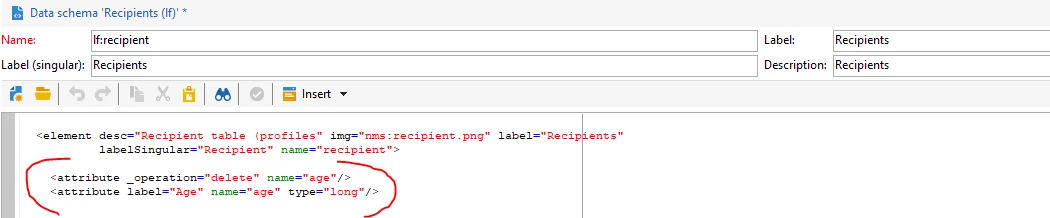
In your extended schema, add the below code inside element tag

<attribute _operation="delete" name="age"/> <attribute label="Age" name="age" type="long"/>

This script remove the OOTB expression (there wont be any impact), and create a SQL Field in database with name as @age

Update the database structure > logout and reconnect

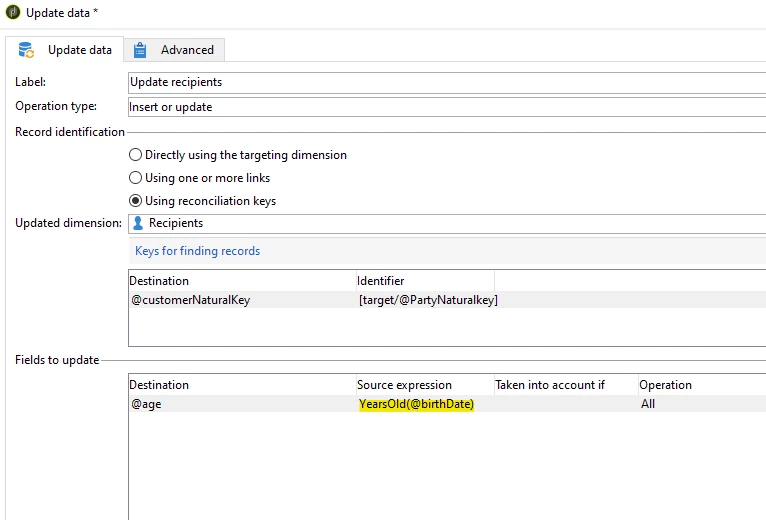
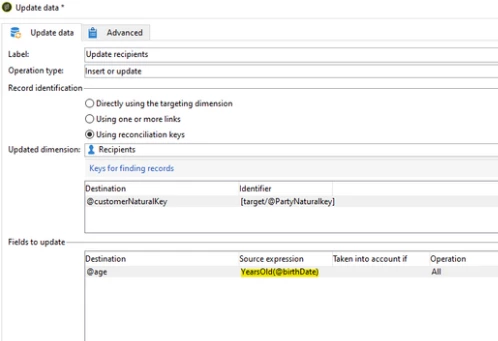
Now in your workflow, use the Update data activity to update the age as per your screenshot.

For the first time, fetch all the recipients in a query and update their age using your workflow.

2 replies

ParthaSarathy
Community Advisor
Community Advisor
October 13, 2023

Hi @a_b_se ,

Yes you can delete it, and create a new attribute with different name and create a dbIndex for it. And using daily workflow you can update the age.


To delete and create an index for a new age field,

Extend your recipient schema and add below line inside element tag:


<dbindex name="age">

      <keyfield xpath="@recipientAge"/>

  </dbindex>

<attribute name="age" _operation="delete"/>

<attribute name="recipientAge" label="Recipient Age" type="long"/>


--Update the database structure--

~  ParthaSarathy S~  Click here to join ADOBE CAMPAIGN USER GROUP for Quarterly In-person | Hybrid | Virtual Meetups
A_B_SEAuthor
Level 4
October 13, 2023

Hello @parthasarathy  and thanks for your reply. I'll try to reformulate:


Do you advice against doing any changes to the age variable in general since it is an out of the box attribute? Or do you see any risks changing the attribute?


ParthaSarathy
Community Advisor
Community Advisor
October 13, 2023

Hi @a_b_se ,

Generally, _operation="delete" we will be using it to remove OOTB attributes.

Before deleting, Just make sure you're not using it in any of your workflows.

~  ParthaSarathy S~  Click here to join ADOBE CAMPAIGN USER GROUP for Quarterly In-person | Hybrid | Virtual Meetups
A_B_SEAuthor
Level 4
October 13, 2023

I do not want to delete any OOTB attributes, I was just asking if changing the structure of the one mentioned is approved or it would pose any kind of problems. Is it common to edit such OOTB attributes? Our company never did it and are not aware of the risks.