
Bug with split activity, anyone knows what may be the reason? | Community
Skip to main content
CampaignerForLife
Level 5
November 4, 2025
Solved

Bug with split activity, anyone knows what may be the reason?

  • November 4, 2025
  • 1 reply
  • 137 views

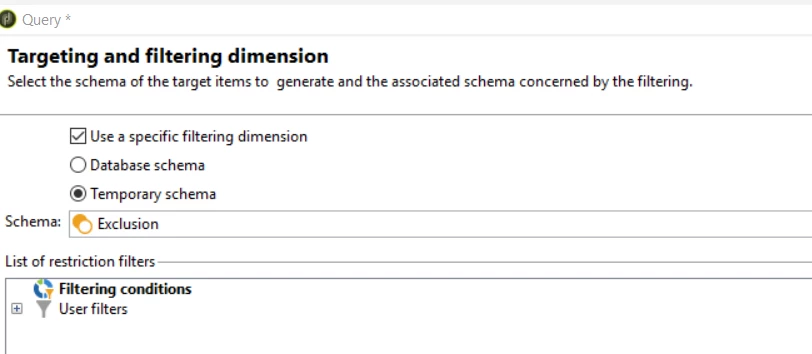
I'm finding some bugs in split activty. First one, even when it says exclusion, it is not. I've to recheck it. 


But later, it feels like the schema isn't really added. When I come back to the split, if I press Previous, it shows me another shcema (The database one)
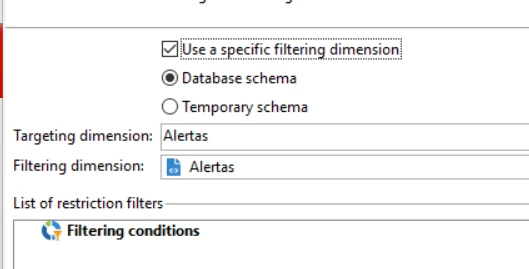
 

And if i execute, it gives an error of missmatching schemas (X schema to  '', empty). 


Anyone knows why is this happening? Thank you in advance!

Best answer by SushantTrimukheD

Hi @campaignerforlife,

In v7, these issues are usually UI or cache-related, especially after copying activities. You might see warnings like “Document types are incompatible” when reloading.

When using “Use data from the target and additional data” in the General tab, make sure populations don’t overlap unless that’s intentional — overlapping can cause exclusion rules to behave unexpectedly and introduce duplicate records.

If the issue persists, try the following steps:

  1. Reconfigure the Split Activity from scratch

    • Delete the problematic Split and add a new one from the palette.

    • In the General tab, explicitly set “Temporary schema” as the targeting dimension (as shown in your screenshot).

    • Ensure it matches the inbound transition’s schema (e.g., temp:query from a previous Query activity).

  2. Add an Enrichment activity upstream

    • Place it just before the Split.

    • Choose “Keep all additional data from the main set” and include the inbound temporary columns you use for filtering.

    • This helps stabilize the schema and prevent mismatches.

  3. Clear cache and restart the console

    • Cached metadata can sometimes cause these UI inconsistencies.

Give these steps a try and see if it resolves the issue.

Thanks,
Sushant Trimukhe

1 reply

SushantTrimukheD
SushantTrimukheDAccepted solution
Level 4
November 5, 2025

Hi @campaignerforlife,

In v7, these issues are usually UI or cache-related, especially after copying activities. You might see warnings like “Document types are incompatible” when reloading.

When using “Use data from the target and additional data” in the General tab, make sure populations don’t overlap unless that’s intentional — overlapping can cause exclusion rules to behave unexpectedly and introduce duplicate records.

If the issue persists, try the following steps:

  1. Reconfigure the Split Activity from scratch

    • Delete the problematic Split and add a new one from the palette.

    • In the General tab, explicitly set “Temporary schema” as the targeting dimension (as shown in your screenshot).

    • Ensure it matches the inbound transition’s schema (e.g., temp:query from a previous Query activity).

  2. Add an Enrichment activity upstream

    • Place it just before the Split.

    • Choose “Keep all additional data from the main set” and include the inbound temporary columns you use for filtering.

    • This helps stabilize the schema and prevent mismatches.

  3. Clear cache and restart the console

    • Cached metadata can sometimes cause these UI inconsistencies.

Give these steps a try and see if it resolves the issue.

Thanks,
Sushant Trimukhe