alert when file is not RECEIVED 3RD TIME | Community
Skip to main content
Level 4
January 26, 2024
Solved

alert when file is not RECEIVED 3RD TIME

  • January 26, 2024
  • 2 replies
  • 1441 views

i want to run a import workflow between 7am to 10am and set schedular to run 3times a day..

so workflow will run 3 times between this duration

now when file is received i want the workflow to move to file loadign acitity


but in case file is not received between 7am to 10am i wan to send alert but not evEry hour(ASSSUME FILE NOT RECEIVED WHEN RUN FIR THE FIRST TIME)

but only after Wkf run comlpleteD for 3imes a day and file is not received EVEN THENthen i want TO SEND ALERT


please let me know how can we achieve this


@ParthaSarathy

@parthasarathy 

@parthas 

@AkshayAnand 

@Craig_Thonis 

@Manoj_Kumar_ 

@Amine_Abedour 

@Marcel_Szimonisz

@DavidKangni 

@Amit_Kumar 

@ShashankNigam02

@Ganesh5067

@Jonathon_wodnicki

This post is no longer active and is closed to new replies. Need help? Start a new post to ask your question.
Best answer by ParthaSarathy

Hi @dishasharma ,

You can try the same approach mentioned in this thread and modify the query condition as below,


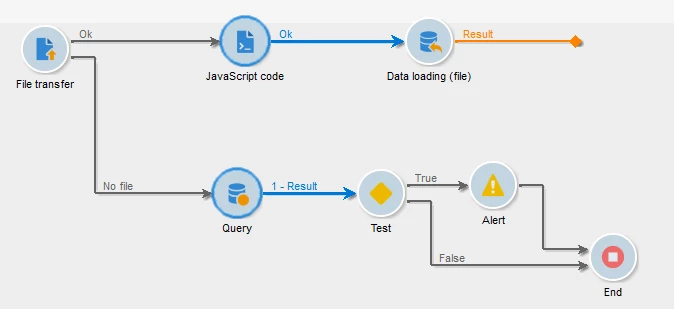
File Transfer:

In File transfer activity's Advanced tab, add the below script

vars.hour = formatDate(new Date(), "%2H");

Query:

Targeting & Filtering Dimension: xtk:workflow

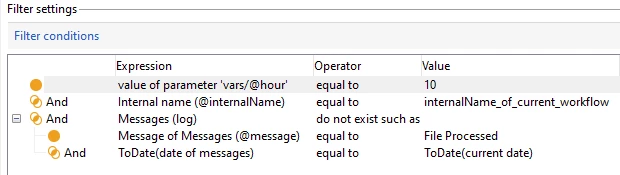
Filtering Condition:

(Highlighted in BOLD fonts are newly added/modified condition compared to the reference thread's query condition)

$(vars/@hour)   equal to 10

AND

@internalName equal to internal_name_of_current_workflow

AND

Message (log)   do not exist such as

        @message                 equal to    File Processed

         AND

        ToDate(@logDate)     equal to  ToDate( GetDate()) 

2 replies

Manoj_Kumar
Community Advisor
Community Advisor
January 27, 2024

Hello @dishasharma 


If you know the timing of the 3rd run then use this:


You will have to use JavaScript to achieve this.


After the scheduler activity add JavaScript code activity and write this code.

instance.vars.myRunHour=formatDate(new Date(), "%2H");

This will give you the hour when the 3rd run is happening.


Then add a test activity in your workflow to check if the the variable hour is matching with the timing of 3rd run. If yes then it is the third run and send the alert.


If you are not sure the timings of the workflow run


You can use the JavaScript  to update value of an option. You can increase the value of this option every time the WF is run.


On every run check if the value of that option is 3 and file status.


// set Option setOption('WFrunCounter',0); //get Option getOption('WFrunCounter');


Manoj  | https://themartech.pro
Level 3
February 1, 2024

@_manoj_kumar_ 

thank you for your help but m facing one challenge here


If you are not sure the timings of the workflow run

You can use the JavaScript  to update value of an option. You can increase the value of this option every time the WF is run.


On every run check if the value of that option is 3 and file status.

what i am doing is:

this m doing before file transfer activity:


Option
setOption('WFrunCounter',0);

 now after file tranafer acitity when no file received m incrementing counter

but when file not received for for first time and then m incmrenting counter

but later on when wkf run fir 2nd time it is stgarting from 0


please please help to provide how can I set these counters AND USE IT WHN FILE NOT RECEIEVD FOR 3RD TIME

RELLAY CONfused and not able to achieve results please help

Level 4
February 2, 2024

@_manoj_kumar_ 


plrase reply

plrase help m stuck

ParthaSarathy
Community Advisor
ParthaSarathyCommunity AdvisorAccepted solution
Community Advisor
February 5, 2024

Hi @dishasharma ,

You can try the same approach mentioned in this thread and modify the query condition as below,


File Transfer:

In File transfer activity's Advanced tab, add the below script

vars.hour = formatDate(new Date(), "%2H");

Query:

Targeting & Filtering Dimension: xtk:workflow

Filtering Condition:

(Highlighted in BOLD fonts are newly added/modified condition compared to the reference thread's query condition)

$(vars/@hour)   equal to 10

AND

@internalName equal to internal_name_of_current_workflow

AND

Message (log)   do not exist such as

        @message                 equal to    File Processed

         AND

        ToDate(@logDate)     equal to  ToDate( GetDate()) 

~  ParthaSarathy S~  Click here to join ADOBE CAMPAIGN USER GROUP for Quarterly In-person | Hybrid | Virtual Meetups