Add dynamic value in update activity - example 'Data from March 2025' | Community
Skip to main content
sharma_nik
Level 2
February 3, 2025
Solved

Add dynamic value in update activity - example 'Data from March 2025'

  • February 3, 2025
  • 1 reply
  • 620 views

Hello


I am trying to find a solution to update Month name ( Jan, Feb, March) and year value (2025) dynamically in an update activity. The value should look like "Data from March 2025"

The Month name should be starting from next month. For example, If I run the workflow in Jan, then the month value should be FEB.

Tried using "'Data from '+Month(AddMonths(formatDate(GetDate(), '%B'), 1))+' '+Year(GetDate())" but it is giving error 
 XTK-170016 You are not authorized to use SQL expressions. 'formatDate' cannot be processed.

Similar to above requirement, I am also trying to add dynamic values in two fields lets say startDate and endDate.
startDate should be from 1st of next month when the workflow executes.

endDate should be last date of next month from when the workflow executes.

if the workflow executes in Feb, startDate would be 1/3/2025 and endDate would be 31/3/2025.


Thanks

This post is no longer active and is closed to new replies. Need help? Start a new post to ask your question.
Best answer by ParthaSarathy

Hi @sharma_nik ,

Place an enrichment activity > advanced tab > add below script in initialization script,

//To get Next Month's First Date var date1 = new Date(); date1.setMonth(date1.getMonth() + 1); vars.NextMonthFirstDate = '01/'+formatDate(date1, "%2M/%4Y"); //To get Next Month's Last Date var date2 = new Date(); date2.setMonth(date2.getMonth() + 2); vars.twoMonthString = formatDate(date2, "%4Y-%2M")+'-01T00:00:00'; var twoMonthDate = new Date(vars.twoMonthString); twoMonthDate.setDate(twoMonthDate.getDate() - 1); vars.NextMonthLastDate = formatDate(twoMonthDate, "%2D/%2M/%4Y"); //Fetch Next Month var date3 = new Date(); date3.setMonth(date3.getMonth() + 1); vars.NextMonthString = 'Data from '+formatDate(date3, "%Bl %4Y"); logInfo("Date: "+vars.NextMonthString);

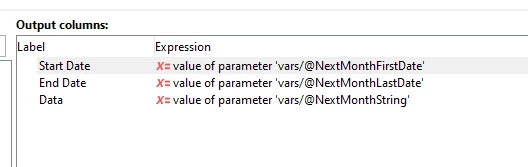
In Enrichment > add data > add the below expressions in output columns,

$(vars/@NextMonthFirstDate) $(vars/@NextMonthLastDate) $(vars/@NextMonthString)


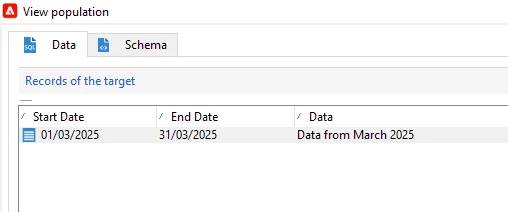
Result:

1 reply

ParthaSarathy
Community Advisor
ParthaSarathyCommunity AdvisorAccepted solution
Community Advisor
February 3, 2025

Hi @sharma_nik ,

Place an enrichment activity > advanced tab > add below script in initialization script,

//To get Next Month's First Date var date1 = new Date(); date1.setMonth(date1.getMonth() + 1); vars.NextMonthFirstDate = '01/'+formatDate(date1, "%2M/%4Y"); //To get Next Month's Last Date var date2 = new Date(); date2.setMonth(date2.getMonth() + 2); vars.twoMonthString = formatDate(date2, "%4Y-%2M")+'-01T00:00:00'; var twoMonthDate = new Date(vars.twoMonthString); twoMonthDate.setDate(twoMonthDate.getDate() - 1); vars.NextMonthLastDate = formatDate(twoMonthDate, "%2D/%2M/%4Y"); //Fetch Next Month var date3 = new Date(); date3.setMonth(date3.getMonth() + 1); vars.NextMonthString = 'Data from '+formatDate(date3, "%Bl %4Y"); logInfo("Date: "+vars.NextMonthString);

In Enrichment > add data > add the below expressions in output columns,

$(vars/@NextMonthFirstDate) $(vars/@NextMonthLastDate) $(vars/@NextMonthString)


Result:

~  ParthaSarathy S~  Click here to join ADOBE CAMPAIGN USER GROUP for Quarterly In-person | Hybrid | Virtual Meetups
sharma_nik
Level 2
February 19, 2025

Thank you so much Partha for your response. It helped a lot. 🙂