Add checkbox in predefined filter | Community
Skip to main content
tejashriw155148
Level 4
January 7, 2021
Solved

Add checkbox in predefined filter

  • January 7, 2021
  • 4 replies
  • 2379 views

Hi,


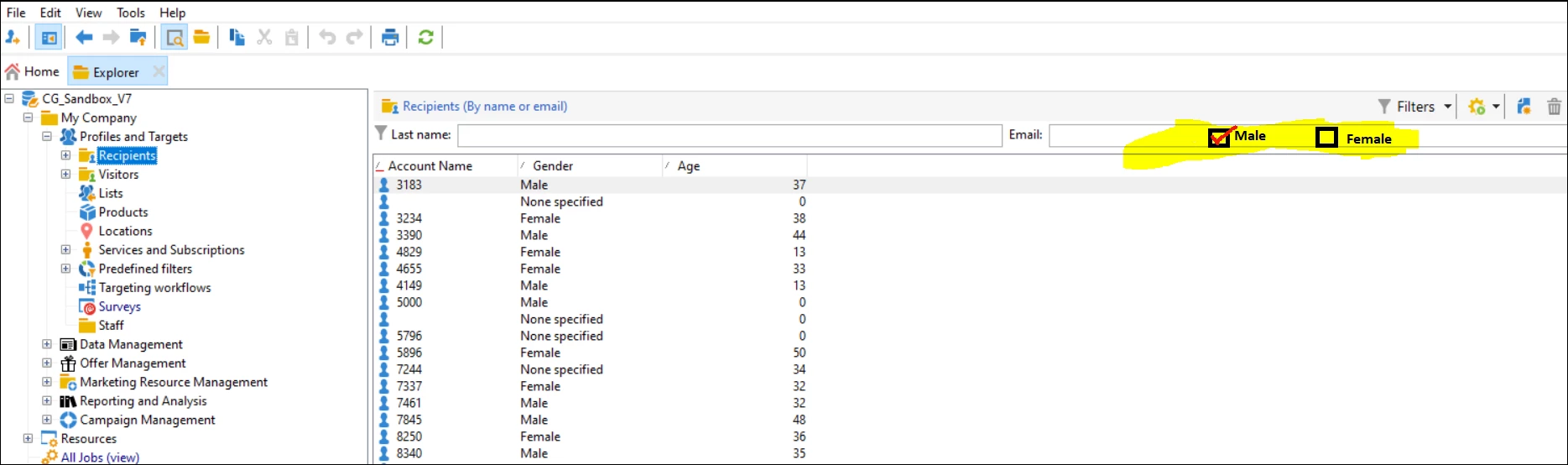
Please let me know how can I add predefined filter for gender, it means if I checked male then it should show all records related to male gender only.


Example: highlighted in bleow screenshot.


Thanks,

This post is no longer active and is closed to new replies. Need help? Start a new post to ask your question.
Best answer by ParthaSarathy
Hi @tejashriw155148 ,
You can create male and female checkbox for recipient list with this steps,
step1: Data Schema
In the extended recipient schema, create 2 attributes @male and @female with data type as boolean.
Give default value as 'Yes' and followed by a condition expr="@gender=1" for male and expr="@gender=2" for female.
(After updating DB structure, For cross verification, you can create a workflow query as @male=yes and check it is fetching all male gender successfully.)
Step2: Pre-defined filter
Duplicate 'byNameOrEmail' predefined filter.
In General tab, Make the filtering condition for newly created attribute @male and @female.
In Parameter tab, Check the checkbox 'Default filter for associated document type'
In Form tab,
 <form colcount="4">
   <input noTransaction="true" xpath="@lastName"/>
   <input noTransaction="true" xpath="@email"/>
   <input noTransaction="true" xpath="@male"/>
   <input noTransaction="true" xpath="@female"/>
 </form>
In Preview tab, we can see how it is rendering and you can validate for male and female checkbox.
 
Regards,
ParthaSarathy S

4 replies

January 7, 2021

By adding a custom filter in the settings tab.

Currently last name and email are predefined, you can add a search box i guess so, not sure on the check box functionality.

Anita_punmiya
Level 5
January 11, 2021

Hi @tejashriw155148 :


You can create your custom filter , save it and label as per your choice.

 Once saved, you can select it from the filters option .

Thanks.

ParthaSarathy
Community Advisor
ParthaSarathyCommunity AdvisorAccepted solution
Community Advisor
January 12, 2021
Hi @tejashriw155148 ,
You can create male and female checkbox for recipient list with this steps,
step1: Data Schema
In the extended recipient schema, create 2 attributes @male and @female with data type as boolean.
Give default value as 'Yes' and followed by a condition expr="@gender=1" for male and expr="@gender=2" for female.
(After updating DB structure, For cross verification, you can create a workflow query as @male=yes and check it is fetching all male gender successfully.)
Step2: Pre-defined filter
Duplicate 'byNameOrEmail' predefined filter.
In General tab, Make the filtering condition for newly created attribute @male and @female.
In Parameter tab, Check the checkbox 'Default filter for associated document type'
In Form tab,
 <form colcount="4">
   <input noTransaction="true" xpath="@lastName"/>
   <input noTransaction="true" xpath="@email"/>
   <input noTransaction="true" xpath="@male"/>
   <input noTransaction="true" xpath="@female"/>
 </form>
In Preview tab, we can see how it is rendering and you can validate for male and female checkbox.
 
Regards,
ParthaSarathy S
~  ParthaSarathy S~  Click here to join ADOBE CAMPAIGN USER GROUP for Quarterly In-person | Hybrid | Virtual Meetups
Sukrity_Wadhwa
Community Manager
Community Manager
January 20, 2021

Hi @tejashriw155148,

Were you able to resolve this query with any of the given solutions? Do let us know.

Thanks!

Sukrity Wadhwa