Workfront fusion Entry Date correct format under filter condition | Community
Skip to main content
Level 2
February 26, 2026
Solved

Workfront fusion Entry Date correct format under filter condition

  • February 26, 2026
  • 1 reply
  • 11 views

Hi Guys,
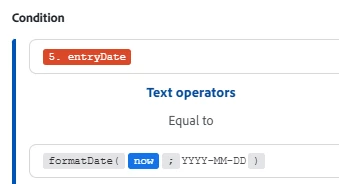
How to write the correct format for Entry date under filter condition?


This is my current format but it wont pass to it.


Thanks, 

    Best answer by etaylor-1

    Hi ​@GeraldFa thanks for your question, please see below, i have included a few links as well. 


    From your screenshots:

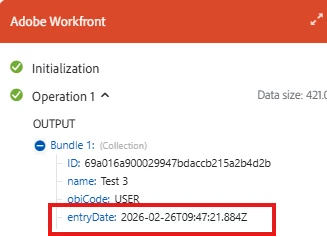
    • entryDate coming from Workfront is a Date/Time value like
      2026-02-26T09:47:21.884Z (ISO 8601)
      Item data types.
    • Your filter is using a Text operator and the value
      formatDate(now; YYYY-MM-DD).

    There are two issues:

    1. The format argument must be in quotes.
      Fusion’s date/time functions expect the format pattern as a string, e.g. 'YYYY-MM-DD'
      Function overview.

    2. Equality on a full Date/Time vs a date-only string will never match.
      entryDate has a time component; formatDate(now; 'YYYY-MM-DD') returns only the date text (e.g. 2026-02-26). Even if the syntax is correct, those values won’t be equal as dates.

    Correct format for your current expression

    If you just want to fix the syntax of what you have now, change the right side to:

    Copy

    formatDate(now; 'YYYY-MM-DD')

    So your filter would read:

    • Left: 5. entryDate
    • Operator type: Text operators → Equal to
    • Right (expression): formatDate(now; 'YYYY-MM-DD')

    This makes the function valid, but on its own it still won’t pass bundles, because of the time issue.

    Recommended way to filter “entries from today”

    To reliably get records whose entryDate is today, you have two common patterns:

    Option 1 – Date range (recommended)

    Use Date operators and set a range from the start of today to the start of tomorrow:

    1. First condition

      • Field: 5. entryDate

      • Operator type: Date operators

      • Operator: Greater than or equal to

      • Value (expression):

        Copy

        parseDate(formatDate(now; 'YYYY-MM-DD'); 'YYYY-MM-DD')
    2. Second condition (AND)

      • Field: 5. entryDate

      • Operator type: Date operators

      • Operator: Less than

      • Value (expression):

        Copy

        addDays(
        parseDate(formatDate(now; 'YYYY-MM-DD'); 'YYYY-MM-DD');
        1
        )

    This keeps any entryDate between today at 00:00 and tomorrow at 00:00.

    Option 2 – Compare formatted text

    If you prefer to stay in Text operators, compare the formatted entry date to today’s date:

    • Change the left side to an expression (if your UI allows expression mapping) like:

      Copy

      formatDate(5.entryDate; 'YYYY-MM-DD')
    • Operator type: Text operators → Equal to

    • Right side:

      Copy

      formatDate(now; 'YYYY-MM-DD')

    This converts both sides to a plain YYYY-MM-DD string before comparing.

    Fusion filters are designed exactly for these “field vs expression” comparisons
    Use filters.
    1 reply

    etaylor-1Adobe EmployeeAccepted solution
    Adobe Employee
    February 26, 2026

    Hi ​@GeraldFa thanks for your question, please see below, i have included a few links as well. 


    From your screenshots:

    • entryDate coming from Workfront is a Date/Time value like
      2026-02-26T09:47:21.884Z (ISO 8601)
      Item data types.
    • Your filter is using a Text operator and the value
      formatDate(now; YYYY-MM-DD).

    There are two issues:

    1. The format argument must be in quotes.
      Fusion’s date/time functions expect the format pattern as a string, e.g. 'YYYY-MM-DD'
      Function overview.

    2. Equality on a full Date/Time vs a date-only string will never match.
      entryDate has a time component; formatDate(now; 'YYYY-MM-DD') returns only the date text (e.g. 2026-02-26). Even if the syntax is correct, those values won’t be equal as dates.

    Correct format for your current expression

    If you just want to fix the syntax of what you have now, change the right side to:

    Copy

    formatDate(now; 'YYYY-MM-DD')

    So your filter would read:

    • Left: 5. entryDate
    • Operator type: Text operators → Equal to
    • Right (expression): formatDate(now; 'YYYY-MM-DD')

    This makes the function valid, but on its own it still won’t pass bundles, because of the time issue.

    Recommended way to filter “entries from today”

    To reliably get records whose entryDate is today, you have two common patterns:

    Option 1 – Date range (recommended)

    Use Date operators and set a range from the start of today to the start of tomorrow:

    1. First condition

      • Field: 5. entryDate

      • Operator type: Date operators

      • Operator: Greater than or equal to

      • Value (expression):

        Copy

        parseDate(formatDate(now; 'YYYY-MM-DD'); 'YYYY-MM-DD')
    2. Second condition (AND)

      • Field: 5. entryDate

      • Operator type: Date operators

      • Operator: Less than

      • Value (expression):

        Copy

        addDays(
        parseDate(formatDate(now; 'YYYY-MM-DD'); 'YYYY-MM-DD');
        1
        )

    This keeps any entryDate between today at 00:00 and tomorrow at 00:00.

    Option 2 – Compare formatted text

    If you prefer to stay in Text operators, compare the formatted entry date to today’s date:

    • Change the left side to an expression (if your UI allows expression mapping) like:

      Copy

      formatDate(5.entryDate; 'YYYY-MM-DD')
    • Operator type: Text operators → Equal to

    • Right side:

      Copy

      formatDate(now; 'YYYY-MM-DD')

    This converts both sides to a plain YYYY-MM-DD string before comparing.

    Fusion filters are designed exactly for these “field vs expression” comparisons
    Use filters.