Using Fusion to create a Planning entry from an issue and mapping custom field values | Community
Skip to main content
Level 2
November 6, 2024
Solved

Using Fusion to create a Planning entry from an issue and mapping custom field values

  • November 6, 2024
  • 1 reply
  • 645 views

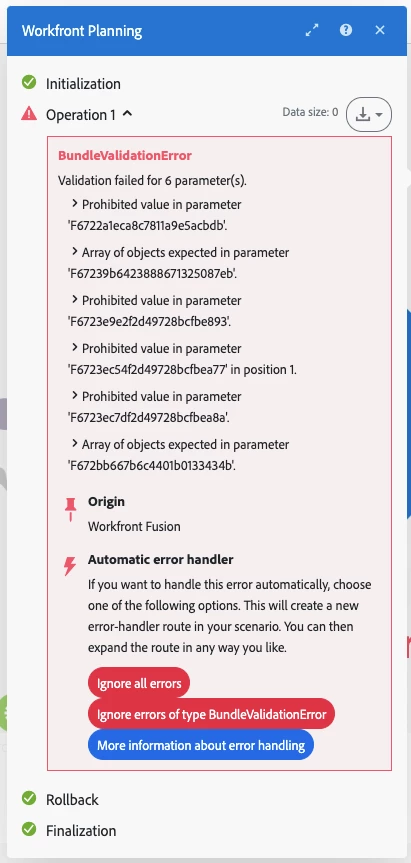
We just licensed Planning and I'm trying to create Planning entries from issues.  I have been able to do it at the most basic level but I get errors when trying to leverage custom form fields from the issue and put those values into the Planning entry.


The fields I'm having problems with are either single- or multi-select dropdowns in the issue and the text values are the same in Planning but are built as custom columns in Planning rather than records.  Trying to map the values from the custom form fields into the fields for Planning yields the errors below.


I understand these are two different object types and (as far as I'm aware) custom forms aren't supported in Planning quite yet, but has anyone tried this and been successful?
 

This post is no longer active and is closed to new replies. Need help? Start a new post to ask your question.
Best answer by monicacardoso

Hi @christiansi6


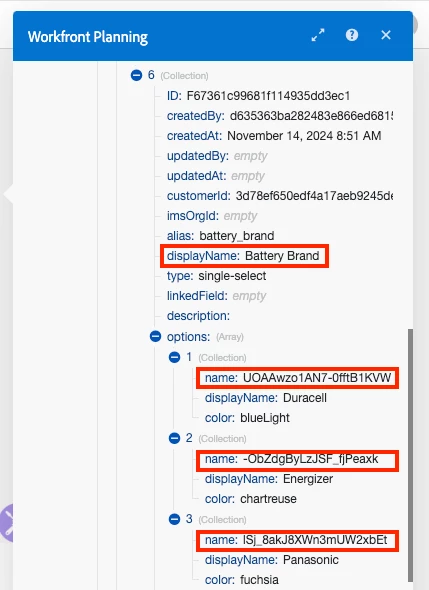
Thank you for your question! Each of the options within the single-select or multi-select drop-downs have a unique ID associated with them. This can be seen in the output of a "Get record types" module for Workfront Planning. 


It sounds like you are mapping the displayName of the option instead of the name, which is what the system would expect.


For example, I have a single-select dropdown field in my instance called "Battery Brands". Within that field, the options are "Duracell", "Energizer" and "Panasonic". In the UI, I can simply select one of those options from the dropdown using the displayName. However, in Fusion I can see that there is an ID associated with each of the options. If I try to map the displayName, I will run into the same error as your screenshot. I must map the option's name (which is the ID). 


I have included a screenshot below for clarification: 


With that being said, if you are running into further issues with this, I would recommend submitting a support ticket so that our team can take a look at your specific fields and assist you. 


- Monica

1 reply

monicacardosoAdobe EmployeeAccepted solution
Adobe Employee
November 15, 2024

Hi @christiansi6


Thank you for your question! Each of the options within the single-select or multi-select drop-downs have a unique ID associated with them. This can be seen in the output of a "Get record types" module for Workfront Planning. 


It sounds like you are mapping the displayName of the option instead of the name, which is what the system would expect.


For example, I have a single-select dropdown field in my instance called "Battery Brands". Within that field, the options are "Duracell", "Energizer" and "Panasonic". In the UI, I can simply select one of those options from the dropdown using the displayName. However, in Fusion I can see that there is an ID associated with each of the options. If I try to map the displayName, I will run into the same error as your screenshot. I must map the option's name (which is the ID). 


I have included a screenshot below for clarification: 


With that being said, if you are running into further issues with this, I would recommend submitting a support ticket so that our team can take a look at your specific fields and assist you. 


- Monica