Sanity Check: Non-editable fields in Update module? | Community
Skip to main content
Sven-iX
Community Advisor
Community Advisor
April 15, 2025
Solved

Sanity Check: Non-editable fields in Update module?

  • April 15, 2025
  • 2 replies
  • 477 views

Hey all - 
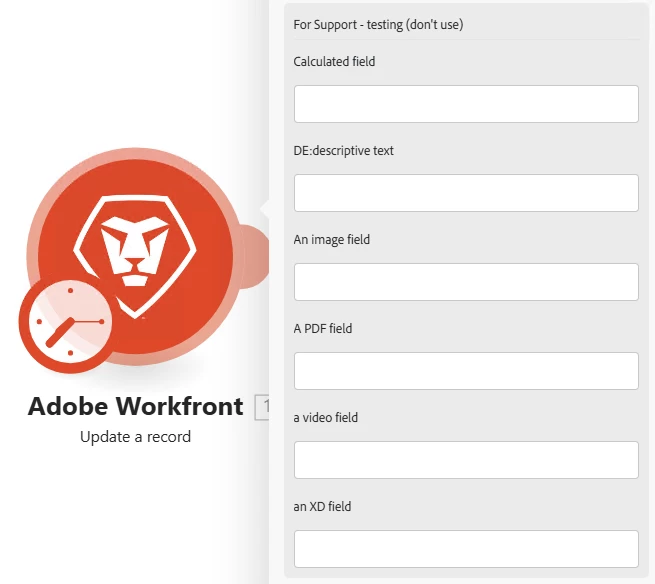
I just created a ticket for this and wanted to check - do you see this as well? Or is it just my client's environment: The update module shows non-editable fields as text boxes... (When I select "attach custom form")


Best answer by Sven-iX

response from Support


We discussed this with the team and also tried testing the behavior in postman and found that the calculated field returns 200 and acts like a successful update, but then WF ignores it and proceeds to output the result of the calculation.
Then, further we discussed this with the engineering team and they mentioned that this behavior is expected. For instance, if there's an expression configured for Field A, the first time a value is set, it will accept the value provided through the API: IF(ISBLANK({DE:field A}), {DE:field A}, "new value")
That's why users aren't even seeing an error when they try to set a value for a calculated field. The value they provide is accepted initially, but the final value is determined by the formula's evaluation.

I replied back that I feel by definition the fields in the screenshot are not user settable, ie, readonly (you configure them in the form editor) so these shouldn't show up at all in an Update module. 

2 replies

Lawson02
Level 6
April 15, 2025

I don't have any experience with any of the other fields but the calculated field was showing up for me and allowed me to enter a value. I added the image field as well and it would let me edit. I think at least the functionality for the calculated field has been like that for a while. I don't interact with the image field so I wouldn't know about that one.

Sven-iX
Community Advisor
Sven-iXCommunity AdvisorAuthor
Community Advisor
April 15, 2025

Man, that's weird. Thanks, @lawson02 appreciate you responding. 

Sven-iX
Community Advisor
Sven-iXCommunity AdvisorAuthorAccepted solution
Community Advisor
April 23, 2025

response from Support


We discussed this with the team and also tried testing the behavior in postman and found that the calculated field returns 200 and acts like a successful update, but then WF ignores it and proceeds to output the result of the calculation.
Then, further we discussed this with the engineering team and they mentioned that this behavior is expected. For instance, if there's an expression configured for Field A, the first time a value is set, it will accept the value provided through the API: IF(ISBLANK({DE:field A}), {DE:field A}, "new value")
That's why users aren't even seeing an error when they try to set a value for a calculated field. The value they provide is accepted initially, but the final value is determined by the formula's evaluation.

I replied back that I feel by definition the fields in the screenshot are not user settable, ie, readonly (you configure them in the form editor) so these shouldn't show up at all in an Update module.