I'm new to Fusion and one of the quick wins we've identified is pulling the overall deliverable due date custom field in the issue into the project template. The goal is for the last task due date which is release final files automatically aligns with the overall due date set by the client in their request. Is this even possible and if so, what happens to the tasks if the time allotted doesn't align with the template? Any insights would be helpful to the possibility, concerns and even how to start setting this up as a scenario. Thanks in advance!
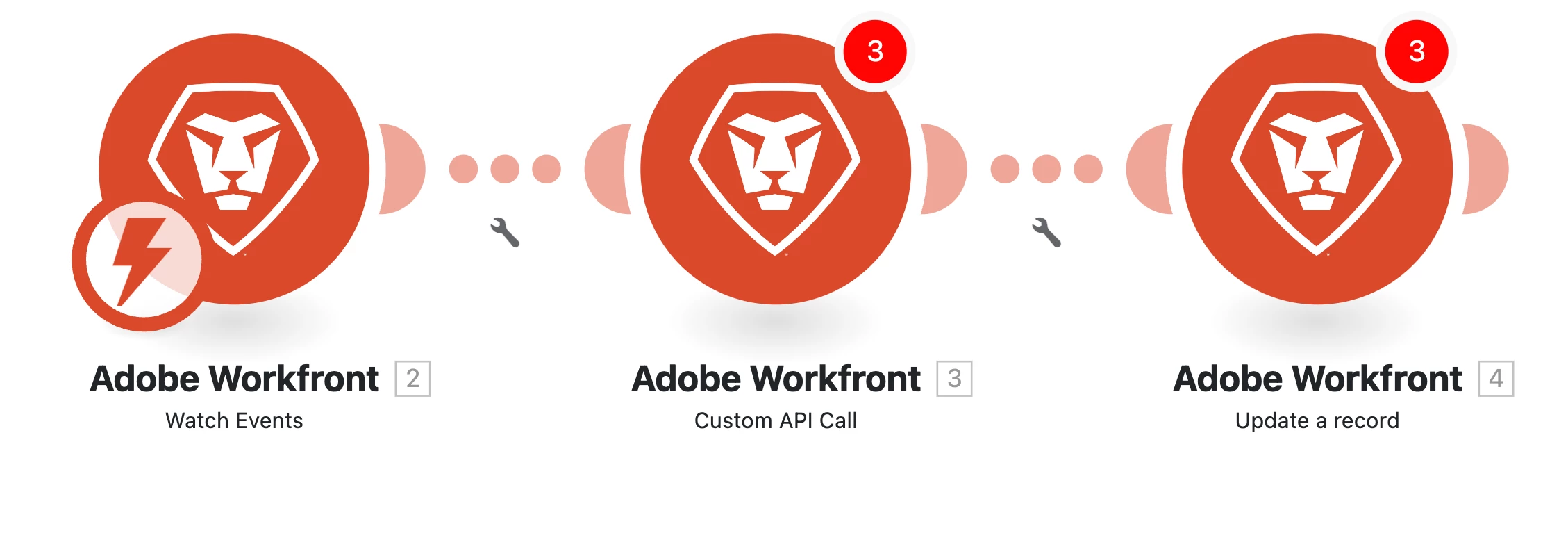
I would use the module “Workfront - Watch Events” and listen to Create and Update events of issues. You can also add a filter for template, portfolio, program here to get only relevant events.
Then I use the projectID of the incoming issue event and search for the issue with the biggest due date in the custom form.
Let’s say issue custom form has custom fields: myCustomDueDate. The technical name would be DE:myCustomDueDate.
Use the module “Workfront - Custom API Call” (because the normal Workfront Search module can’t really order elements which want to do) and use the path “/optask/search” and as query parameters:
projectID: <project ID from the new state of the incoming create or update issue event>
DE:myCustomDueDate_Sort=DESC // Gives you the latest date
DE:myCustomDueDate_Mod=notnull // That issues without due date are ignored
I would use the module “Workfront - Watch Events” and listen to Create and Update events of issues. You can also add a filter for template, portfolio, program here to get only relevant events.
Then I use the projectID of the incoming issue event and search for the issue with the biggest due date in the custom form.
Let’s say issue custom form has custom fields: myCustomDueDate. The technical name would be DE:myCustomDueDate.
Use the module “Workfront - Custom API Call” (because the normal Workfront Search module can’t really order elements which want to do) and use the path “/optask/search” and as query parameters:
projectID: <project ID from the new state of the incoming create or update issue event>
DE:myCustomDueDate_Sort=DESC // Gives you the latest date
DE:myCustomDueDate_Mod=notnull // That issues without due date are ignored