
Fusion: Edit Microsoft Excel in SharePoint? | Community
Skip to main content
_Manish_Singh
Level 9
January 29, 2025
Solved

Fusion: Edit Microsoft Excel in SharePoint?

  • January 29, 2025
  • 2 replies
  • 730 views

Hello,

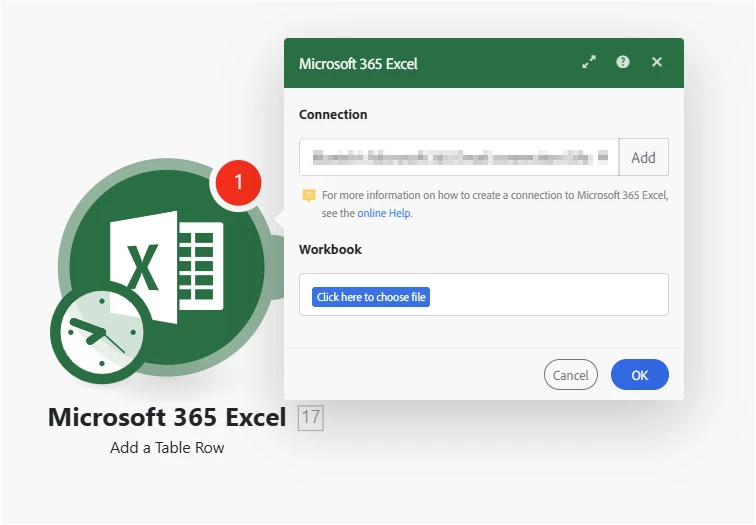
I'm trying to add rows to an Excel file located on a public SharePoint site that everyone in our company can access. However, when I click 'choose file,' it only allows me to select files or folders from my OneDrive, but nothing outside it although I have the access. Since it is a shared site, I am unsure how to establish the connection to get the file. Has anyone tried this before?
Best answer by Antony6790

Not sure what is the process in your company but we had to go through Azure App and connect to Sharepoint.


We had a requirement to connect Fusion to our Enterprise sharepoint site and read excel file data and create projects in Workfront.


So we registered an App in Azure and added Graph API permission "Site.read.all" and able to access excel file from SharePoint. 


Thanks,

Antony.

2 replies

KellieGardner
Community Advisor
Community Advisor
January 29, 2025

 the Excel module is a connection through One Drive which is a connection to your personal file storage and not a connection through SharePoint. 


Depending on how the file is saved, from SharePoint you can add a shortcut to your One Drive and see if you can then access the file?


_Manish_Singh
Level 9
January 30, 2025

Hello @kelliegardner - I tried the shortcut method, but it didn't work because the shortcut is just a reference and not the actual file, so Excel app in Fusion does not recognize it.

Antony6790Accepted solution
Level 3
January 30, 2025

Not sure what is the process in your company but we had to go through Azure App and connect to Sharepoint.


We had a requirement to connect Fusion to our Enterprise sharepoint site and read excel file data and create projects in Workfront.


So we registered an App in Azure and added Graph API permission "Site.read.all" and able to access excel file from SharePoint. 


Thanks,

Antony.

_Manish_Singh
Level 9
January 30, 2025

It is good to know that it is possible. I will contact IT.

Could you please check on your end if the Excel app I shared in the screenshot can access SharePoint files? My use case is not just to read the file but to edit them using the Excel app in fusion. Please check and let me know.

Level 3
January 30, 2025

Tried the excel connector but  getting below message when using the connection. 


"You need to extend the permissions given to the selected connection so that we can use it.?


So with right permissions in the registered App, I think this will work. Let me know if you are able to connect and read/update excel sheets from sharepoint using Excel connector.


Thanks,

Antony..