Export Output Bundles | Community
Skip to main content
Level 9
November 22, 2023
Question

Export Output Bundles

  • November 22, 2023
  • 2 replies
  • 1178 views


Hi Fusion Community,


Does anyone know of a quick way to export Output Bundles from a modules execution?  Instead of me having to click on each individual operation within a module after an execution, and then downloading each operations output separately - this will take forever when you have hundreds or thousands of operations for a given module - I'm wondering if there's a quicker way to export this data?


Thanks!

Nick
 

This post is no longer active and is closed to new replies. Need help? Start a new post to ask your question.

2 replies

lgaertner
Level 9
November 24, 2023

Hi,


Did you already try to aggregate the outputs of each operation into an array? 


Regards

Lars

NickVa7Author
Level 9
November 24, 2023

I shall try that.  Thanks, Lars.

ChrisStephens
Community Advisor
Community Advisor
November 27, 2023

May I ask what you are trying to do it for?

NickVa7Author
Level 9
November 27, 2023

Hey Chris!
The specific use case is as follows:

  • We have a Fusion scenario set up to assist in importing our HR system's PTO records as Time Off records in WF.
  • During testing, we imported over 100 records without a value in the Time Off External Reference ID field.
  • We use this field to also mass delete the Time Off records each week and import a fresh batch.
  • Because we imported 100 records without an ExtRefID, it made it hard to locate all of the new Time Off Records for deletion (using a report).  
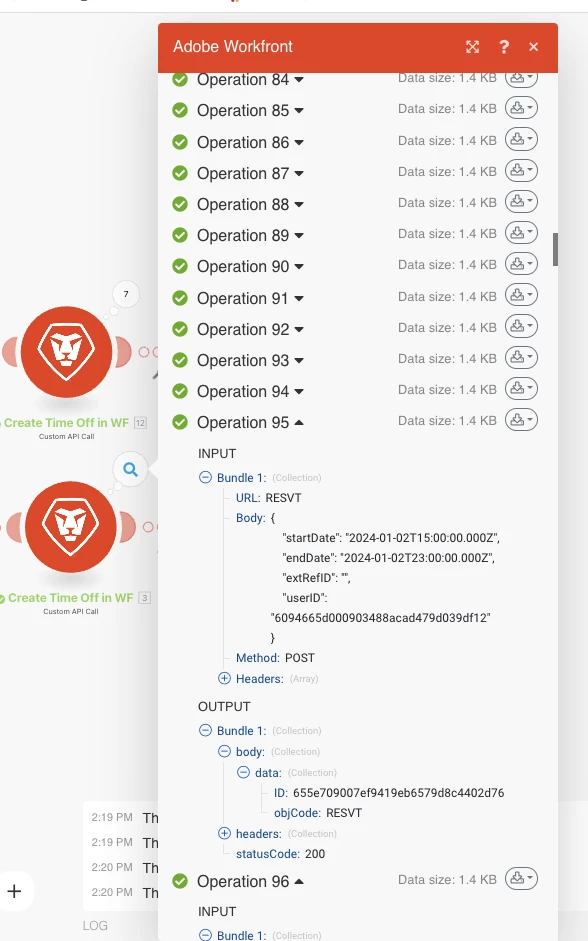
  • I had to manually expand each operation bundle (screenshot attached) from the successful import to then find the Time Off ID, and then copy it to a new CSV to be used in my deletion scenario.
  • Opening every operation bundle for over 100 operations was painful, and I was hoping there was an easier more efficient way to get all the Time Off ID's.

ChrisStephens
Community Advisor
Community Advisor
November 28, 2023

Oh ok, so you're trying to export them from a historical run? Sorry, I don't have any good ideas for that, I've always had to do it manually as painful as it is.