API call to update a form after a submission in Workfront | Community
Skip to main content
Level 3
May 3, 2025
Solved

API call to update a form after a submission in Workfront

  • May 3, 2025
  • 1 reply
  • 539 views

Hi, I am trying to update a form field via Fusion automation in the following way:


We have e.g. 4 time slots, that submitters can select from and after one slot has been selected I would like to remove this option for other submitters in order to prevent duplicate slot "bookings".


Example:
The field is called
SELECT A TIME:
7:00
8:00
9:00
10:00
Mr. Smith selects time 7:00 and submits a request.

When Mrs. Smart opens the request form after Mr. Smith's submission, the field SELECT A TIME shows the following available slots:

8:00

9:00

10:00


I heard it is possible via an API call to hide a field choice, since the RECORD TYPE FORM or FIELD does not exist in the dropdown. Has anybody experience with a similar update of a form after a form submission (to hide a field)?
This post is no longer active and is closed to new replies. Need help? Start a new post to ask your question.
Best answer by Sven-iX

Hi @trakill 
If I understand this correctly, you're populating the dropdown with 32 entries (30min) per day, for every work day? 

How do you populate this? 

Also, not clear on this bit "the RECORD TYPE FORM or FIELD does not exist in the dropdown" - what do you mean? 


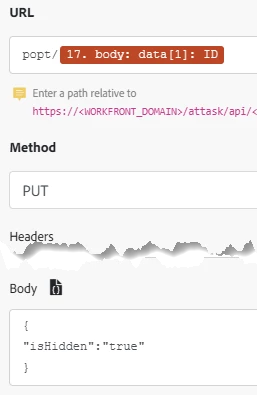
as for "hide a field choice" via API

this is the object hierarchy:

  • Form/category (CTGY)
    • category parameter (CTGYPA)
      • parameter (PARAM)
        • parameter option (POPT)

In your case, you want to edit a parameter option, specifically its "hidden" attribute. The module updateRecord doesn't have that option, so you need to use a customAPI call. 


I'm not trying to be a purist but this still rubs me the wrong way to use a formfield option is being used as a schedule slot. 


But let me know how it works out!

1 reply

Sven-iX
Community Advisor
Community Advisor
May 9, 2025

Hi @trakill I doubt this is what you'll want: Hiding an option hides it for wherever this field is used... in ANY other form instances on any other object. 


Instead, you may want to implement this as an external lookup where the lookup pings a Fusion scenario. can you share more specifics of how you've set up the form/request queue and how it'll be used? 

TraKillAuthor
Level 3
May 18, 2025

Hi Sven-iX,

Thank you for your response. That is exactly what I want. It can be hidden forever, since it should be a one time selection only and then not be visible for following requesters.

The form is set up as a booking time, so I have the name of the booking the time I changed in the meantime to Date and Time and the dropdown looks like this in 30 minutes slots from 6 am to 10 pm in 24 hour timeframe as a single select dropdown field:

Monday, June 16, 2025 - 6:00
Monday, June 16, 2025 - 6:30
Monday, June 16, 2025 - 7:00


etc.

Sven-iX
Community Advisor
Sven-iXCommunity AdvisorAccepted solution
Community Advisor
May 18, 2025

Hi @trakill 
If I understand this correctly, you're populating the dropdown with 32 entries (30min) per day, for every work day? 

How do you populate this? 

Also, not clear on this bit "the RECORD TYPE FORM or FIELD does not exist in the dropdown" - what do you mean? 


as for "hide a field choice" via API

this is the object hierarchy:

  • Form/category (CTGY)
    • category parameter (CTGYPA)
      • parameter (PARAM)
        • parameter option (POPT)

In your case, you want to edit a parameter option, specifically its "hidden" attribute. The module updateRecord doesn't have that option, so you need to use a customAPI call. 


I'm not trying to be a purist but this still rubs me the wrong way to use a formfield option is being used as a schedule slot. 


But let me know how it works out!