Workfront PROOF: how to get "View details" in all Proof Notifications emails? | Adobe Higher Education
Skip to main content
August 23, 2024
Pergunta

Workfront PROOF: how to get "View details" in all Proof Notifications emails?

  • August 23, 2024
  • 1 resposta
  • 696 Visualizações

We have been trying to edit our Proof notifications to always include Workfront links in the notifications email. Some recent some notifications don't have this, but instead we see a weird "blue I" non-clickable. 


Can someone please help how we can fully adjust the email notifications?
Goal: so that every email will contain Workfront proof links (NOT URL from PROOF HQ but has to be from Workfront, as creating "new proof versions" is needed with this

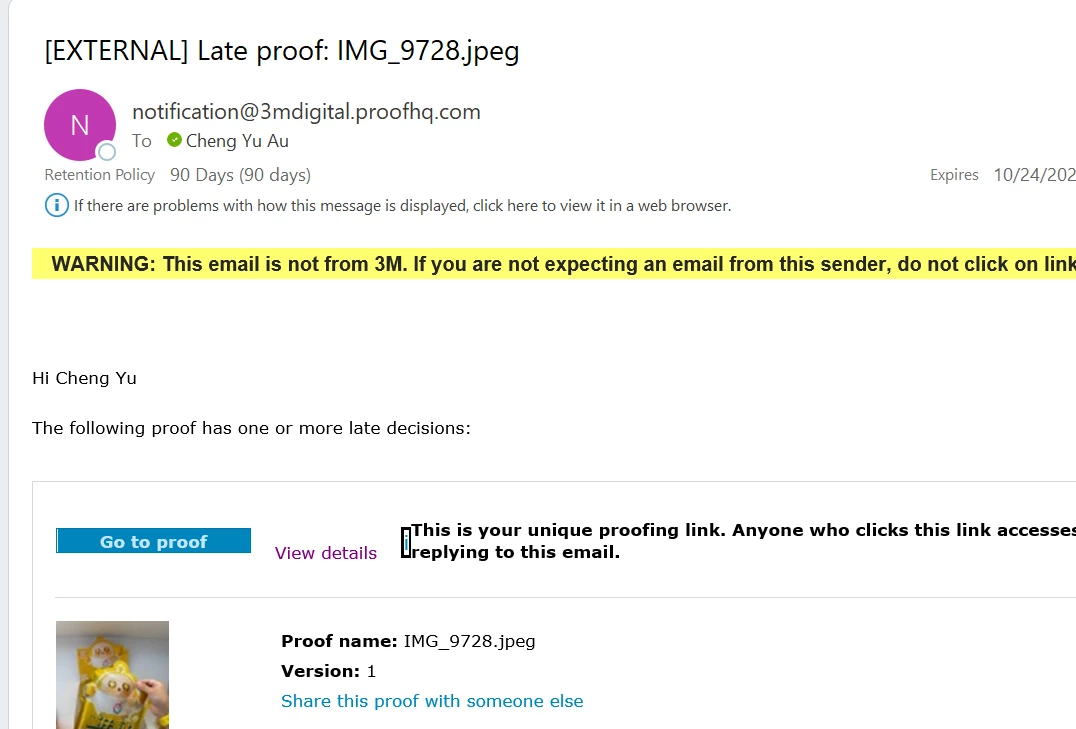
  

)

Este tópico foi fechado para respostas.

1 Resposta

lindselib
Level 4
November 13, 2024
lindselib
Level 4
February 10, 2025

Disappointing news here, after spending a while going back and forth with support they are not pursuing a fix of this issue at the time.


The best we could nail down is that randomly the email notification was linking to the proof in proofHQ vs the document on the Workfront project, and when it did there was not a "view details" link back to the project. It seemed that this only happens on upload, and that a workaround is going back to the proof workflow and sending another email notification manually to the reviewer/approver. 


But support couldn't successfully/consistently replicate in their environments and say it shouldn't be an issue once they merge proof and Workfront notifications... someday 😉 Until then no solve for this one!