Workfront API - Difference in Actual Hours Fields for Tasks | Community
Skip to main content
KellieGardner
Community Advisor
Community Advisor
March 27, 2025
Solved

Workfront API - Difference in Actual Hours Fields for Tasks

  • March 27, 2025
  • 3 replies
  • 752 views

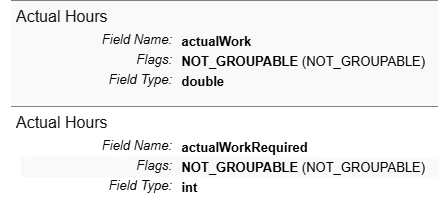
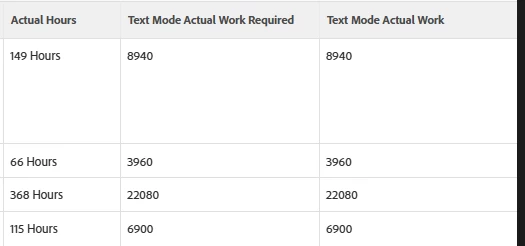
I'm curious if anyone knows and can explain the difference between these fields in the API explorer. My assumption was hours vs minutes but when I use them both in text mode, they both return the values in minutes. 


Best answer by skyehansen

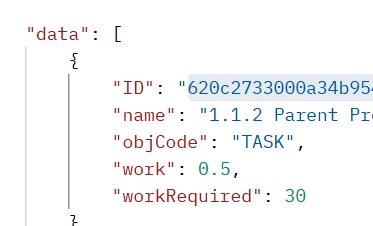
Just like Planned Hours has a work and workRequired option, it looks like Actual Hours similarly have an actualWork and actualWorkRequired options.


When I send an API call looking for work and workRequired, what I get back is in hours and minutes based on the option. Likely the same thing goes for Actual Hours. Attaching a screenshot of a task with half an hour on the planned hours field. Edited to add that this is more relevant on the fusion side of things, as the field you pull in and want to transform will be in a particular format that you will want to keep in mind when you act on it.

 

3 replies

Sven-iX
Community Advisor
Community Advisor
March 27, 2025

the difference is the value format - integer vs a value with decimals

Not sure why there is a double option it's not like we cut PLANNED hours to seconds...

KellieGardner
Community Advisor
Community Advisor
March 27, 2025

Thanks, I see the field types are different however, it doesn't seem to affect the data in any way. 


I know Workfront stores hours as minutes, so I can see why the numbers are not showing as hours but really trying to understand the need for both in the API and when you would use one vs the other. 


Additional note: The native field for Actual Hours in reporting pulls "actualWorkRequired" and the filter for actual hours uses "actualWork"


skyehansen
Community Advisor and Adobe Champion
skyehansenCommunity Advisor and Adobe ChampionAccepted solution
March 27, 2025

Just like Planned Hours has a work and workRequired option, it looks like Actual Hours similarly have an actualWork and actualWorkRequired options.


When I send an API call looking for work and workRequired, what I get back is in hours and minutes based on the option. Likely the same thing goes for Actual Hours. Attaching a screenshot of a task with half an hour on the planned hours field. Edited to add that this is more relevant on the fusion side of things, as the field you pull in and want to transform will be in a particular format that you will want to keep in mind when you act on it.


Sven-iX
Community Advisor
Community Advisor
March 27, 2025

BOOM - Skye FTW again

So work and actualWork = in hours, hence the format Double
WorkRequired & actualWorkRequired = in minutes no decimals needed > Integer.


skyehansen
Community Advisor and Adobe Champion
March 27, 2025

Note for newbies to Fusion: it can be pretty frustrating figuring out which one is which in Fusion (both are called the same thing, I usually pull in both).


Sven-iX
Community Advisor
Community Advisor
March 27, 2025

It looks like there is some data massaging going on in the report for them to both show minutes. 
What valueformat is it using? 

That cracked me up


The native field for Actual Hours in reporting pulls "actualWorkRequired" and the filter for actual hours uses "actualWork"

I don't have a good response to that.