
Want to add a Project report column with a link to the Project > Documents screen | Community
Skip to main content
JamesM-MERGE
Level 4
February 21, 2023
Solved

Want to add a Project report column with a link to the Project > Documents screen

  • February 21, 2023
  • 6 replies
  • 2147 views

Does anyone know if it's possible with text mode to add a Project report column with an active link to the Projects > Documents screen?

Best answer by RandyRoberts

The slick way to do it is to create a calc field that is on every project Called "Project Documents", something like this:

CONCAT("https://hcgint.my.workfront.com/project/view?ID=", {ID} , "&activeTab=list-project-documents")

Then, in a report, create a column with this text mode:

displayname=WF Documents link.url=customDataLabelsAsString(Project Documents) linkedname=html(URL) textmode=true valueexpression=IF(ISBLANK({DE:Project Documents}),"","Docs Link") valueformat=HTML

 Looks like this:
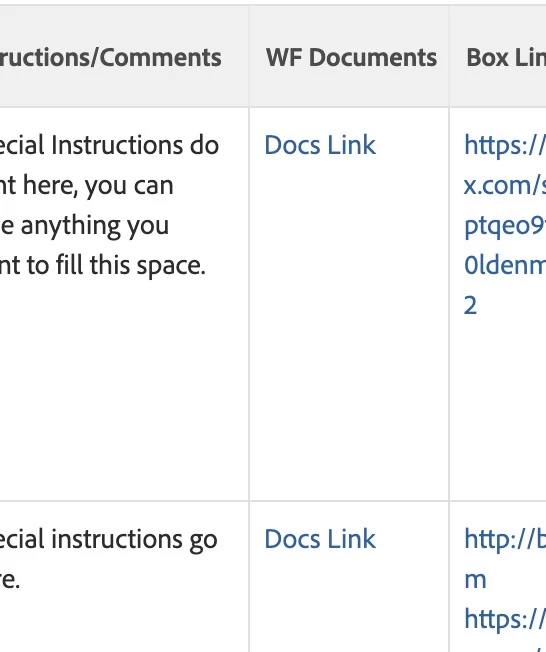
 

TIP: if this solved your problem, I invite you to consider marking it as a Correct Answer to help others who might also find it of use.

6 replies

RandyRoberts
Community Advisor
RandyRobertsCommunity AdvisorAccepted solution
Community Advisor
February 21, 2023

The slick way to do it is to create a calc field that is on every project Called "Project Documents", something like this:

CONCAT("https://hcgint.my.workfront.com/project/view?ID=", {ID} , "&activeTab=list-project-documents")

Then, in a report, create a column with this text mode:

displayname=WF Documents link.url=customDataLabelsAsString(Project Documents) linkedname=html(URL) textmode=true valueexpression=IF(ISBLANK({DE:Project Documents}),"","Docs Link") valueformat=HTML

 Looks like this:


TIP: if this solved your problem, I invite you to consider marking it as a Correct Answer to help others who might also find it of use.

JamesM-MERGE
Level 4
February 21, 2023

Thanks for your help with this!

RandyRoberts
Community Advisor
Community Advisor
April 26, 2023

You only need to replace the part that says "YOURDOMAIN": 

CONCAT("https://YOURDOMAIN.my.workfront.com/project/view?ID=", {ID} , "&activeTab=list-project-documents")

You need to create the calc field on a form that is attached to every project first.

Level 3
April 26, 2023

Hi Randy,


It was my fault, I just realised I was trying to apply this syntax on the task report which is why the column showed blank.


Is there a way to pull this on task level report? I now see Docs Link by amending the expression to below but its not an active link.


valueexpression=IF(ISBLANK({project}.{DE:Project Documents}),"","Docs Link")


Kind regards,

Lukasz


RandyRoberts
Community Advisor
Community Advisor
April 26, 2023

Valuexpressions do not natively produce clickable links. It's easier than you may think though. Just add the Field from the project to the task report. In this screenshot, "Project Documents_" is the DE:Project Documents calc field.

Level 3
April 26, 2023

Right, of course. I tried this as initial solution but than got into trying shorten or replace the URL with "Docs Link" or alike.


Thanks

Lukasz

RandyRoberts
Community Advisor
Community Advisor
April 26, 2023

That can probably be done as well, although I have not done it.

Level 3
April 26, 2023

Thanks, Ill do some research. I was chasing too many leads on this hence the confusion!


Level 3
April 27, 2023

Hi Randy,


So while I was looking into this matter further I managed to pull project documents URL into task report with the code below without a need for calculated field. Next I aim to make it a custom link. I hope this can be useful for someone out there.


displayname=Project Documents (Direct Link)
textmode=true
valueexpression=CONCAT("https://winningmoves.my.workfront.com/project/view/documents?ID=", {projectID})
valueformat=HTML 

RandyRoberts
Community Advisor
Community Advisor
April 27, 2023

yep, you can do that directly as well but if you want it to display "Docs Link" or something like that and not the whole URL, you'll need the calc field.