Unable to Display Business Analyst Name in Task Report where the Name is from the Custom Form "Project Personnel" | Adobe Higher Education
Skip to main content
Level 3
March 28, 2024
Risolto

Unable to Display Business Analyst Name in Task Report where the Name is from the Custom Form "Project Personnel"

  • March 28, 2024
  • 2 risposte
  • 868 visualizzazioni

The report is a Task type report.  I have completed the report and here is the text for the text mode of the column in which I am trying to display the Business Analyst name.


displayname=PROJECT BUSINESS ANALYST NAME
linkedname=project
namekey=view.relatedcolumn
namekeyargkey.0=project
namekeyargkey.1=AssignedBusinessAnalyst
textmode=true
valuefield=project:AssignedBusinessAnalyst
valueformat=customDataLabelsAsString


The Custom Form has the field AssignedBusinessAnalyst which contains the name of the Business Analyst

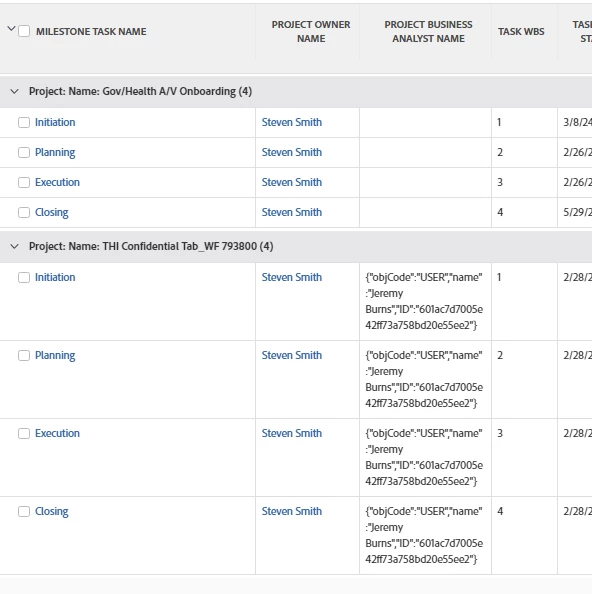
Here is the result of the report.  The third column is the Name.  Two lssues exist.

1.  The first project is not showing any data but data exists in the field - not sure why no data is displayed.

2.  The second project is showing data but I only want to see the name (the data for the name is correct in what is being displayed)


Questo argomento è stato chiuso alle risposte.
Migliore risposta di skyehansen

the syntax for pulling what you need off a typeahead field is a bit tricky. It will end up looking something like this:

displayname=______
linkedname=project
textmode=true
valueexpression={project}.{DE:______:name}
valueformat=HTML


I don't know why the data wouldn't show up, if there's data in that field on that project. So after you double check that, I would suggest looking up the actual user (even though the answer is hardcoded into that project, does the user still exist). And then after you find that the user still exists and the custom form is correct, I would recommend having your authorized service contact submit a ticket to Support.

2 risposte

MoniqueEvans
Community Advisor
Community Advisor
April 1, 2024

Hi @billpe two questions:

1. Is the custom form on the project or the task?

2. Is "AssignedBusinessAnalyst" a Text or TypeAhead field?

BillPeAutore
Level 3
April 1, 2024

Hello Monique

The Custom Form is for a project

The AssignedBusinessAnalyst is a TypeAhead field

skyehansen
Community Advisor
skyehansenCommunity AdvisorRisposta
April 1, 2024

the syntax for pulling what you need off a typeahead field is a bit tricky. It will end up looking something like this:

displayname=______
linkedname=project
textmode=true
valueexpression={project}.{DE:______:name}
valueformat=HTML


I don't know why the data wouldn't show up, if there's data in that field on that project. So after you double check that, I would suggest looking up the actual user (even though the answer is hardcoded into that project, does the user still exist). And then after you find that the user still exists and the custom form is correct, I would recommend having your authorized service contact submit a ticket to Support.

BillPeAutore
Level 3
April 2, 2024

Skye,


That solved my problem.  Thank you


Bill