
Timesheets Did Not Autogenerate as Expected | Community
Skip to main content
JustinRenteria2
Level 6
June 3, 2025
Solved

Timesheets Did Not Autogenerate as Expected

  • June 3, 2025
  • 1 reply
  • 395 views

Hi all - I was looking at our timesheets and noticed that they did not autogenerate like they normally do for us on the 1st of the month.  Normally, the following month's timesheets (July) autogenerate when we reach the 1st of the prior month but it looks like that didnt happen this month.  Anyone else experience this? If so pls submit a case to support! Hopefully they dont make us autogenerate them manually as a fix since that would be very cumbersome. 
This post is no longer active and is closed to new replies. Need help? Start a new post to ask your question.
Best answer by ElliotLeson

Hi @justinrenteria2 ...we are having this issue. I submitted a ticket yesterday morning and sent a follow up at the end of the day. I haven't heard back.

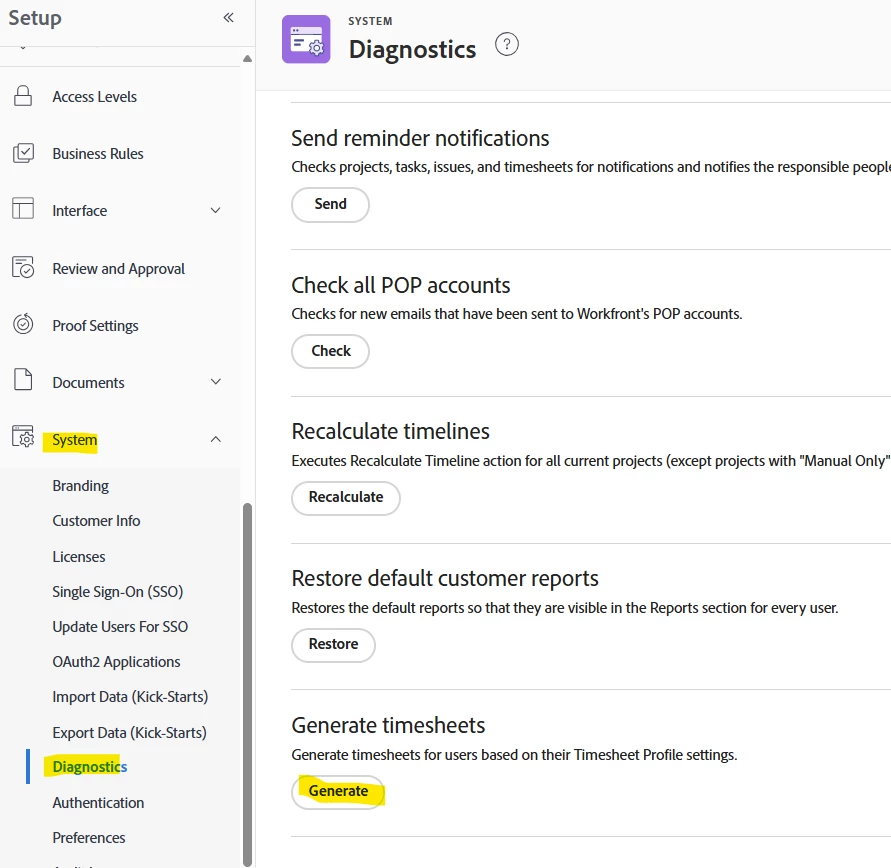
Since we rely heavily on timesheets I went in under Set Up, System, Diagnostics, and clicked the Generate timesheets button.

I'm hoping we will not have to do this every week or other week since two weeks are now showing.


Hope this helps!


1 reply

ElliotLeson
ElliotLesonAccepted solution
Level 3
June 3, 2025

Hi @justinrenteria2 ...we are having this issue. I submitted a ticket yesterday morning and sent a follow up at the end of the day. I haven't heard back.

Since we rely heavily on timesheets I went in under Set Up, System, Diagnostics, and clicked the Generate timesheets button.

I'm hoping we will not have to do this every week or other week since two weeks are now showing.


Hope this helps!


JustinRenteria2
Level 6
June 3, 2025

Thanks for the tip! Just what I needed. I'll test it out